™
Features & Functions
Main Unit
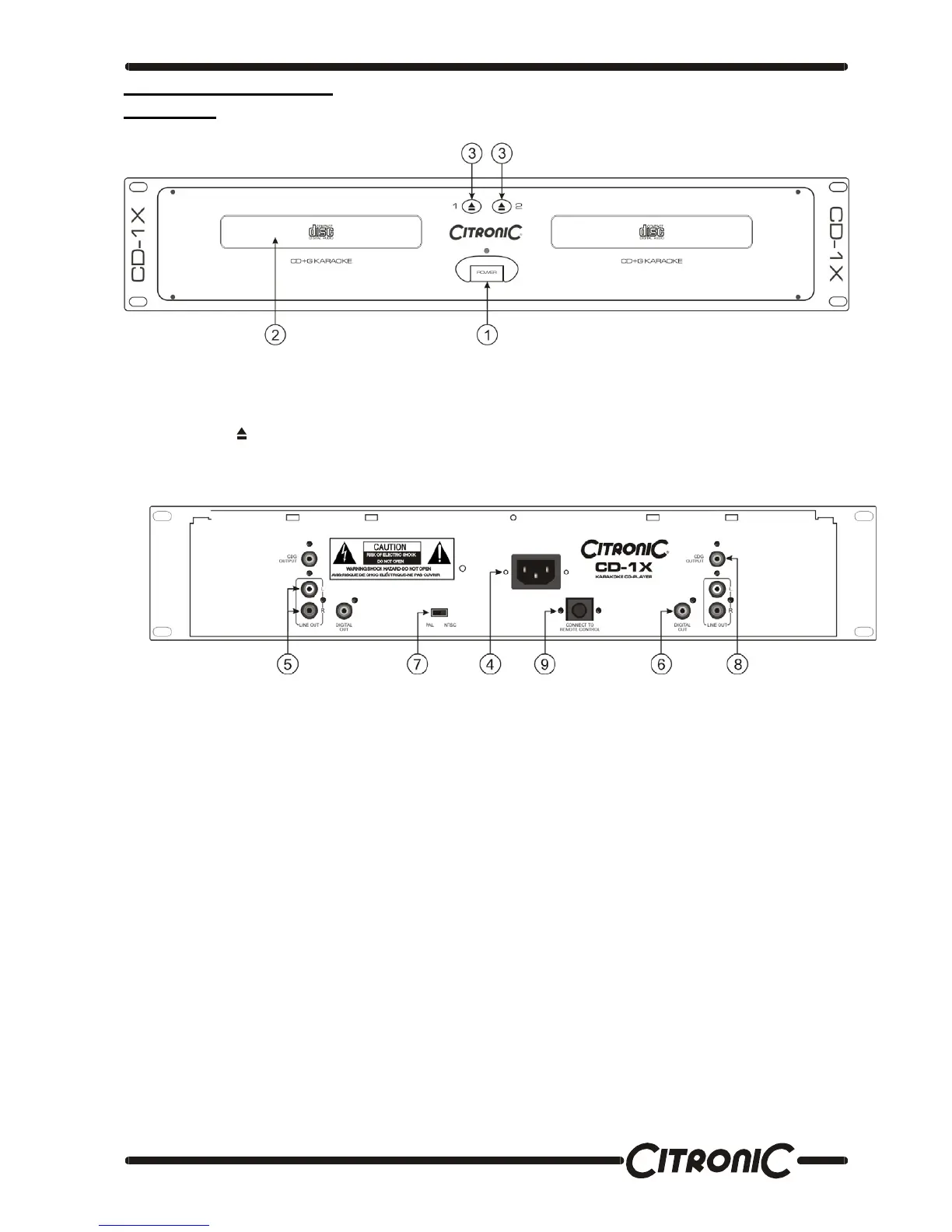
1. Power Switch
When the power switch is pressed, the power turns on.
2. Disc Holder
Place the discs in the holder. Press the OPEN/CLOSE (3) button to open and close the disc holder.
3. Open/Close
Press it to open and close the disc holder. The control unit also includes OPEN/CLOSE button. The disc holder cannot
be opened during playback, so stop playback before pressing the button.
4. AC Connection
This connection accepts a standard UK IEC connection power lead.
5. Line Out L & R
The audio signals from each player are output from these jacks. Connect these to a Line or CD input of your mixer.
6. Digital Output
The music-signal of this socket is digital. Connect the output to the respective input of a digital amplifier or mixer for
example.
7. TV Format Selector Switch
Select the format compatible with the screen being used.
8. CDG Output
This output connects to the input of your screen being used to display the karaoke graphics using an RCA connector
plug.
9. Remote Control Connector
This 8-pin terminal connects to the remote control unit with the supplied cord.


 To Next Page