INFIL SYSTEMS
AND
Eq INSERT
Both
mixers
feature
the lnfil
1
system,
while
the
SM650
features
an
additional
infil system
and an
Eq lnsert.
All
connections
and
controls
are
found on the
rear
of
your
chosen
mixer.
The
infil
and Eq
inserts that
relate
to the
SM650
only are
clearly
marked
for
your
convenience.
INFIL 1
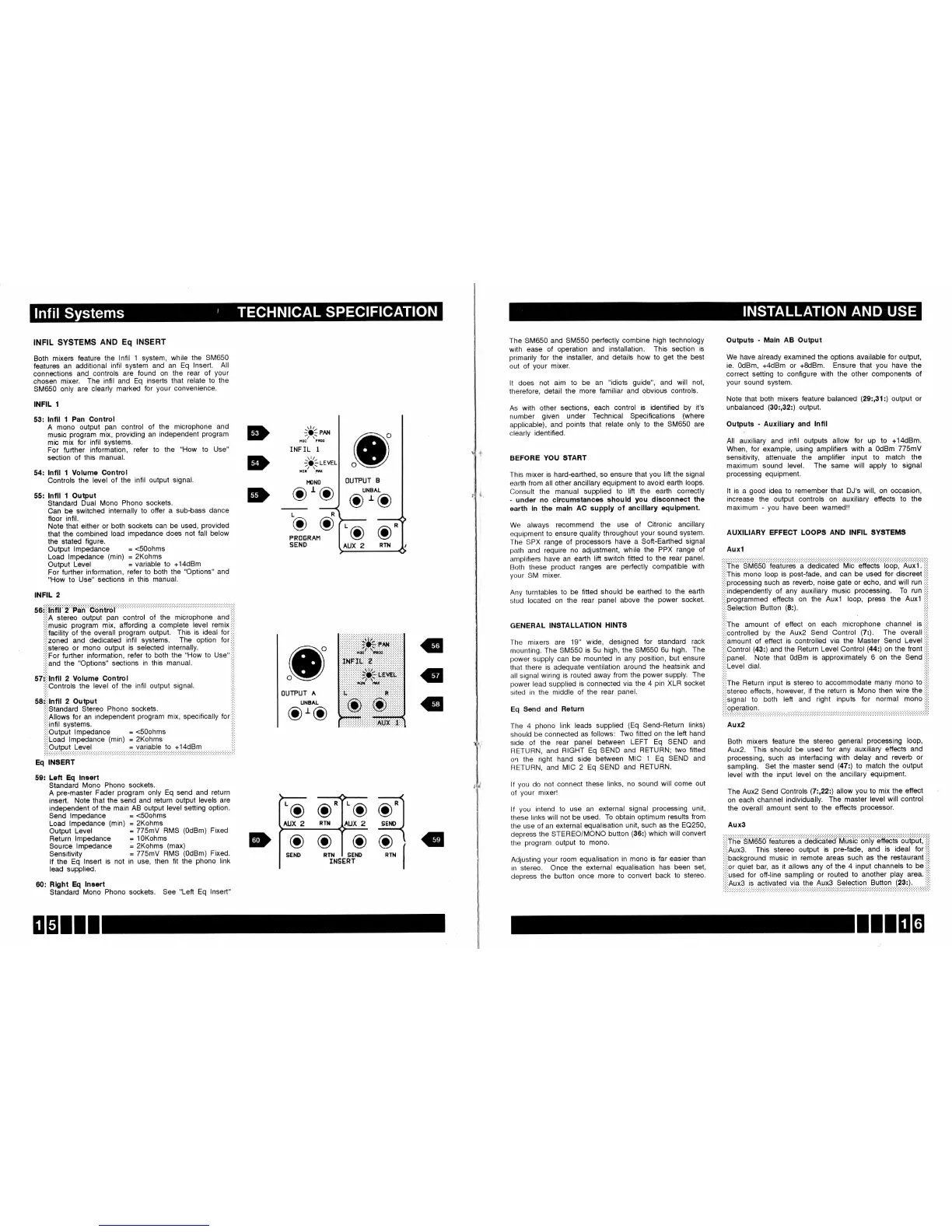
53: lnfll
1
Pan
Gontrol
A mono
output
pan
control
of the
microphone
and
music
program
mix,
providing
an
independent
program
mic
mix for infil
systems.
For
fufiher
information,
refer
to the
"How
to
Use"
section
of this manual.
54: lnfll
1 Volume
Control
Controls
the level
of the
infil
output signal.
55: lnfll
1 Output
Standard
Dual
Mono
Phono sockets.
Can
be
switched internally
to otfer a
sub-lcass dance
floor infil.
Note
that either
or both
sockets
can be used,
provided
that the
combined load
impedance
does not fall below
the
stated figure.
Output lmpedance
=
<SOohms
Load
lmpedance
(min)
=
2Kohms
Output
Level
=
variable
to
+14dBm
For further
information,
refer
to both the
"Options"
and
"How
to
Use"
sections
in this manual.
INFIL
2
s6liiiliifll
2
'Pa'n
cdiitiol
:.,i
iii,A
stereo
output
pan
control
of the microphone
and:ii:
::;imusic
program
mix, affording
a complete
level remix:,:,
:i::facility
of the
overall
program
output. This
is ideal for:i;:
iii,zoned
and
dedicated
infil
systems.
The
option for:i,:
i,i'stereo
or mono
output is
selected
internally.
,','
:;:,For
fufther
information,
refer
to both
the
"How
to Use"
i:i,
:,i,and
the
"Options" sections
in this manual.
!:!:
:i',;,,:
STt,ilnfll
2 Volume
Controt
,,,'
i:,lControts
the
level of the
infil output
signal.
:l::
s8i:i:tnfll
2 Output
i:i:
:,:,standard
Siereo Phono
sockets.
,,'!
:,i,Allows
for
an independent
program
mix, specificalty for:,:,
,,',intit
systems.
I':,
,i,:Output
lmpedance
=
<S0ohms
il,,
i;i:Load lmpedance
(min)
=
2Kohms
',,i
i.'.9ylPll,,,!3Ii'1,,,,,',.:.::.:::.::,:.:.:.r,Y?,ii3,?1.",,'l?,,,I],'.4.9.P.T,'.,.,.,.,'',,.,,.,,.,,,,
Eq
INSERT
59: Left
Eq
lneert
Standard
Mono
Phono sockets.
A
pre-master
Fader
program
only Eq
send and
return
insert.
Note
that the send
and return
output levels
are
independent
of the main
AB output level
setting option.
Send
lmpedance
=
<S0ohms
Load
lmpedance
(min)
=
2Kohms
Output Level
=
775mY
RMS
(OdBm)
Fixed
Return
lmpedance
=
l0Kohms
Source
lmpedance
=
2Kohms
(max)
Sensitivity
=
775mV RMS
(OdBm)
Fixed.
lf the
Eq
lnsert
is not in use,
then fit the
phono
link
lead supplied.
60: Rlght
Eq
lneert
Standard
Mono
Phono
sockets. See
"Lett
Eq lnsed"
o'o
oro
'o
.'.'-'.'.':'.'.'.'.:.\'l'rJ.'.'.'.','.'.'.'.'.'.'.'
:: :::::
:::
:: :::::::i{)f
;:;f,
N$:;:
;:;:;
:;:
.
:. :. :. :. :. :. : {to :' :. :' :oeoc :. :. :. :. :. :. :. :' :
:
:lllElli:'::f,
,,,',,,',,,,,,,,,,,
i,,,,i,
.'.'.'. .'.'.'.','.'.1'l'/,:.'.'.'.'.'.','.'.',', .'
;:;:;:;:;:;:;:;:;:;)i}!::liEIiEE:::::
:. :. :' :. :. :... :rlipl :.:. :'n$:. :. :' :. :. :. :. :' :. :.
.:.Ii.:.:.:.:.:.:.:.:.:.:.:.:.:.:.:.:fi .:.:.:.:.:.:
:': :':
"+r:':':':':':':)*.:':':':':':
:':'
:.:::.f|): ::::::',[f]),,',,,,,,,,,,,
:':.:.:.)-.i-:(.:.:.:':.:.:.H(:.:.:.:.:.:':.:.
tiiiiffi:;:1:,::,l
l
D
D
D
.,iui:r
INF IL
1
",-ri*'u
t0N0
OUTPUT
A
UNBAL
oro
OUTPUT
B
UNBAL
L
o
PROER
SEND
AR
o
RTN
G
€
G
;
:
;
:
;
:; :
i
:
;
:
;
:
;
:
;
:
i
:
;
:
;
:
i: ;
:
;
:
;
:[$
i(
:
i
;
i
I
i
:
;
;
\--
-'\--
--l
['o c'l',o
o-l
[rux z
Rm
hux
z
sEhrD
I
D
ilG
I
rNsERr
I
IIEIII
The
SM650
and SM550
perfectly
combine high
technology
with
ease
of
operation
and installation. This
section is
primarily
for
the
installer, and
details how to
get
the
best
out
of
your
mixer.
It does
not aim
to
be an
"idiots
guide",
and will
not,
therefore,
detail
the
more
familiar and obvious
controls.
As
with
other
sections,
each
control is identified
by it's
number
given
under
Technical
Specifications
(where
applicable),
and
points
that relate only to
the SM650 are
clearly
identified.
BEFORE
YOU START
This mixer
is hard-earthed,
so
ensure that
you
lift the signal
earth from all
other ancillary
equipment
to avoid
earth loops.
Consult
the
manual
supplied
to lift
the earth correctly
-
under no
clrcumstances
should
you
dlsconnect
the
earth
ln the maln
AC supply
of ancillary
equlpment.
We
always
recommend
the
use of
Citronic ancillary
equipment
to
ensure
quality
throughout
your
sound
system.
The
SPX
range
of
processors
have
a Soft-Eafthed
signal
path
and
require
no adjustment,
while
the PPX
range
of
amplifiers
have
an eafth
lift
switch
fitted to
the
rear
panel.
Both these
product
ranges
are
perfectly
compatible
with
your
SM
mixer.
Any
turntables
to be
fitted
should
be
eafthed to
the
earth
stud located
on
the rear
panel
above
the
power
socket.
GENERAL INSTALLATION
HINTS
The
mixers
are
19" wide,
designed
for standard
rack
mounting.
The
SM550
is 5u high,
the
SM650
6u high.
The
power
supply
can be
mounted
in
any
position,
but
ensure
that
there
is adequate
ventilation
around the
heatsink
and
all signal
wiring
is routed
away from
the
power
supply.
The
power
lead
supplied
is
connected
via
the
4
pin
XLR
socket
sited
in
the middle
of the
rear
panel.
Eq
$end
and Return
The
4
phono
link
leads
supplied
(Eq
Send-Return
links)
should
be
connected
as follows:
Two
fitted on
the left
hand
side
of
the rear
panel
between
LEFT
Eq
SEND and
RETUHN,
and
RIGHT
Eq
SEND and
RETURN;
two
fitted
on
the
right
hand
side
between
MIC 1 Eq
SEND
and
RETURN,
and
MIC 2
Eq
SEND
and RETURN.
lf
you
do not
connect
these
links,
no
sound will
come
out
of
your
mixer!
lf
you
intend
to use
an
external
signal
processing
unit,
these
links
will
not
be used.
To
obtain optimum
results
from
the
use
of an
external
equalisation
unit, such
as the EQ250,
depress
the
STEREO/MONO
button
(36:)
which
will
conveft
the
program
output
to
mono.
Adjusting
your
room equalisation
in mono is
far easier
than
in
stereo.
Once
the
external
equalisation
has
been
set,
depress
the button
once
more to
conved
back
to
stereo.
Outputs
-
Main
AB Output
We have already
examined the options available
for
output,
ie. OdBm,
+4dBm
or
+8dBm.
Ensure
that
you
have
the
correct setting to configure with
the other components of
your
sound system.
Note that both mixers
feature balanced
(29:,31:)
output or
unbalanced
(30:,32:)
output.
Outputs
-
Auxiliary and
lnfil
All auxiliary and infil
outputs allow for
up
to +14dBm.
When, for example,
using amplifiers with a 0dBm
775mY
sensitivity, attenuate the
amplifier input to
match the
maximum
sound level.
The
same will apply
to signal
processing
equipment.
It
is
a
good
idea to remember that DJ's
will, on occasion,
increase the output controls on auxiliary
etfects to the
maximum
- you
have
been warned!!
AUXILIARY EFFECT
LOOPS AND INFIL
SYSTEMS
Auxl
:':,Tiiej
SM650 ieaiijies a
o6oiCairio rrrtic eitteCts
bop;
nijii.
'i'i
,'i,This
mono
loop is
post-fade,
and can
be used for discreet:iii
;iiiprocessing
such as reverlc, noise
gate
or echo,
and will
run
I'i,
':.'independently
of any auxiliary
music
processing.
To run:,:;
i;:;programmed
effects on
the Auxl loop,
press
the Auxl
,:,:
'iiiselection
Button
(8:).
iiii
;,,,fne
amount
of
effect on
each microphone
channel
it,:l:
':':controlled
by the Aux2
Send
Control
(7:).
The
overall
i;i;
i'i,amount
of
effect
is controlled
via the Master
Send Level
:i:i
'i,iControl
(43:)
and
the Return
Level Control
(44:)
on the front::i:
,,,,panet.
Note that
0dBm
is approximately
6 on the
Send
iii:
,,i,Level
dial.
:i:i
:i:,fne
Return
input is
stereo to
accommodate
many
mono to
';i1
,i,:stereo
effects,
however,
if
the return
is Mono then
wire the:i:i
,,,;signat
to both
left
and right
inputs
for normal
mono,i::
':.:
Aux2
Both
mixers
feature
the
stereo
general processing
loop,
Aux2.
This
should be
used for
any
auxiliary effects
and
processing,
such
as interfacing
with
delay and
reverlc
or
sampling.
Set the'master
send
(47:)
to match the
output
level with the
input
level on
the ancillary
equipment.
The Aux2
Send
Controls
(72,222)
allow
you
to
mix the
effect
on each
channel
individually.
The
master
level will
control
the
overall amount
sent
to the
etfects
processor.
AuxS
i:::The
SM650
Tdatur65
h'
d6oiC{iidd''Muiid'only
6ff&iS
c;utpiji,'iii
:,:,nuxS.
This
stereo
output is
pre-fade,
and
is
ideal for:iii
',,,background
music
in remote
areas
such as
the restaurant,il;
,i;'or
quiet
bar,
as it allows
any of the
4
input channels
to be
i'i'
;,i,useO
for
otf-line
sampling
or routed
to
another
play
area.
iiii
'i,:Aux3
is
activated
via the Aux3
Selection
Button
(23:).
:':,


 To Next Page
 Loading...