top page (when book flips open)
EN
SMART PROFILE FEATURES
T-TIMER – CLEANSING TIMER
Cleansing Duration T-TIMER Beeps & Pulses Brush Head
1 minute (factory setting) at 20, 40, & 50 seconds All facial brush heads
2 minutes at 40, 80 & 100 seconds Standard facial brush heads
2 minutes None Standard facial brush heads
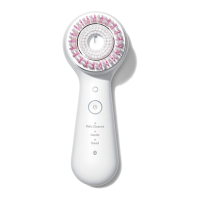
To change the T-TIMER setting, when using a standard brush head, press and hold the +/- button
for 3 seconds.
To disable audible T-TIMER Beeps (spa mode), while the device is off or in pause mode,
simultaneously press and hold the turbo and +/- buttons for 3 seconds. Momentary T-TIMER
pulses will continue at programmed intervals. Repeat to enable audible T-TIMER beeps.
TURBO FUNCTION
The Turbo button is a convenient way to temporarily increase cleansing power any time during
a cleansing cycle, when deeper cleansing is needed.
To use the Turbo function, while the device is on, press and hold the “turbo” button for as long as desired.
To return to the set speed, release the “turbo” button.
NOTE: Using the Turbo function may deplete battery life faster on the device.


 To Next Page