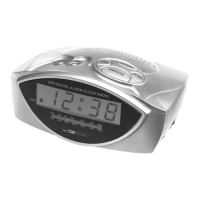
Overview of the Components
1 Time setting function key (TIME)
2 Alarm function key (ALARM)
3 Wake-up interval (SNOOZE)
4 Function key for delayed switch-off (SLEEP)
5 Hour function key (HOUR)
6 Set minutes (MIN)
7 Function switch (AUTO/OFF/ON)
8 LED for activated alarm function (AUTO)
9 BUZZ/VOLUME regulator
10 TUNING regulator
11 Station scale
12 LED
13 Throw-out antenna
14 Battery compartment
Putting into function
Insert the plug into a properly installed 230 V, 50 Hz power socket.
Radio station tuning
Push the function switch (7) to the ON position and select a station by turning the
TUNING control (10). The tuning scale (11) indicates the selected frequency.
Setting of the Clock (24 h)
Hours: Press the TIME key (1) and the HOUR key (5) simultaneously.
Minutes: Press the TIME key (1) and the MIN key (6) simultaneously.
Setting of the Alarm (24 h)
Hours: Press the ALARM key (2) and the HOUR key (5) simultaneously.
Minutes: Press the ALARM key (2) and the MIN key (6) simultaneously.
Radio alarm
• Once the alarm times are set and a radio station has been selected, shift the
function selector (7) to "AUTO". A dot in the display (12) appears next to AUTO
(8).
• As soon as the alarm time is reached, the radio is switched on. The selected
radio station plays at the set volume.
Buzzer alarm
• If you would not like to be woken up by the radio, turn the volume control (9) to
the BUZZ position (buzzer) until it locks in place.
• Instead of the radio, the buzzer goes off when the alarm time is reached.
25
GB
5....-05-MRC 554 12.06.2003 12:41 Uhr Seite 25


 To Next Page
 Loading...