ENGLISH
64
Food/dish Quantity
Power
in watts
Approx.
time in
minutes
Cover
Fruit
Stewed apple, pear 500 g 560 5 - 8 yes
Plum jam 250 g 560 4 - 6 no
Stewed rhubarb 250 g 560 5 - 8 yes
4 baked apples 500 g 560 7 - 9 yes
Tip: add 125 ml water. Lemon juice prevents the fruit from changing
colour. Cook for a further 3 - 5 minutes.
Meat*)
Meat with sauce 400 g 560 10 - 12 yes
Goulash, stewed strips
of meat
500 g 560 10 - 15 yes
Roulade of beef 250 g 560 7 - 8 yes
Tip: stir from time to time, allow to stand for 3 - 5 minutes.
Poultry*)
Chicken fricassee 250 g 560 6 - 7 yes
Poultry soup 200 g 560 5 - 6 yes
Tip: stir from time to time, allow to stand for 3 - 5 minutes.
Fish
Fish fi llet
300 g 560 7 - 8 yes
400 g 560 8 - 9 yes
Tip: turn halfway through, continue cooking for 3 - 5 minutes.
Defrosting and Cooking Vegetables
Apple and red cabbage 450 g 560 14 -16 yes
Leaf spinach 300 g 560 11 - 13 yes
Caulifl ower 200 g 560 7 - 9 yes
French beans 200 g 560 8 - 10 yes
Broccoli 300 g 560 8 - 9 yes
Peas 300 g 560 7 - 8 yes
Turnip cabbage 300 g 560 13 -15 yes
Leek 200 g 560 10 - 11 yes
Corn 200 g 560 4 - 6 yes
Carrots 200 g 560 5 - 6 yes
Sprouts 300 g 560 7 - 8 yes
Spinach
450 g 560 12 - 13 yes
600 g 560 15 - 17 yes
Tip: cook in 1 - 2 tablespoons of liquid, stir from time to time or
divide carefully into pieces. Continue cooking for 2 - 3 minutes and
season just before serving.
Soups / Stews*)
Stew 500 g 560 13 - 15 yes
Soup with garnish 300 g 560 7 - 8 yes
Crème soup 500 g 560 13 - 15 yes
Tip: stir from time to time and continue cooking for 3 - 5 minutes.
*) Ready-made meals.
Immediate Start
If you would like to heat up food or a drink briefl y on maximum
microwave power:
• Start the microwave immediately by pressing the
START/+30SEC./CONFIRM button.
• Cooking starts immediately, with every press of the button
increasing the cooking time by 30 seconds. The microwave
works at 100% power.
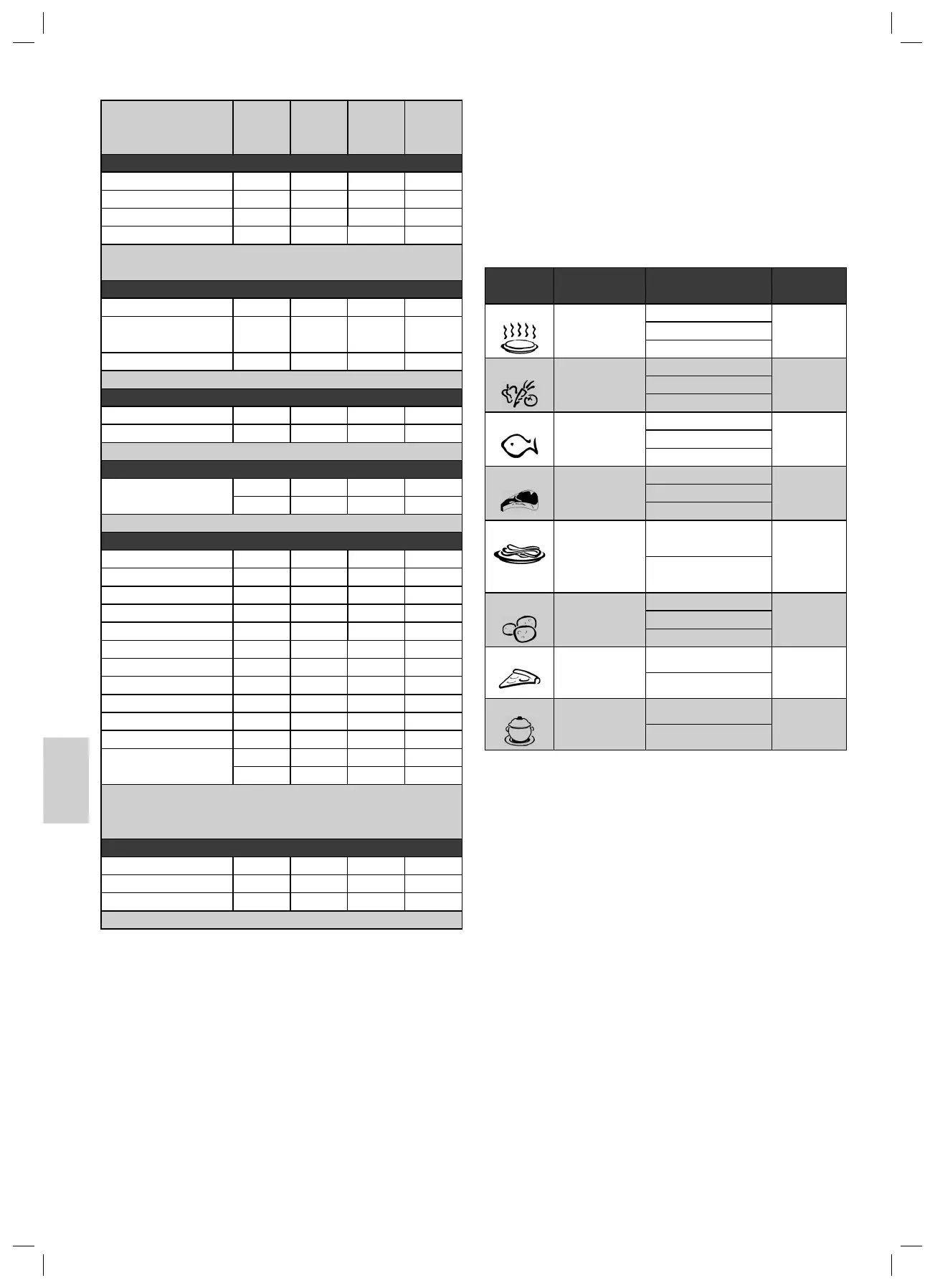
Automatic Cooking
With the help of the automatic programme you can cook certain
quantities of food automatically. Please proceed as follows:
1. Press the STOP/CLEAR button.
2. Turn the rotary knob in a clockwise direction and select the
desired automatic program. Please see the following table
for the possible settings.
Code Program Weight in Grams/
Display
Power
A-1 Heating 200 100%
400
600
A-2
Vegetables 200 100%
300
400
A-3
Fish 250 80%
350
450
A-4
Meat 250 100%
350
450
Noodles/Pasta 50
(with 450 g of water)
80%
100
(with 800 g of water)
A-6
Potatoes 200 100%
400
600
A-7
Pizza 200 100%
400
A-8
Soup 200 80%
400
3. Press the START/+30SEC./CONFIRM button to confi rm
your selection.
4. Turn the rotary knob to set the desired weight.
5. To start cooking press the START/+30SEC./CONFIRM
button.
After that time has elapsed, the device switches off and 5 buz-
zers are heard. Then you can remove the food.
Automatic Defrost
With the defrost programs you can automatically defrost your
food in two different ways. Select defrost according to weight
or time.
1. Press the STOP/CLEAR button.
2. Select one of the defrost programmes by pressing the W.T./
TIME DEFROST button repeatedly:
dEF I Defrost according to weight from 0.1 – 2.0 kg
Defrost according to time from 5 seconds
– 95 minutes
3. Press the START/+30SEC./CONFIRM button to confi rm
your selection.
05-MWG 2228 CB.indd 6405-MWG 2228 CB.indd 64 27.08.2008 11:31:24 Uhr27.08.2008 11:31:24 Uhr
5A-
dEF 2


 To Next Page
 Loading...