Clearline
R
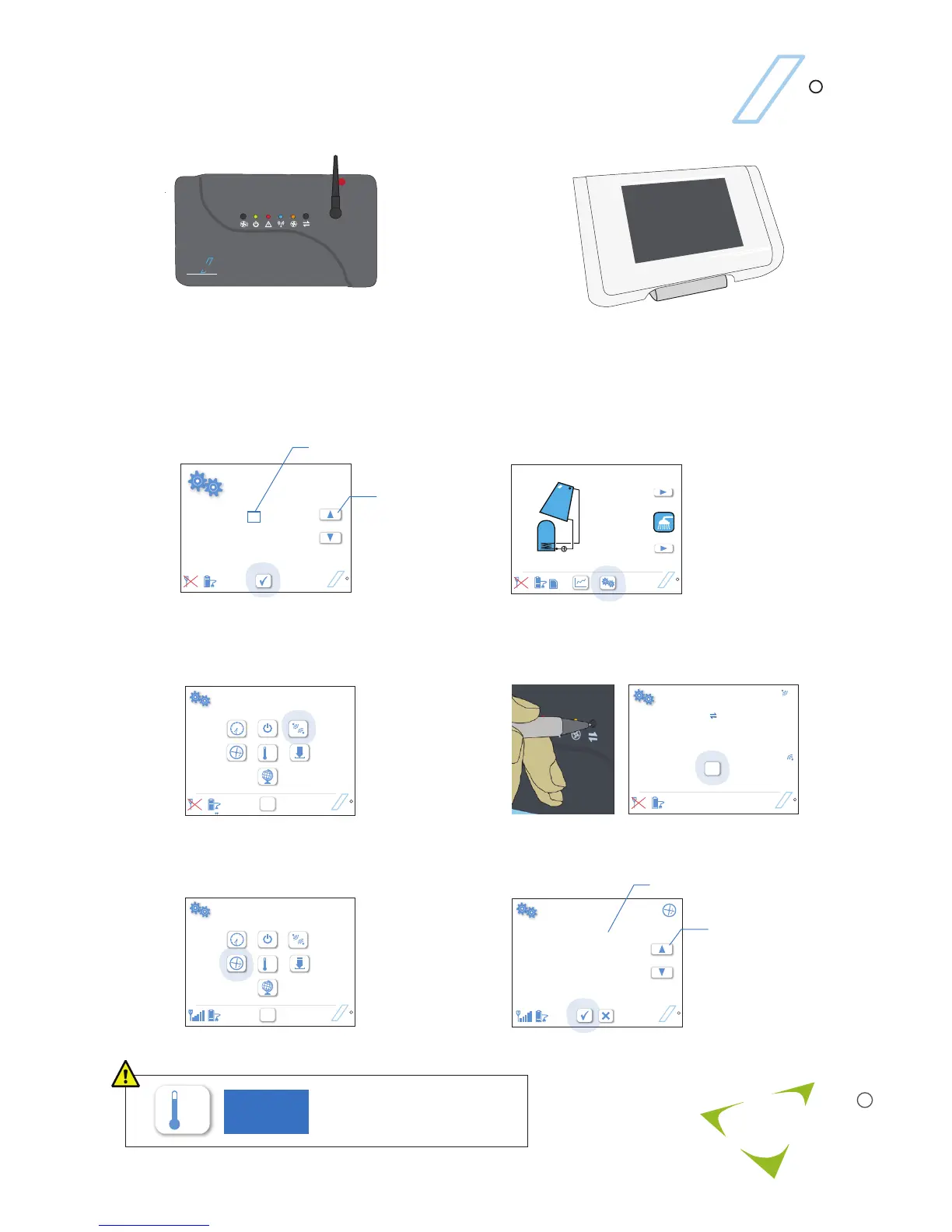
Clearline Aura Quick-start
3
a
HH: MM
12 01
DD/MM/YY
01 01 10
Clearline
R
Clearline
R
0.0
Today
Clearline
R
SD
Tap when finished
Clearline
R
OK
Clearline
R
˚C
OK
Panel Area
3.0 m
Flow Rate
2.5 l/min
Clearline
R
Tap when finished
Tap to select
Glycol
40 %
2
f
Set either panel area (rated flow will be used), or set
a measured flow rate
˚C
2
viridian
s o l a r
R
1
Fix aerial onto V210 solar controller.
T
Clearline
V 2 1 0
2
Connect the power supply to the micro-USB port on the
base of the display. Clearline Aura can be either fixed to
a wall or free standing.
Touch the screen to start. Set date
and time
Tap to select
Tap arrows
to increase
or decrease
b
Tap gears button to go to setup screen
˚C
OK
c
Select wireless connection
d
Press connect button on V210 Controller, then tap OK
Link to V210 controller
Press the connect botton on the Controller
e
Select to input solar flow rate
Tap arrows
to increase
or decrease
Setting the temperature control
affects the performance and
safety of the solar system.
3817
PASSWORD



 To Next Page