EasyManua.ls Logo

cleer ROAM SPORT - User Manual

cleer ROAM SPORT
11 pages
Print Icon
To Next Page IconTo Next Page
Loading...
Quick Start Guide | User Manual | Warranty Card
ROAM SPORT
True Wireless Noise Cancelling Earbuds
ENGLISH
Find this user manual on
www.cleeraudio.com
Follow us on social media
@CleerSound @CleerAudio
V7
Box contents
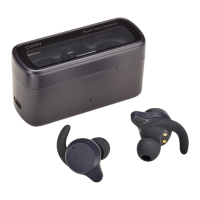
ROAM SPORT
True wireless noise cancelling
earbuds with charging case
Equipped with M Ear-tips and wings
Quick start guide
/ User manual
/ Warranty card
This document
Ear-tips
S / L
Ear-wings
S / L
USB-C cable
Overview
LED indicator
USB-C Connector
Touch pad
Quick start guide Fitting
3. Enjoy your ROAM SPORT.
2. Find “Cleer ROAM SPORT”
on the new Bluetooth device
list and select it to pair.
1. ROAM SPORT will power ON
automatically when opened
the case lid.
Insert both earbuds into your
ears and you should hear the
voice prompt “looking for
device”.
* ROAM SPORT will go into pairing
mode automatically when powered
ON for the first time (if you need
to manually go into pairing mode,
please follow the steps on the
Bluetooth pairing section).
** ROAM SPORT will automatically
connect to the last connected
device if it is in range and
available for pairing.
• Turn on and o the Ambient Noise Control.
• Customize the equalizer setting of your ROAM SPORT.
• Change the touch pad function to suit your preference.
• Change the Bluetooth name of your ROAM SPORT.
• Receive software updates when new features and
improvements are available.
Check playback time and battery level of your ROAM SPORT.
• Voice prompt selection.
* Sound settings are saved to your ROAM SPORT, so you can enjoy
it with any playback device connected to your ROAM SPORT.
The Cleer+ app gives you a more customized control to
your ROAM SPORT, download the Cleer+ app from the App
Store (for iOS devices) or Google Play (for Android devices).
With the Cleer+ app you can:
Cleer+ app
Cleer+
Bluetooth pairing
Pairing Mode
1. Remove both earbuds from
the charging case and insert
them into your ears.
2. Press the touch pad on
either earbud 5 times.
You will hear the voice
prompt “looking for device”.
3. Select “Cleer ROAM SPORT”
on new Bluetooth device list
to pair.
4. ROAM SPORT is now paired.
*To clear the pairing record of
your ROAM SPORT:
1. Remove both earbuds from the
charging case, 2. Put both
earbuds into pairing mode,
3. Press and hold the touch pad
until a voice prompt announces
two audio tones, 4. Return the
earbuds to the charging case and
leave them there for 10 seconds,
5. The pairing record is now cleared.
Press x 5
Track control
* You can select which earbud to use this function on the Cleer+ app,
it is set to the left earbud by default.
Press
twice
x2
Press
thrice
x3
Next track
Previous track
RL
or
Cleer ROAM SPORT Connected

Question and Answer IconNeed help?

Do you have a question about the cleer ROAM SPORT and is the answer not in the manual?

Overview

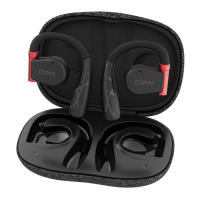
The Cleer ROAM SPORT are true wireless noise-cancelling earbuds designed for an active lifestyle, offering a blend of advanced audio technology, customizable features, and robust design.

Function Description:

The ROAM SPORT earbuds provide a high-quality audio experience with active noise cancellation (ANC) and an ambient mode. They are true wireless, connecting via Bluetooth 5.2, and come with a portable charging case. The earbuds feature touch controls for managing playback, calls, volume, and noise cancellation modes. They are designed to be comfortable and secure for various activities, including sports, with an IPX4 water resistance rating (for earbuds only). The Cleer+ app enhances the user experience by offering extensive customization options, including equalizer settings, touch pad function remapping, Bluetooth name changes, and software updates.

Important Technical Specifications:

  • Driver: 5.8mm neodymium dynamic driver
  • Supported Audio CODEC: SBC, aptX adaptive
  • Frequency Response Range: 20 - 20,000Hz
  • Connections: USB-C (for charging case)
  • Bluetooth Version: BT 5.2
  • Supported Bluetooth Profiles: A2DP v1.3, AVRCP v1.6, HFP v1.7, HSP v1.2
  • Bluetooth Transmission Frequency Range: 2.402-2.480GHz
  • Bluetooth Transmission Power: <8.0dBm
  • Water Resistance Rating: IPX4 (for earbuds only)
  • Weight: 5.6g (per earbud), 56g (both buds and case)
  • Battery Charging: A 5-minute charge delivers up to 1-hour playback; less than 2 hours for a full charge (when charging unit via USB-C cable and charging case).
  • Playback Time: Up to 5 hours on a single charge, with an additional 15 hours provided by the charging case, totaling up to 20 hours of playtime.

Usage Features:

  • Quick Start: ROAM SPORT earbuds power on automatically when the case lid is opened. They enter pairing mode automatically when first powered on. Subsequent connections are automatic to the last connected device.
  • Pairing: To pair, remove both earbuds from the charging case, insert them into your ears, and press the touch pad on either earbud 5 times until you hear the voice prompt "looking for device." Then, select "Cleer ROAM SPORT" from your device's Bluetooth list.
  • Clearing Pairing Record: To clear the pairing record, remove both earbuds from the charging case, put them into pairing mode, then press and hold the touch pad until a voice prompt announces two audio tones. Return the earbuds to the charging case for 10 seconds.
  • Fitting: The manual provides visual guidance for proper earbud fitting to ensure comfort and optimal sound performance.
  • Cleer+ App: This dedicated app (available on App Store and Google Play) offers extensive customization:
    • Toggle Ambient Noise Control (ANC) on/off.
    • Customize equalizer settings.
    • Change touch pad functions to suit user preference.
    • Rename the Bluetooth device.
    • Receive software updates for new features and improvements.
    • Check playback time and battery level.
    • Select voice prompts.
    • Sound settings are saved to the earbuds, allowing customized sound with any connected playback device.
  • Noise Cancellation Mode Control:
    • Pressing the touch pad twice (on the designated earbud, default is right) cycles through Noise Cancellation ON, Ambient mode ON, and all OFF.
    • Noise Cancellation Mode: Utilizes noise cancelling technology and optimized passive isolation to suppress wide-band ambient noise.
    • Ambient Mode: Allows users to hear sounds around them even while wearing the earbuds.
    • ROAM SPORT defaults to noise cancellation mode when powered ON.
  • Call and Playback Control:
    • Press once (on either earbud): Play/Pause music, Pick/Hang up call.
    • Press and hold for 1 second: Reject incoming call.
    • Press and hold for 2 seconds: Trigger default voice assistant.
  • Volume Control:
    • Double tap and hold on the 2nd tap (right earbud): Volume up continuously.
    • Double tap and hold on the 2nd tap (left earbud): Volume down continuously.
  • Track Control:
    • Press twice (on the designated earbud, default is left): Next track.
    • Press thrice (on the designated earbud, default is left): Previous track.
  • Charging: Connect the charging case to a power source using the included USB-C cable. A 5-minute charge provides 1 hour of playtime. A full charge takes less than 2 hours.
  • LED Behavior:
    • While being charged: Solid red LED indicates 100% battery; flashing red LED indicates 1%-99% battery.
    • Not being charged (case open): Solid red LED indicates 20%-100% battery; flashing red LED indicates 1%-19% battery.
    • When the case is closed, the LED flashes red if earbuds are charging.

Maintenance Features:

  • Recycling: The product is designed with high-quality materials and components that can be recycled and reused. The crossed-out wheel bin symbol indicates that the product should not be disposed of with other household waste. Users are advised to inform themselves about local rules for separate collection of electrical and electronic products. The correct disposal of old products helps prevent potentially negative consequences for the environment and human health. The product contains batteries covered by the European Directive 2006/66/EC, which should not be disposed of with normal household waste.
  • Software Updates: The Cleer+ app facilitates receiving software updates when new features and improvements become available, ensuring the earbuds remain up-to-date with the latest functionalities and bug fixes.
  • Warranty: Cleer Limited provides a warranty against defects in material or workmanship for one (1) year from the original date of purchase ("Labor Warranty") and for one (1) year from the original date of purchase ("Parts Warranty"). The warranty covers repair or replacement with new or refurbished products. It does not cover normal wear and tear, cosmetic damage, damage from misuse, abuse, accidents, natural disasters, unauthorized service, or products with altered serial numbers. The warranty also excludes software issues not expressly provided for in any enclosed software license agreement.
  • Cleaning: While not explicitly detailed in the provided manual excerpts, general maintenance for earbuds typically includes regular cleaning of ear tips and surfaces to prevent wax buildup and maintain hygiene and sound quality. The IPX4 rating suggests resistance to splashing water, but they are not designed for submersion.

cleer ROAM SPORT Specifications

General IconGeneral
Brandcleer
ModelROAM SPORT
CategoryHeadphone
LanguageEnglish

Related product manuals