INSTALLATION AND OPERATING INSTRUCTIONS 5
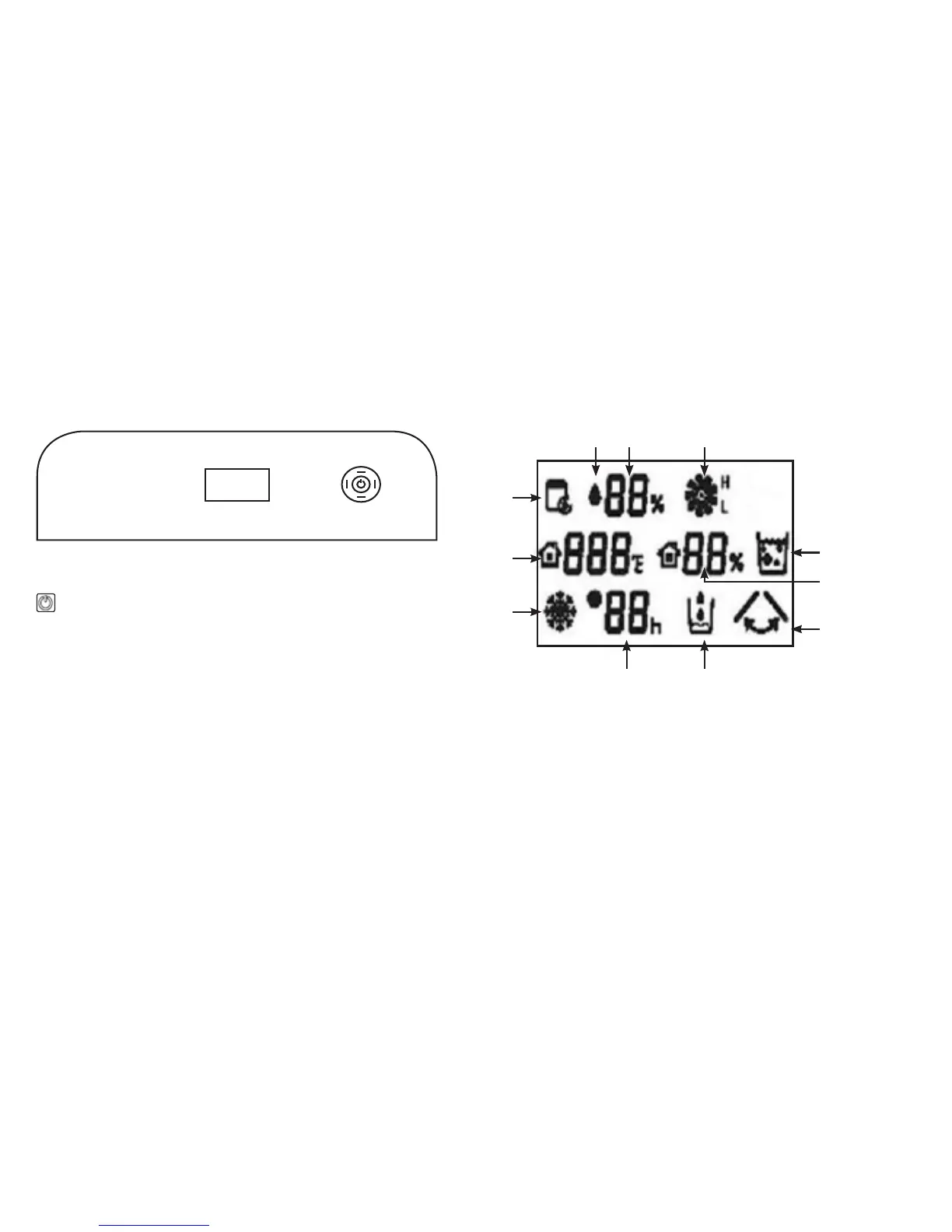
B. CONTROL PANEL & KEY PADS
POWER
Turns unit ON/OFF.
MODE
Allows selection of desired working mode, the corresponding
indicator light will illuminate.
SETTING
Allows selection of the desired running mode (High (H), Low (L))
and ambient relative humidity ratios.
TIMER
To set automatic ON/OFF timer at 1 to 24 hour settings.
SWING
Turns air deflector ON/OFF to allow better distribution of air output.
C. LCD DISPLAY ICONS
1. Automatic Dehumidifying 7. Dehumidifying
2. RH Settings 8. Timer
3. Wind Speed 9. Defrost
4. Water Full 10. Ambient Temperature
5. Ambient Humidity 11. Continuous Dehumidifying
6. Swing
T
i
m
e
r
S
e
t
t
i
n
g
s
M
o
d
e
S
w
i
n
g
1 2 3
78
4
10
9
11
6
5


 To Next Page