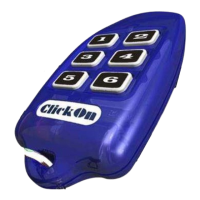
ClickOn
6-Channel Keyring Remote Control
Add security and comfort to your lifestyle
ClickOn
6-Channel Keyring Remote Control
Model: CL-KEY-06
TYPICAL APPLICATIONS
• Remote control of any ClickOn Receiving Device
• Gate/Garage door Control
• Remote controlled lighting
FEATURES
• Code hopping.
• Ideal for security complexes.
• No dip-switches.
• User-friendly programming.
• Compatible with all ClickOn devices.
• Provides ON, OFF and DIMMING control with
ClickOn dimmers.
• Frequency: 433.92Mhz.
• Range: 30 to 100m.
© 2006 ClickOn Technology (Pty) Ltd.
http://www.clickon.co.za
PROGRAMMING
1. Place the receiving device into the programming mode.
This is normally done by pressing and holding the button
on the receiving device until it’s LED starts flashing
continuously. (See receiving device user manual for more
information).
2.
Press and hold the DESIRED
channel button on the Remote
Control until the remote sounds 3
beeps (approx.10 seconds). Check
for a confirmation signal from the
receiving device. (See receiving
device user manual for more
information).
3. Exit the programming mode on the receiving device.
REMOTE CONTROL FUNCTIONS
Keep in mind that these functions will be available only after
successful programming (see PROGRAMMING).
To switch a device ON or OFF
Press and release the button on the
Remote Control. The remote control will
toggle between the ON and OFF
commands each time the button is
pressed.
To DIM a light (when used with a Light Dimmer)
Enter DIM/BRIGHT mode on the Remote control by pressing
buttons 1 and 2 simultaneously.
Press and hold the appropriate button on
the Remote Control to dim or brighten
the light.
The Remote Control will exit the DIM/BRIGHT mode automatically if
no buttons are pressed for 7 seconds.
A forced exit can be achieved by pressing buttons 1 and 2
simultaneously again.
6 0 0 9 6 2 5 9 9 0 5 4 7


 To Next Page
 Need help?
 General