2
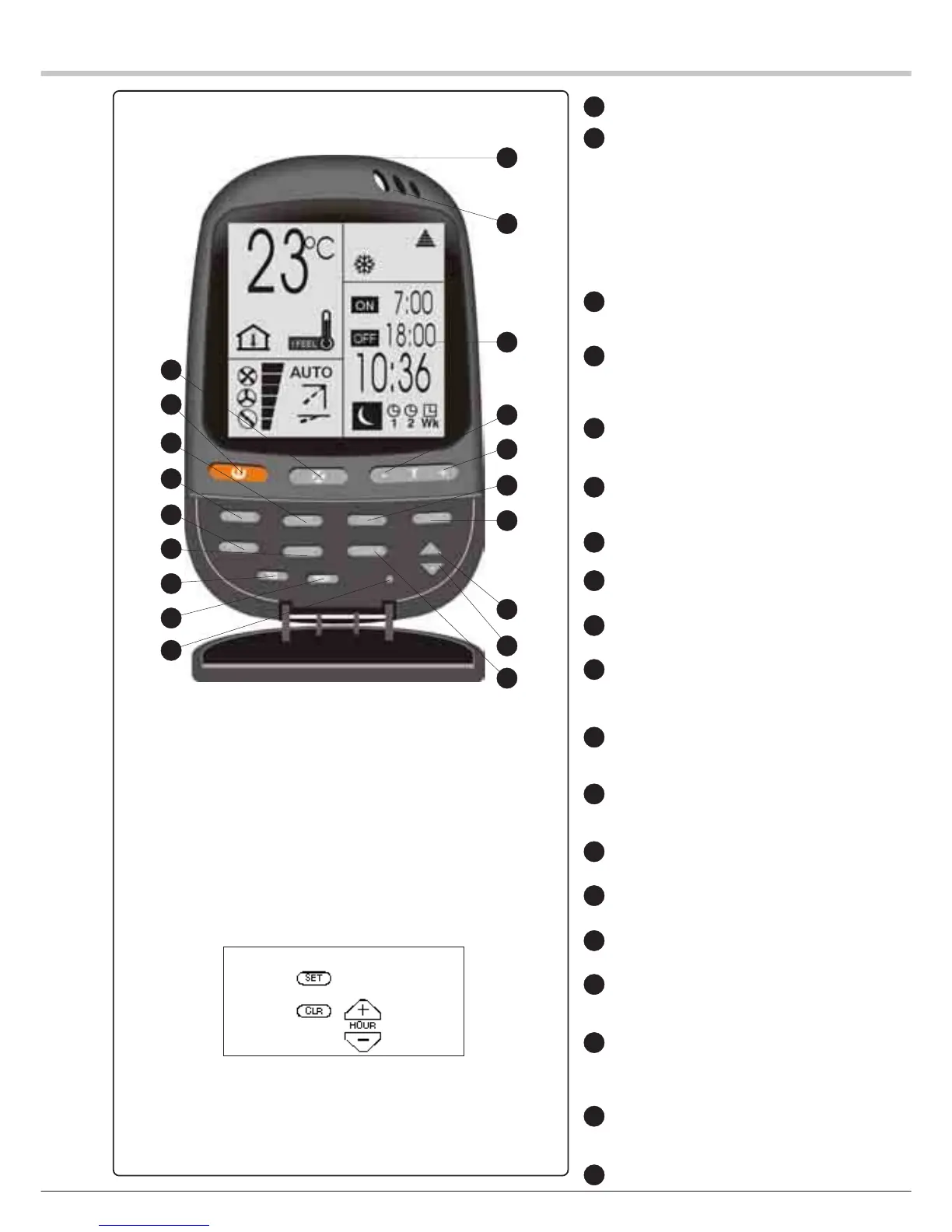
ON / OFF key
Operating mode selection key for
COOLING (except Water chiller wall
unit)
HEATING (except Water chiller wall
unit)
AUTOMATIC COOLING / HEATING REGU-
LATION,
VENTILATION,
DEHUMIDIFICATION(except Water
chiller wall unit)
I FEEL key: local detection of temperature
VENTILATION SPEED or AUTOMATIC VEN-
TILATION selection key
Ambient temperature increase key
Ambient temperature decrease key
SLEEP key
Directional vane sweeping (only wall unit
and water chiller wall unit)
Directional vane sweeping(only wall unit
and water chiller wall unit)
PROGRAMMING selection key
“+” key: increases the operating time datum
“-” key: decreases the operating time datum
Liquid crystal diode display (BACK LIGHT
OPTIONAL)
I FEEL sensor
Infrared signal transmitter
ROOM key: display of the ambient
temperature
SET key: sets the switch-on and/or switch-
off times of the PROGRAMMING FUNCTION
CLEAR key: cancels the preset parameters
of the clock
LOCK keyTouche SET
RESET FUNCTION:
1) Remove one battery
2) Simultaneously press these 4 keys until
the symbols are no longer displayed
3) Reinstall the battery
NOTE :NOTE :
NOTE :NOTE :
NOTE :
Open the cover / flap to access the con-
trol keys.
The four keys to be pressed are:
1
2
3
4
5
6
7
8
9
10
11
12
13
14
15
16
17
18
19
9
4
16
1
3
2
7
8
19
6
5
17
13
14
15
10
11
12
18


 To Next Page
 Loading...