USER MAINTENANCE
1
2
This machine has taken several measurements to protect the
circuit, but if working without water (over 20 seconds) will
short the life of the machine.
Damage will be occurred if works without water.
This machine has a circuit protecting it when over heat.
Stop 15 minutes if working for 3 working cycles continuously
to prolong the life of the machine is recommended.
3
Unplug and empty the unit after using.
Do not keep water in the tank for a long time.
4
Wipe the tank and unit with dry towel.
Do not wash the complete unit with water to avoid the
risk of shock.
Keep in cool and dry place.
11
5
Red
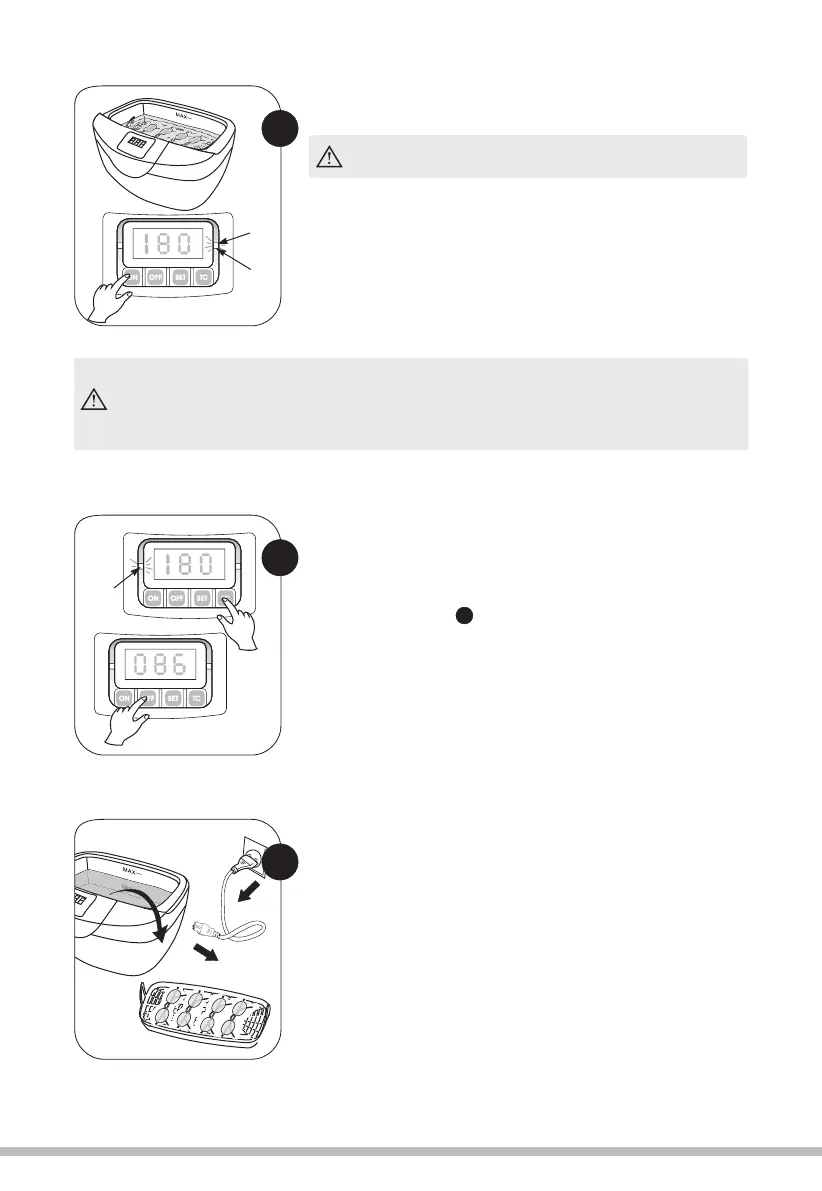
Press "ON" button to start cleaning while the right green
indication light is on.
During cleaning, you can hear the "BUZZ" voice,
it means the unit is working .
This machine has a circuit protecting it when over heat. When the right red indication light
is on, it means this circuit works. If pressing ON, the time left will be displayed but there is
no ultrasonic wave. The machine needs to stop working for 15 minutes, then pressing ON
and the right green light is on, the machine can work normally.
4
10
Red
3
When cleaning is finished, unplug it and open the lid,
then take out the item. At last, pour away the water
from stainless steel tank and wipe it up.
5
When the timer counts down "000 ", the unit will automa-
tically stop. If required you can stop / pause the cleaning
process at any time by pressing the OFF button, pressing
the ON button again will resume the cleaning and the
countdown will continue. When cleaning has finished,
you can repeat the process by pressing ON button again.
Green
Using the HEATER function.
Pressing the TC button starts the built in heater. The
red LED on the left of the control panel will illuminate.
The water will heat to a maximum of 65 degrees C.
Please refer to the point of four different ways of
cleaning for details.
2
If required, you can stop / pause the cleaning process at
any time by pressing the OFF button, pressing ON again
will resume the cleaning and the countdown will continue.
The program can be reset at any time by pressing the SET
button.


 To Next Page