The Cognex DataMan 7500 Series Handheld Verifier is a specialized device designed to ensure the quality of Data Matrix symbols, particularly those produced by Direct Part Mark (DPM) methods, in accordance with the AIM DPM Quality Guideline. This quick reference guide outlines the essential steps for setting up, calibrating, and using the verifier, as well as interpreting its results and configuring its output.
Function Description
The primary function of the DataMan 7500 Series Handheld Verifier is to assess the quality of Data Matrix symbols. It achieves this by employing integrated lighting and fixed optics, which are specifically designed to meet the stringent requirements of the AIM DPM Quality Guideline. The verifier's software analyzes various parameters of the Data Matrix symbol, providing a comprehensive quality report. This ensures that marked parts meet industry standards for readability and reliability, which is crucial for traceability and quality control in manufacturing and logistics. The device is particularly useful for contract compliance, as it provides objective, quantifiable data on symbol quality.
Usage Features
The DataMan 7500 Series Handheld Verifier is designed for ease of use, with several features that streamline the verification process:
- Kit Contents: The verifier kit includes the DataMan 7500 verifier stand-off, a certified calibration card (stored in a protective sleeve), and a quick reference document. The stand-off ensures consistent positioning of the verifier relative to the symbol, which is critical for accurate readings.
- Initial Setup and Communication: For initial setup and establishing communication with the reader, users are directed to refer to the 7500 Series ID Reader Quick Reference. This ensures that the device is properly connected and ready for operation.
- Firmware Update (for existing readers): If an existing DataMan 7500 series reader is being upgraded for verification capabilities, it must be running firmware version 2.1.1 or higher. The update process involves connecting the reader to the DataMan Setup Tool, selecting "System->Update Firmware," and choosing the appropriate firmware file (DM7xx0_v2.1.1_rc1.bin.gz) from the Cognex directory.
- DPMV Feature Activation: To enable the Direct Part Mark Verification (DPMV) feature, a feature key file must be uploaded to the reader. This is done through the DataMan Setup Tool by selecting "System->Upload Feature Key" and choosing the file provided by Cognex. After uploading, a soft reset of the reader is required, which can be performed by scanning a specific "Soft reset" symbol found on the back of the 7500 Series ID Reader Quick Reference.
- Stand-off Installation: The stand-off is easily attached to the DataMan 7500 Series reader, providing a fixed distance and angle for optimal symbol presentation and lighting, which are essential for adhering to the AIM DPM Quality Guideline.
- Calibration Process: Calibration is a critical step to ensure accurate verification results. It involves starting the DataMan Setup Tool, connecting to the reader, and navigating to the "Code Quality Settings" task pane. The verifier is then placed against the certified calibration card, with the symbol centered below the reader. Squeezing the trigger initiates the calibration routine, which can take several seconds. The Setup Tool provides a graphic guide to assist with precise alignment, indicating when the symbol is correctly positioned within the field of view and rotation. A single beep from the reader signifies successful calibration. Each reader must be calibrated individually.
- Code Quality Verification: After calibration, the verification process begins by enabling the "Turn Code Quality On" icon in the DataMan Setup Tool's toolbar and selecting the "Results Display" task pane. The verifier is placed against the Data Matrix symbol, ensuring it is centered and perpendicular to the surface. Squeezing the trigger initiates the read and verification. If the reader is out of position, the Setup Tool provides a visual guide to help align the red rectangle (center of the reader's view) within the green target rectangle (symbol area) with no more than 10 degrees of rotation. A beep confirms a successful read and verification.
- Code Quality Results Display: The "Results Display" task pane provides a comprehensive overview of the verification outcome. It shows an overall "Pass/Fail" result, individual AIM/DPM metrics with corresponding grades (e.g., Cell Modulation, Fixed Pattern Damage, Reference Decode, Minimum Reflectance, Cell Contrast, Axial Non-Uniformity, Unused Error Correction, Grid Non-Uniformity), and process control metrics (if enabled), such as Cell Growth (CGH and CGV). For detailed explanations of these metrics, users can access "View->Q+A Help."
- Formatting Output Data: The DataMan Setup Tool allows users to customize the output string for verification results using the "Data Formatting" task pane. This feature enables the verifier to return specific Code Quality results to third-party applications. It supports standard formatting and, in Advanced mode, Perl-Style Regular Expression features for more complex output configurations.
- Logging Data: The "Data Logging" task pane, accessible under "System Settings" in Advanced mode, allows for the generation of Code Quality Reports for each verified symbol. This feature requires the reader to be connected to the DataMan Setup Tool. Users can enable "Code Quality Results" and specify a directory to save reports along with an image of the verified symbol. The "Prefix filename with" option allows for adding a custom prefix to each report filename.
- Code Quality Configuration Codes: For quick adjustments without connecting to the DataMan Setup Tool, specific Code Quality configuration symbols can be scanned. These include symbols to quickly turn "Code Quality On" and "Code Quality Off." Additional configuration symbols are available in the online documentation.
Maintenance Features
While the document does not explicitly detail "maintenance features" in the traditional sense (like cleaning or part replacement), it does outline procedures that ensure the device's ongoing accuracy and functionality:
- System Calibration: Regular calibration with the certified calibration card is essential for maintaining the accuracy of the verifier. The document emphasizes that each reader must be calibrated individually, suggesting that this is a routine procedure to ensure reliable results over time.
- Firmware Updates: Keeping the device's firmware up-to-date is a form of maintenance that ensures the verifier operates with the latest features, bug fixes, and compliance with evolving standards. The process for updating firmware is clearly outlined.
- Saving Configurations: The ability to save and upload configurations ("System->Save Settings" and "File->Save Configuration") allows for consistent operation across multiple readers and ensures that preferred settings can be easily restored or deployed. This helps maintain operational consistency and reduces setup time, which can be considered a form of operational maintenance.
In summary, the Cognex DataMan 7500 Series Handheld Verifier is a robust tool for ensuring Data Matrix symbol quality, offering a user-friendly interface for setup, calibration, verification, and results analysis, all while adhering to critical industry guidelines.

 Need help?
 General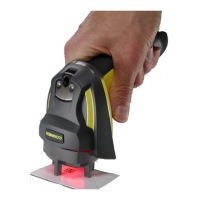

 To Next Page