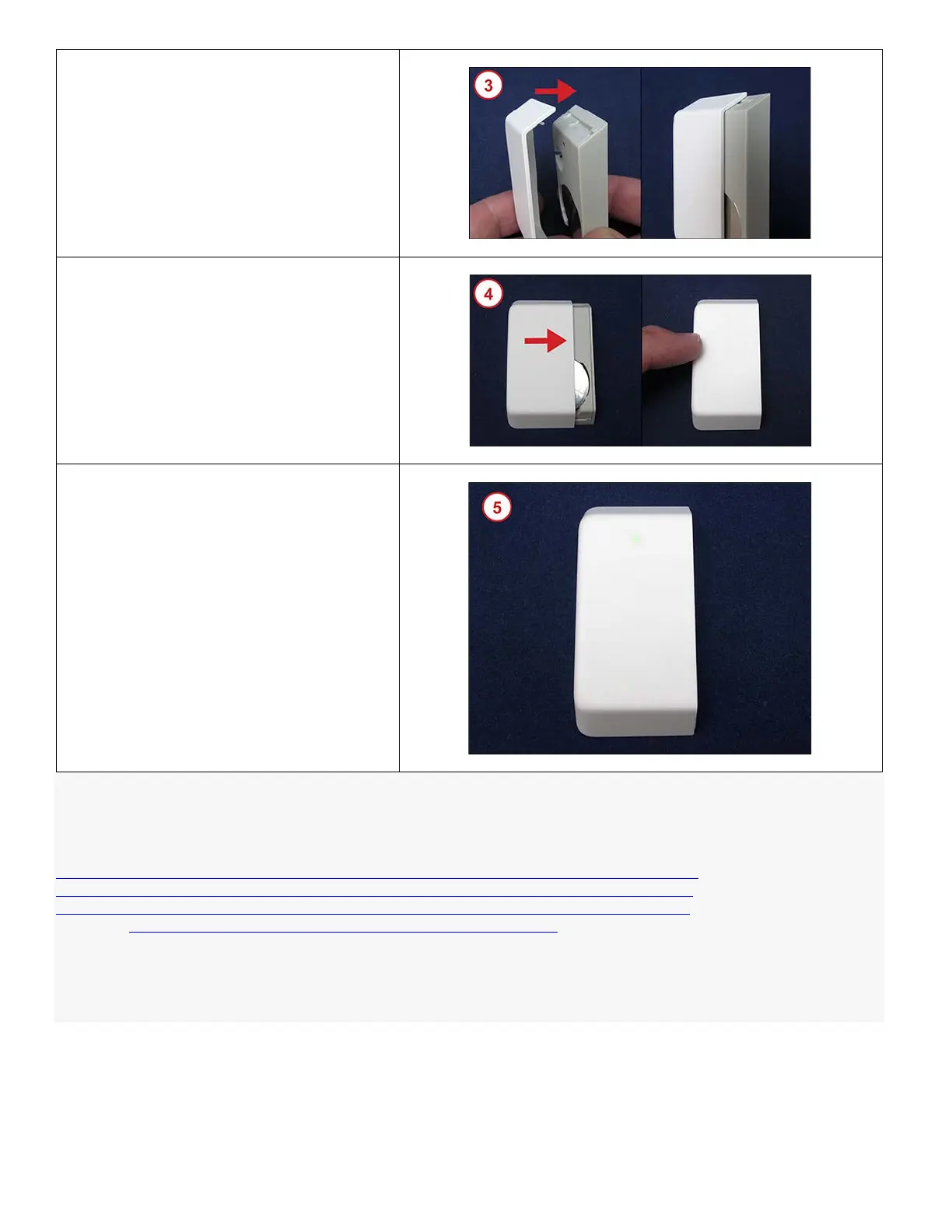
3. Align the small tab on the cover with the
slot in the track on the Sensor body. Press
the cover down onto the Sensor.
4. Use your thumb or finger to slide the cover
towards the opposite end of the Sensor
until it snaps into place.
5. When the battery is inserted correctly, and
the cover is reattached, the green light on
the front of the Sensor will light up.
Confirm that the low battery alert has resolved and the equipment appears on your list of connected devices. You
should also ensure that sensor events such as door opening or motion registers as an activity on your system.
Need Help? Find these instructions online at
https://customer.xfinity.com/help-and-support/home-security/installing-battery-xhs2-ue-sensor or
https://customer.xfinity.com/help-and-support/home-security/installing-battery-xhs2-ty-sensor or
http://customer.xfinity.com/help-and-support/home-security/installing-battery-xhs2-se-sensor. Get more troubleshooting
support at https://www.xfinity.com/support/gettingstarted/troubleshooting/ or contact a customer service expert at 1-800-
XFINITY.
Help Protect Our Environment: Please properly recycle your discarded batteries. For your convenience, batteries are
accepted for recycling at various locations. Check www.call2recycle.org or call 1-800-8-Battery (1-800-8-228-8379) to
find a recycling location near you.



 To Previous Page