8
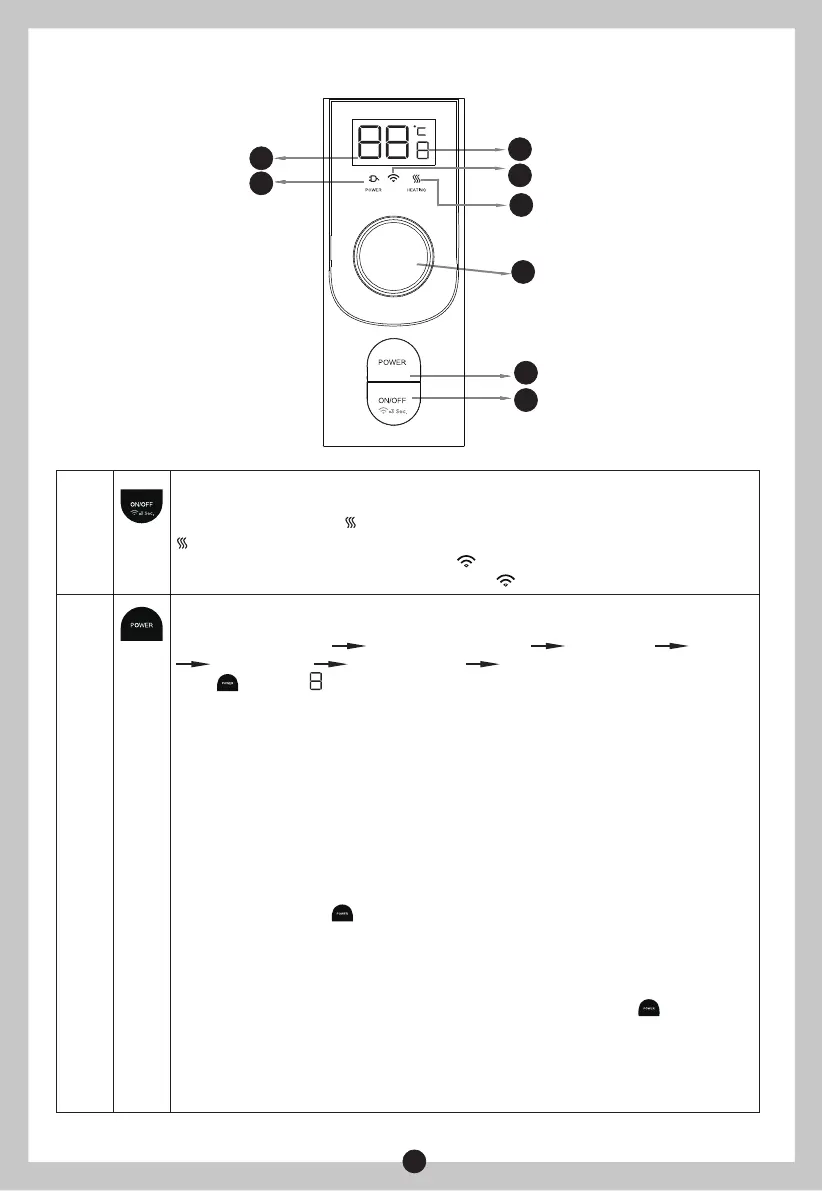
(Fig.7)
4.1 Operating Of The Unit
2
1
3
4
5
6
8
7
WIFI
No.1
ON/OFF
Turn the unit on or off.
When heating, the icon 7 is in red. When the temperature reaches the setting,
turns off.
Press 3 s for Wireless Connection. Icon 8 starts to flash. Then refer to "APP SETUP
AND OPERATION". When wireless connected, is on.
MODE:
To cycle through functions,icon 9 Change from “1” to “H”
“1”:Single-tank heating “2”:Double-tank heating “3”MEMO U “4” ECO
“5”Sterilization “H” appointment “1”:Single-tank heating………
Press , if icon 9 shows:
stands for Single- tank heating:
Only 1 tank is heated up. Meet your temporary demand for less warm water
consumption. Flex capacity to fit user counts. Precise energy savings.
stands for Double- tank heating:
Both tanks are heated up with 2 heating elements.
stands for MEMO U Function :
When the Memo U function is on, it analyzes your hot water consumption and keeps it
at 75°C for the first week. It then starts to set your hot water schedule based on your
regular routine from the next week.
If you press the button again or manually adjust the set temp on the water heater,
the MEMO U function will be automatically turned off.
But in APP, it does not allow to adjust temp during Memo U function is on, unless to
turn off this function.
If power off, turn off, or cycle through to other functions, the MEMO U function is
disabled and the related date writing is cleared. Need to press button to learn again.
MEMO U cannot be executed in the mode of repeated appointments.
stands for ECO Function :
Set temp. at 55°C.
No.2
1
2
3
4



 To Next Page