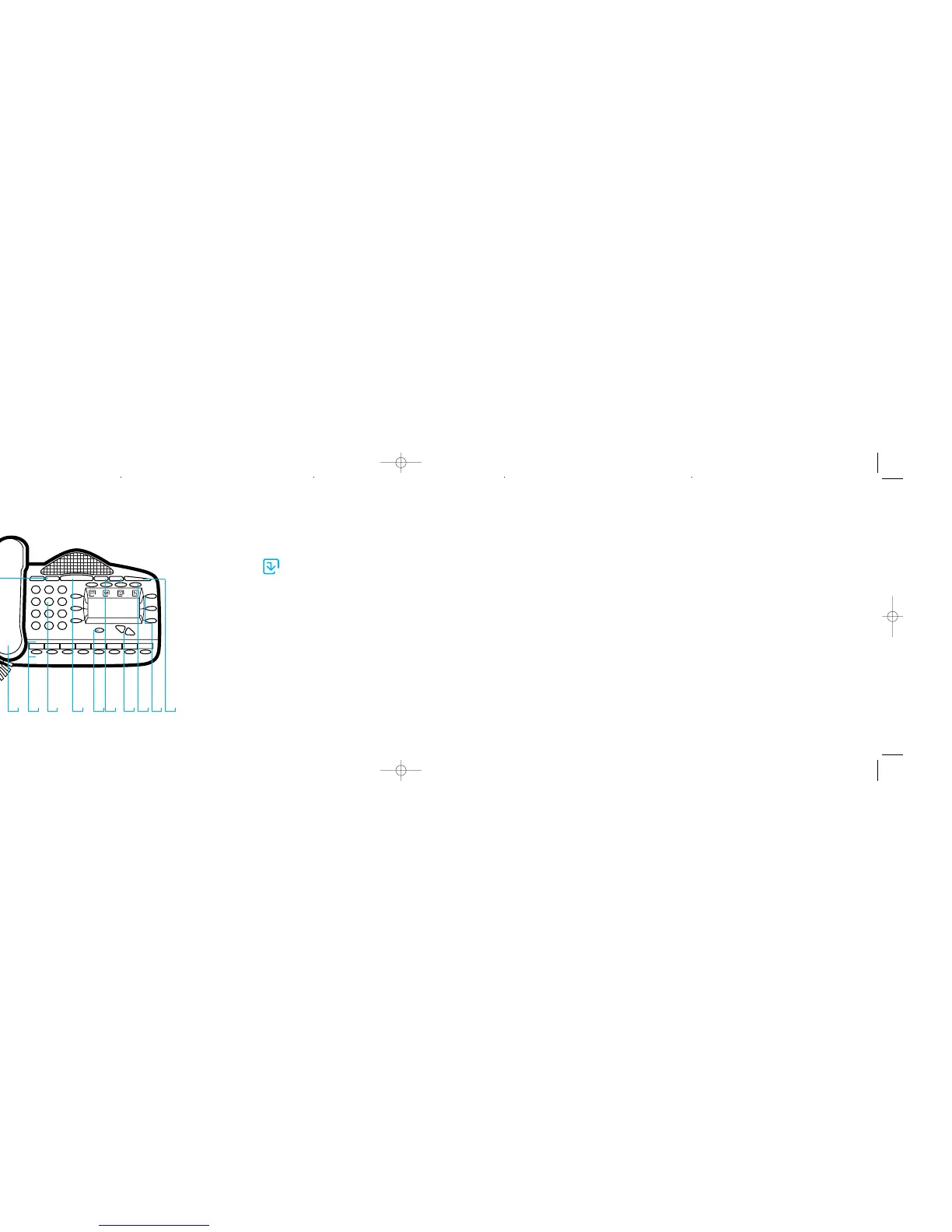
features
Data socket (underneath)
Headset socket (underneath)
mute key
Handpiece
Programmable keys
Numeric keypad
hands free key/ light
C-key
volume keys
Scroll/edit keys
function keys:
Program
<
Message <
Directory <
Network <
Display keys
Message waiting/ringing indicator
01
02
03
04
05
06
07
08
09
10
11
12
13
phone setup
To select a different ringing tone
Select program
Press the scroll down key
Select ringing options and
select a different ringing tone
Press the scroll down key
Select confirm or exit to cancel
Select contrast options and
select a different level of contrast
Select exit
answering and
making calls
answer a call that
is ringing on the
Keystation using
the handpiece
Pick up the handpiece or
Select answer the call
and/or pick up the handpiece
answer a call that
is ringing on the
Keystation using
hands-free
Select answer the call
make an external call
Pick up the handpiece
Press a free line key
or dial 0 and then the number
make an internal call
Select internal call
Select the appropriate station, or
Dial the station number (20 – 51),
and pick up handpiece
transferring calls
Note: The following instructions
assume you are on a call
transfer a call to an
internal number
Select Internal transfer
Select the appropriate station, or
Dial the station number (20-51)
and when the call is answered
Select transfer
transfer an
external call to an
external number
Select external transfer
Select an available line as
indicated by
‘◊’
and then
Dial the external number and when
the call is ringing on the external number
Select transfer
deflecting calls
Note: The following instructions
assume that your station is ringing
deflect a call to
another station
Select deflect the call
Select Stn. no. .
Connect features.
01 02 03 0704 06 0908 10 11 131205
deflect a call to
your voicemail box
Select deflect to voice mail
diverting calls
divert all calls
Press the scroll down key
until “Divert” is displayed
Select divert
Select divert all calls
Dial the internal station
number (20 – 51), or
Dial 0 and the target external
number, and press ‘confirm’, or
Press ‘Divert to voice mail’
cancel divert all calls
Select cancel divert
divert calls when
your station is busy
Press the scroll down key
until ‘Divert’ is displayed
Select divert
Select divert when busy
Dial the target station number, or
Dial 0 and the target external number,
and press ‘confirm’, or
Press ‘Divert to voice mail’
cancel divert
a call on busy
Press the scroll down key
until “Divert” is displayed
Select divert
Select divert when busy
and the diversion is cancelled
divert calls when
your station does
not answer
(after four rings)
Press the scroll down key
until “Divert” is displayed
Select divert
Select divert on no answer
Dial the target station number, or
Dial 0 and the target external number,
and press ‘confirm’, or
Press ‘Divert to voice mail’
cancel divert a
call on no answer
Press the scroll down key
until “Divert” is displayed
Select divert
Select divert on no answer
and the diversion is cancelled
voicemail
Note: Voicemail services require the
voicemail module to be installed.
enter a personal
greeting
Press the “message” key, and
Select voice messaging
Enter your Station number or select the
Station from the menu
Then enter your voice
mailbox password followed by #
Select greetings
Follow the text and voice prompts to
enter and check your greeting
turn on your voicemail
Divert on ‘no answer’ to the voice mail is
automatically set when a voice
mailbox is allocated to your station
You may also select the other
divert options as required
Press the scroll down key (?)
until ‘divert’ is displayed
Select divert
Select divert when busy or
Select divert all calls
Select ‘divert to voice mail’
retrieve messages from
your voice mailbox
The ‘message waiting’ light indicates
that a new message has been left
Select new voice messages
Enter your station number or select
the station from the menu
You will be prompted to enter your voice
mailbox password, followed by #
Select play
change your
voice mailbox
password
Press the “message” key, then
Select voice messaging and
enter your station number or
select the station from the menu
Enter your existing password,
(default is 1111), followed by #
Press the scroll down key
Select change password and
Enter your new password
(up to 8 digits long – e.g. 12341234)
Select confirm or press #


 To Previous Page
 Loading...