EasyManua.ls Logo

Commodore AMIGA 520 - Page 9

Commodore AMIGA 520
10 pages
Print Icon
To Next Page IconTo Next Page
To Previous Page IconTo Previous Page
Loading...
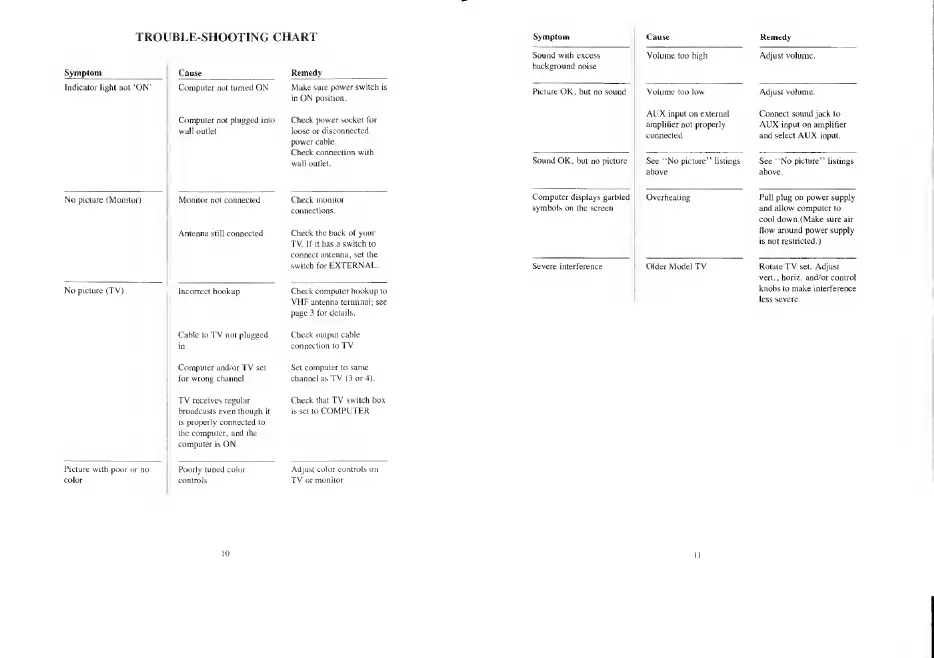
TROUBLE-SHOOTING CHART
Indicator liulil
not
'ON"
No picture
(Monito!
;
Moniiur noi conrvclcil
Antenna Mill c
Computer and/or
TV
set
for wrong channel
TV receives regular
broadcasts
even
though
\>
is properly connected to
the computer,
and the
computer is ON
Make sure
power
switch
in ON position.
Check
power
socket Tor
loose or
disconnected
power
cable.
Check
connection with
wall
outlet.
Check the hack
of your
TV.
[f
Lt has a switch to
switch for
EXTERNAL.
Check
computer hookup to
VHF antenna
terminal; see
page 3
for details.
Cable
to
TV not plugged
Check output cable
Set computer to same
channel as
TV
[3
or
4).
Check that
TV switch box
is
set
to COMPUTER
Sound
with
excess
background noise
Picture OK,
but
c
AUX input on external
amplifier not proper!}
connected
Connect sound jack to
AUX input on amplifier
and select AUX input.
Sound
OK, but r
tings See ""No picture" listings
Computer displays
garbled
symbols on the screen
Pull
plug on power
supply
and allow computer to
cool down. (Make sure air
How around power supply
is not restricted.)
Severe interferen
Older Model
TV
Rotate
TV
set. Adjust
vert.,horiz. and/or control
knobs to make
interference

Other manuals for Commodore AMIGA 520

Related product manuals