CommRadio CR-1a User Manual – New Edition: 1 May 2014
3
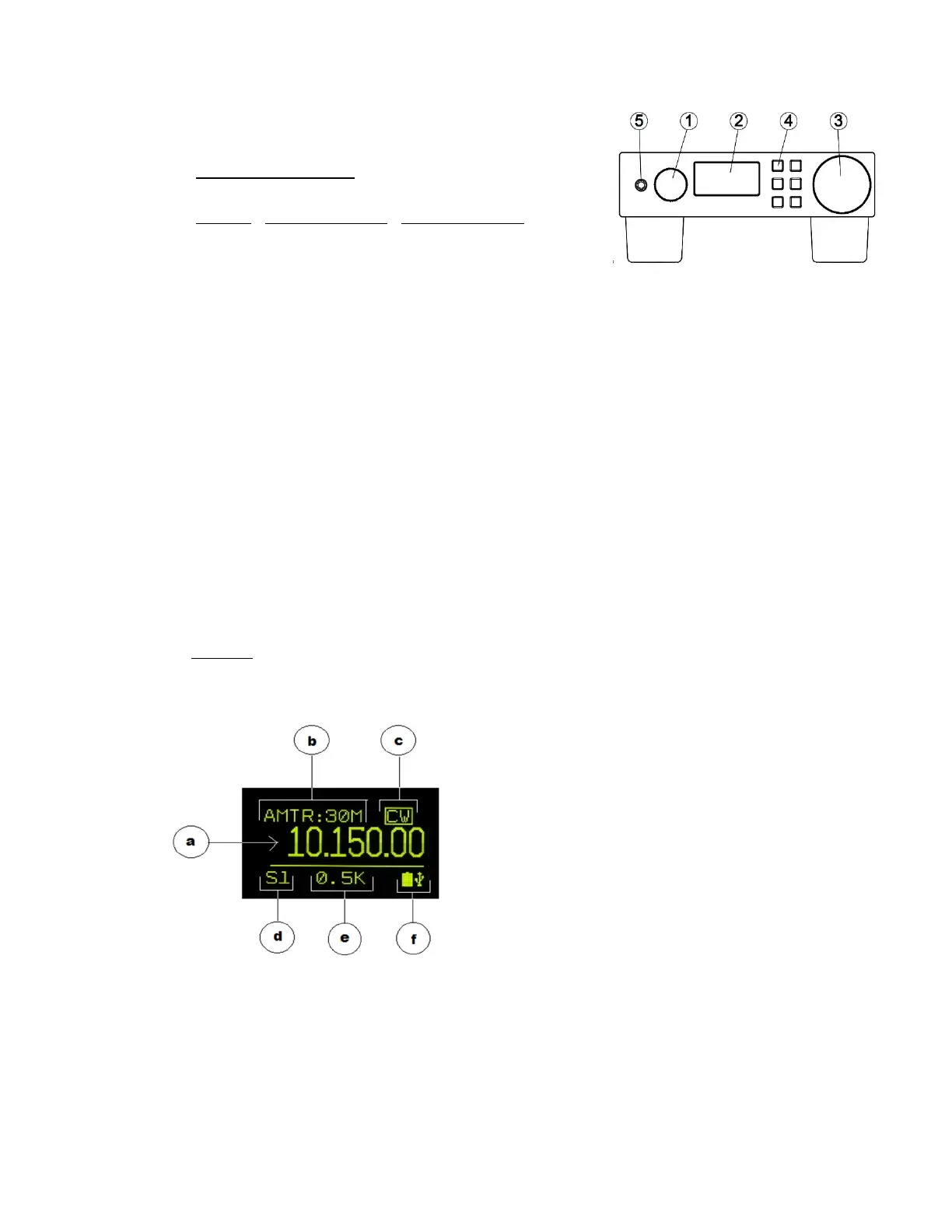
B. Front Panel Controls
1: On/Off - Volume Control - Menu Knob [M]
Description: Rotary Encoder-12 detents per revolution
with push-in switch.
On/Off Control: Push [M] to turn - ON. Hold [M] to turn - OFF
• Volume (default): a click of the knob independently controls the
Head-set and speaker volume. There is no indication of the volume level on the display.
• Menu: Push-In [M] momentarily for Menu Selections that include:
o Spectrum: Frequency Range, Bands, Filters, Mode Selections
o Controls: AGC, Squelch, Brightness
o Configuration: Timing, Time-out, SWL-Amateur, Continent, Software Version
2: Display: 128 x 64 pixel x 1.5”diagonal OLED.
Organization:
a. Frequency
b. Band
c. Mode (active: highlighted box)
d. Signal Strength: S-Units
e. Filter Bandwidth
f. Power Status Icons


 To Next Page
 Loading...