EasyManua.ls Logo

CompanyBlue JKFS-WiFi - User Manual

CompanyBlue JKFS-WiFi
2 pages
Print Icon
To Next Page IconTo Next Page
Loading...
MODEL NUMBER: JKFS-WiFi
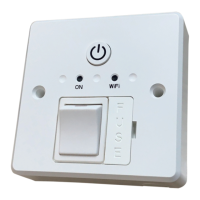
SPECIFICATION WiFi SWITCHED FUSED SPUR
MODEL JKFSWIFI NAME WiFi SWITCHED FUSED SPUR
COLOUR WHITE FUNCTION TUYASMART APP CONTROL
INPUT AC240V COMPATABLE WITH ALEXA & GOOGLE ASSISTANT
AMBIENT TEMP -20C – 45C 13AMPRATED CURRENT
ROCKER SWITCH
2POLE
MAX 3000W RESISTIVE
SWITCHED RATED POWER
FOLLOWING MAX LOAD
1000W HALOGEN, INCANDESCENT
100W COMPACT FLUORESCENT
500W LED FLUORESCENT
NOT SUITABLE DISCHARGE LIGHT
ELECTRICAL CLASS
APPROVAL
CE, RoHS.
PACKING SIZE
85*85*47mm MAIN MATERIAL & DIM PC, H85xW85xD47mm
NET WEIGHT 167g
CARTON SIZE/
Qty WEIGHT
375x285x280mm/60pcs/12kgs
MINIMUM DEPTH WALL BOX 25MM BOOST TIME
MULTIPLE SELECT HOURS
WIFI SPECIFICATION 2.4GHZ FREQUENCY RANGE 2.4 – 2.48GHZ
PACK CONTENTS:
1* WiFi Spur unit
1* Instrucon leaflet
2* Retaining screws
INSTRUCTION FOR WiFi SWITCHED SPUR
Compitable with alexa& Google Assistant
These instrucons are for guidance only Please read before
installaon and retain for future reference
MAINS FREQUENCY 50Hz/60Hz
PROGRAMMABLE PROGRAMMED (ON and OFF)

Question and Answer IconNeed help?

Do you have a question about the CompanyBlue JKFS-WiFi and is the answer not in the manual?

Summary

Specification WiFi Switched Fused Spur

Instruction for WiFi Switched Spur

Compatibility with Alexa and Google Assistant

Details compatibility with voice assistants like Alexa and Google Assistant.

General Safety Instructions

Operation

Count Down Timer

Allows setting a start hour and minutes for a countdown timer function.

App Control and Pairing

Guides on downloading TUYASMART app, registering, and pairing the device via Wi-Fi.

Power Button

Instructions on how to turn the device on or off using the power button.

Scheduled Time Programming

Details on setting scheduled on/off times and repeat options for daily or weekend operation.

Connecting to Voice Assistants

Steps to connect the device with Alexa or Google Assistant through their respective apps.

Overview

The device described is a WiFi Switched Fused Spur, model number JKFS-WiFi, designed for smart home integration.

Function Description

This device allows for remote control of electrical appliances via WiFi, making them compatible with smart home ecosystems like Alexa and Google Assistant. It functions as a fused spur, providing a switched power outlet with an integrated fuse for safety. Users can program the device to turn appliances on and off at scheduled times, set countdown timers, and control it manually or through a smartphone/tablet app. The device supports TUYASMART app control, enabling remote operation from anywhere with internet access.

Important Technical Specifications

  • Model Number: JKFS-WiFi
  • Input Voltage: AC240V
  • Mains Frequency: 50Hz/60Hz
  • Rated Current: 13AMP
  • Maximum Load (Resistive): 3000W
  • Maximum Load (Halogen/Incandescent): 1000W
  • Maximum Load (Compact Fluorescent): 100W
  • Maximum Load (LED Fluorescent): 500W
  • Compatibility: Alexa & Google Assistant, TUYASMART App
  • WiFi Specification: 2.4GHZ
  • Frequency Range: 2.4 - 2.48GHZ
  • Electrical Class: II
  • Operating Ambient Temperature: -20°C to 45°C
  • Dimensions (Device): H85 x W85 x D47mm
  • Packing Size: 85 x 85 x 47mm
  • Net Weight: 167g
  • Minimum Depth Wall Box: 25mm
  • Fuse Type: BS 1362 (1" x 1/4")
  • Material: PC (Polycarbonate)
  • Certifications: CE, RoHS

The device is a 2-pole rocker switch with a switched rated power. It is not suitable for discharge lights.

Usage Features

  • Smart Control: Compatible with Alexa and Google Assistant for voice control.
  • App Control: Utilizes the TUYASMART app for smartphone/tablet control, allowing remote operation and programming.
  • Programmable Schedules: Users can set specific "ON" and "OFF" times for appliances, with options for daily or weekend repetition.
  • Countdown Timer: Features a countdown function where users can set hours and minutes for the device to operate.
  • Manual Override: Includes an override button on the unit for direct control.
  • WiFi Connection Indicator: An LED indicator shows the status of the WiFi connection.
  • Easy Pairing: The pairing process involves pressing a reset button for 5 seconds until a blue indicator blinks rapidly, followed by app configuration.
  • Personalization: Users can personalize the device's name and icon within the app.
  • Installation: Designed to fit a 1-gang 25mm deep (min) back box. It can be used as part of a ring main and accepts 2 x 2.5mm T&E conductors per terminal. An earth loop connector is supplied if required, and earthing to a metal back box is necessary if installed in one.
  • Connectivity: Connects to mains supply via terminals marked L IN (brown/red cable) & N IN (blue/black cable) and to the load via L out & N out.

Maintenance Features

  • Fuse: The device incorporates a replaceable BS 1362 (1" x 1/4") fuse for circuit protection.
  • Safety Instructions: Emphasizes the importance of switching off mains supply and removing circuit breaker/fuses before installation.
  • Professional Installation: Recommends installation by a qualified electrician adhering to local regulations and wiring regulations (BS7671).
  • Electrical Checks: Advises double-checking all electrical connections during installation and performing electrical tests upon completion.
  • Environmental Responsibility: The product is marked with a crossed-out wheeled bin symbol, indicating that it should not be disposed of with general household waste in the EU. Users are encouraged to recycle it responsibly through return and collection systems to promote sustainable reuse of materials.

CompanyBlue JKFS-WiFi Specifications

General IconGeneral
BrandCompanyBlue
ModelJKFS-WiFi
CategorySwitch
LanguageEnglish