Compressor Supreme Force Feedback
User Manual
Page 6
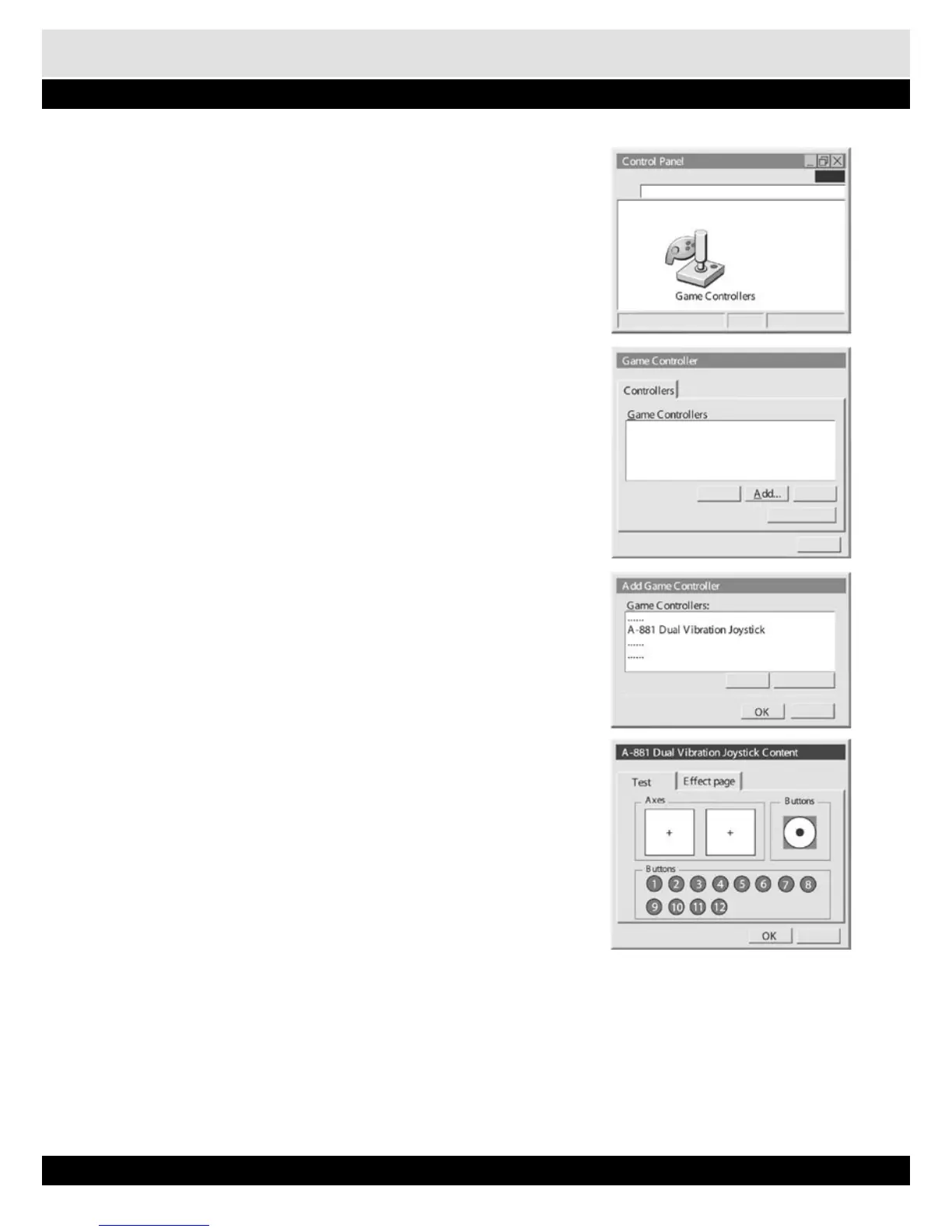
6. After installation is completed, go to Control Pa-
nel of Windows.
7. Double click icon of „Game Controllers”.
8. On the dialog of Controller, click „Add...”.
9. Select „A-881 Dual Vibration Joystick” from the
list of Game Controller. Then, click „OK”.
10. From Game Controller dialog, select „A-881
Dual Vibration Joystick”, then click „Proper-
ties”.
11. Turn steering wheel, steps foot pedals, press all
buttons except Mode, to verify their functions.
12. Test vibration at the second page „Effect
page”.
13. You can play game now.
14. Inside the game, it is best to select controller in OPTION or CONTROLLER to „A-881 Dual Vi-
bration Joystick”. Then, select corresponding buttons for gear shift or other functions.
15. In some games, force feedback can be set to different degree of different type of force. For
example, Collision, Road Grip, etc. Try these setting to get satisfactory force feeling.
16. In some games, acceleration and brake are configured to buttons. Some can be set to present
configuration of Gas and Brake pedals, some cannot. If not, program the foot pedals to corre-
sponding buttons.


 To Next Page