DEEP LEARNING PLUS QUICK START GUIDE12
LIVE DEEP LEARNING EVENT TIMELINE
Any detected Deep Learning-based events detected by the DL PLUS device will display in Event Timeline
on the right-side of the Live user interface. This will display a thumbnail image along with relevant event
information such as channel, time, and rule type. Click the thumbnail to initiate playback of the event.
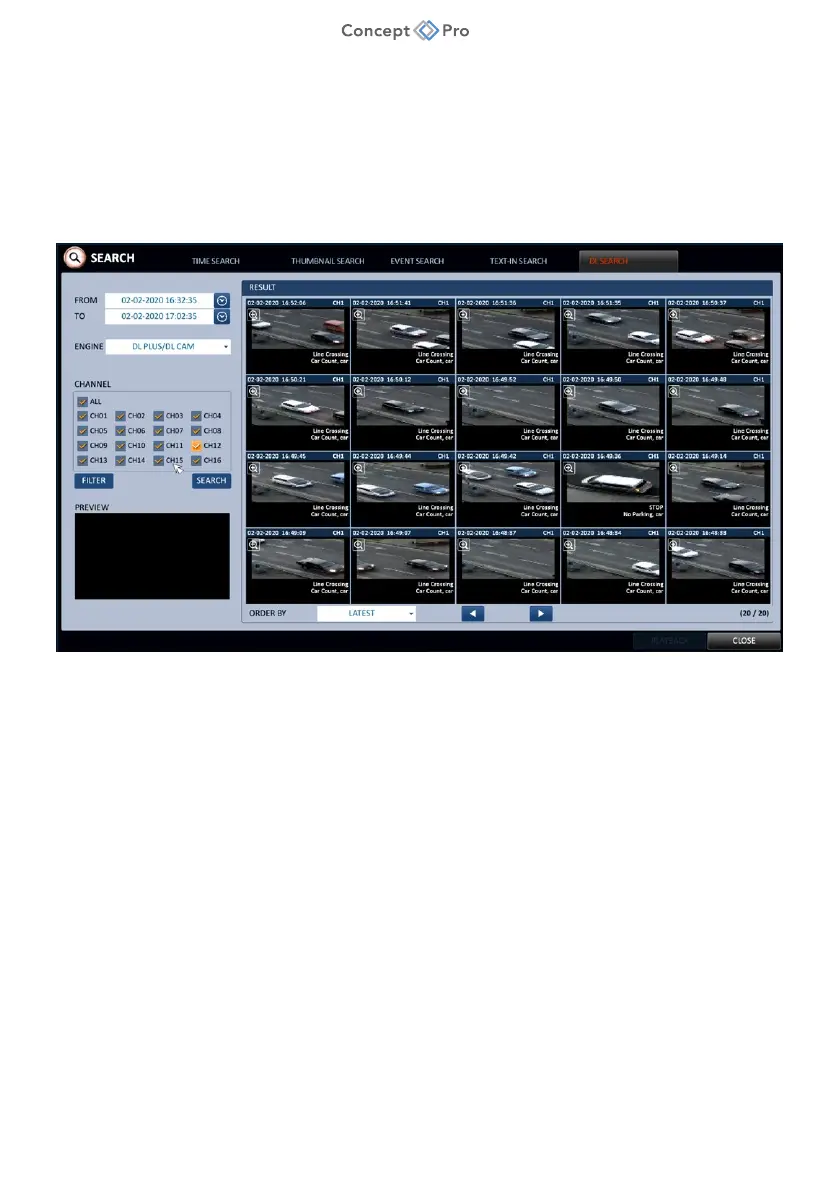
Using Deep Learning Search
Easily search for recorded Deep Learning-based events detected using the DL PLUS algorithms using the
DL Search menu .
1. From the Concept Pro Video Recorder user interface, navigate to <MENU> - <SEARCH> -
<DL SEARCH> menu.
2. Enter desired search parameters for each field:
a. FROM: Enter start date/time.
b. TO: Enter end date/time.
c. ENGINE: Select DL PLUS/DL CAM
d. CHANNEL: Select desired channel(s).
e. FILTER: If desired, click to filter search by rule type or object keyword.
3. Click <SEARCH> and results will list in the RESULTS window. Use the arrow buttons to
browse thumbnail images. Click once to begin playing a live preview and double-click to
move to Playback.



 To Next Page