EasyManua.ls Logo

CONCORD 105 - Function of Controls and Jacks; On-Off-Volume; Selector; Red R Button

CONCORD 105
12 pages
Print Icon
To Next Page IconTo Next Page
To Previous Page IconTo Previous Page
Loading...
lXreo.
Ie
x105)(
4r
x
12)(44
)
(45
t
t
ffi
15
l. \.\ ctu
\'
.9
:Y
L-.$-r'
2t
78
\
\,,
\-.
\\'
6
Wl*€
dq,*-
'#nq-
|
16
,'1iffi,ffi
.W}
\;
wdffifu:.1.
,19
J5_
48
tr;l,fx8ii,.:S;ij
ff*r
/ru
r-
I
,:',
ffiEffi /.\%
t;'
M
k*#i
d,kJ
"
*"ei,l
fi,
ffi
4g
r*
.W
d_rcr
El
\4
%
*6*
;
"-:
.
^**&:Y
.
;rffi{
j
ffMr
P
, s\r,
I
{fs
n
-*
Q
***1
ffi
--;.
i: I
*
.qt$-*
ffil*eg.'*
f$
-.wr
w
rWl n
ffi
I
$Sr_ji
.L
'::*.-g
.
S
ffiffiH
€t
1j3
\r
i:
i
J,!
ffi
r-\
'ffi
\'
f
,-'q."G
t
,1T
Yl
.\ l ts ,1.
74
75
*
ugr-q;
IY
*{s
"t
: 6'll
#-s;
l*
L9@@@D@@
e3)(e0
95
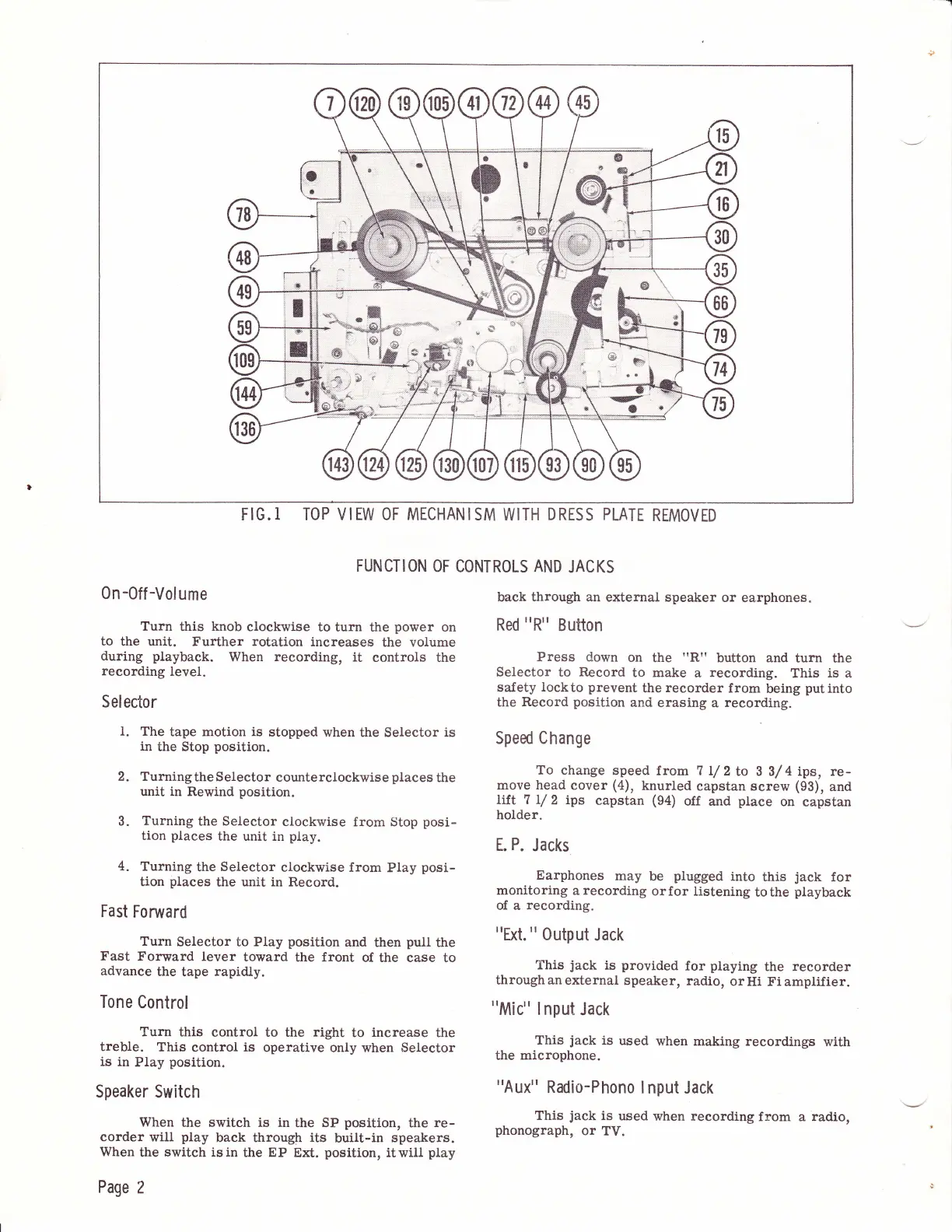
FIG.I
TOP VIEW OF
MECHANISM
WITH
DRESS PLATE
REMOVED
FUNCTION
OF
CONTROLS
AND
JACKS
0n
-0ff
-Volume
Turn
this
knob
clockwise to
turn the
power
on
to
the unit. Further rotation
increases
the volume
during
playback.
When recording,
it
controls
the
recording
level.
Selector
l.
The
tape motion is
stopped
when the
Selector
is
in
the
Stop
position.
2. Turning
the Selector
counterclockwise
places
the
unit in Rewind
position.
3.
Turning
the
Selector
clockwise
frorn Stop
posi-
tion
places
the unit in
play.
4.
Turning
the
Selector
clockwise from
Play
posi-
tion
places
the
unit in Record.
Fast
Forward
Turn
Selector to Play
position
and
then
pull
the
Fast
Forward lever
toward the front
of the case
to
advance
the
tape
rapidly.
Tone
Control
Turn
this
control to the
right
to
increase
the
treble.
This control is
operative
only when
Selector
is
in
PIay
position.
Speaker Switch
When
the switch is in
the SP
position,
the
re-
corder
will
play
back through its
built-in
speakers.
When
the
switch
isin
the
EP
Ext.
position,
itwill
play
Page
2
back through an
external speaker
or
earphones.
Red
"R"
Button
Press down
on
the
rrRrr
button and turn
the
Selector
to
Record
to make
a
recording.
This
is
a
safety lockto
prevent
the
recorder
from
being
putinto
the
Reeord
position
and
erasing a
recording.
Sped
Change
To change
speed
from 7 I/
2
to 3 3/
4 ips,
re-
move head
cover
(4),
knurled
capstan screw
(93),
and
lift 7 L/
2
ips
capstan
(94)
off
and
ptace
on capstan
holder.
E.
P.
Jacks
Earphones
may
be
plugged
into
this
jack
for
monitoring
arecording
orfor listening
tothe
playback
of a
reeording.
"Ext.
"
0utput
Jack
This
jack
is
provided
for
ptaying
the
recorder
throughan
external
speaker,
radio,
orHi
Fi amplifier.
"Mic"
lnput
Jack
This
jack
is
used
when making
recordings
with
the microphone.
"Aux"
Radio-Phono
lnput
Jack
This
jack
is
used
when recording
from
a
radio,
phonograph,
or
TV.

Related product manuals