The Data Buffer
The buffer contains the data for the device to be programmed. It may be edited per individual byte, or filled with a constant value. You may open new buffers
or save
the contents of the active buffer at any time. A portion of the buffer is displayed in the buffer window. Depending on the type of device selected -
memory modules or EPLD - the buffer window will display the data either in the Hex- and ASCII format or display the Fuse-Map.
In the case of memory modules the programming
-, compare- or read-actions only refer to the data area between the buffer's Start Address and End
Address.
The cursor may be positioned in the active buffer window with either the mouse or the cursor buttons. [PgUp], [PgDn], [Home] and [End] leaf through the
buffer. [TAB] changes the cursor between address, hex area and ASCII area. By entering a hexadecimal number or character respectively the byte below the
cursor will be overwritten, after which the cursor automatically moves to the next byte. The buffer window allows you to edit an EPLD
-Fuse-Map just as easily
by changing the state of the fuse at the location of the cursor with [0] or [1] ([0] = ´ Fuse burned ´, [1] = ´ Fuse not burned ´).
If you wish to display a distinct address in the buffer window, simply overwrite the address in the buffer window with the desired address and confirm the
entry with a return. The buffer window will then display the data starting with the address entered.
Buffer Window
This window displays part of the buffer containing data of the device to be programmed. You may move the cursor in the buffer window and edit the data.
If you wish to display a certain address in the buffer window, simply overwrite the address in the buffer window with the desired address and confirm with a
return. The buffer window will then display the data starting with the address entered.
Split and Shuffle
The program fSplitter.exe iIn the GALEP program directory can be used for splitting a file with 16-bit data into two 8-bit files, containing the even and the
odd bytes. This method generates buffer data for two 8-bit memory devices that are combined to a 16-bit memory.
Configuration of the Data Buffer
From version 1.17.02 on there are 2 modes of use for the Data Buffer and the link to original file. They are so called Production and Developer modes.
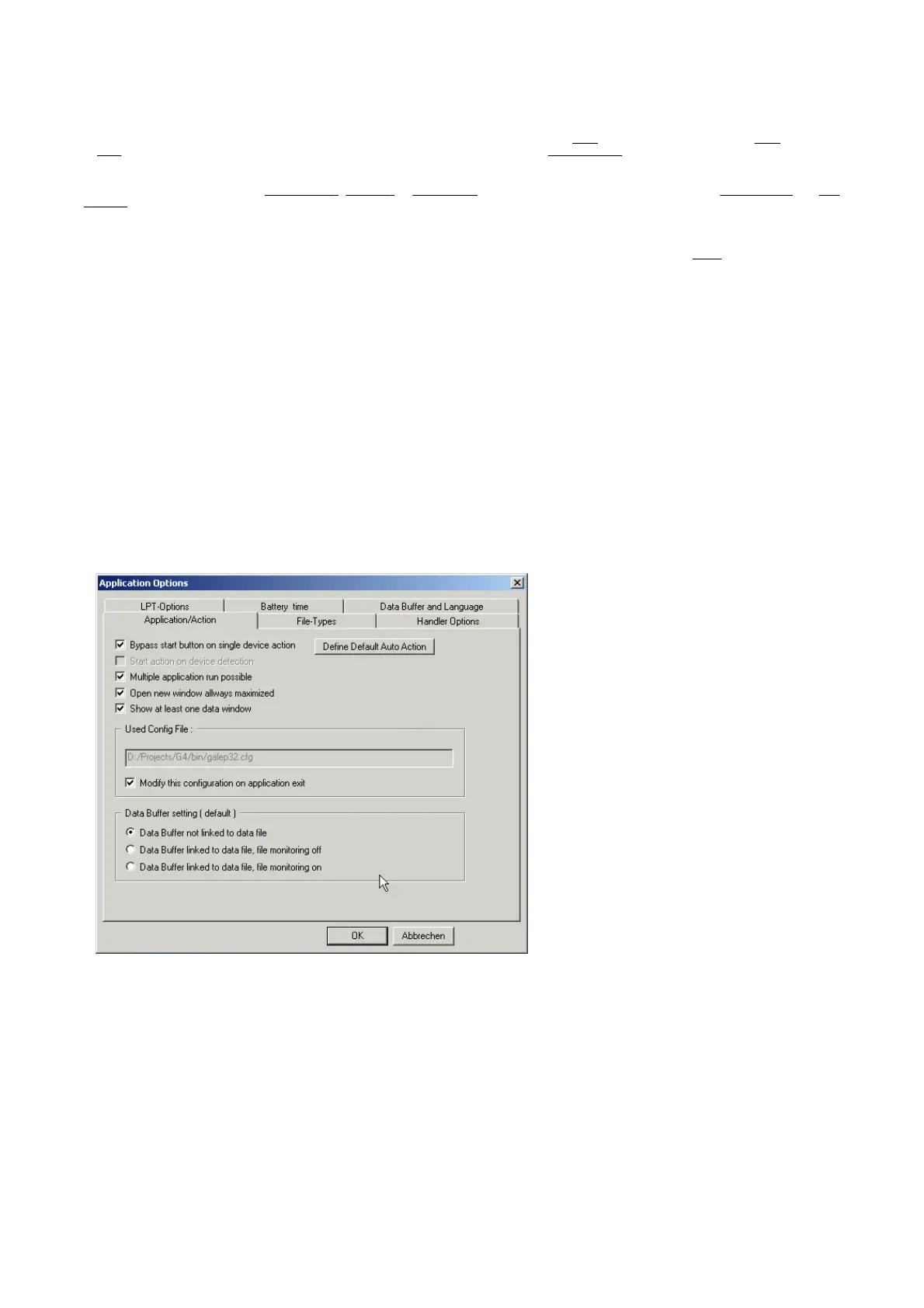
You can switch to the mode you need in the Application Options dialog ( menu Options -> Application ) :
In the Data Buffer setting ( default ) area you have the following options to choose :
Data Buffer not linked to data file ( Production mode )
With this setting the Data Buffer isn't linked to the loaded/saved file. The Data Buffer will be entirely stored in the project file by closing and fully restored at
next start of the Galep32 application. The data file itself will be ignored ( no automatically loading ).
Data Buffer linked to data file, file monitoring off ( Developer mode )
With this setting the Data Buffer is linked to the loaded/saved file. The Data Buffer will be not stored, but the link to the loaded/saved file only. At the next
start of the Galep32 application the linked data file will be loaded ( if exist ).
Data Buffer linked to data file, file monitoring on ( Developer mode )
The same as previous, but in addition the file monitoring is activated ( to notify if the loaded/saved file was changed out of the Galep32 application ).
The setting can be changed at any time local for a project :
1. Using menu Options.
2. Usin
context menu of the Workspace.


 To Next Page
 Loading...