3
6
♦ Insert at least 20 coins per tube for best performance.
♦ If a coin drops in and stands on end, correct it.
♦ Be careful not to load bent coins.
♦ Be certain to load the correct coin in each tube.
♦ After loading tubes manually, payout at least one coin from each tube to assure
proper operation! Use inventory buttons A-E for payout.
OPERATING THE AUTOMATIC CHANGE ADJUSTING
FUNCTION (FLOAT)
This function allows the coin changer to return the tube levels to a controlled level.
1. Set the base quantities (the number of coins to be loaded initially).
2. Reinstall the cassette tube assembly into the changer.
3. Mark each tube with the base quantity (to make it easier to recognize a shortfall).
The coin changer judges each set quantity as zero regardless of the actual count.
4. By pressing the “AUT” for a least one second the coin changer will return the
tube levels to the base start level.
5. When the coins in the cassette become fewer than the base quantity and the shortfall
is replenished. If the coin amount in all tubes are less than preset level and the “AUT”
switch is pressed, this becomes the new preset level.
The coin changer’s memory will be affected when:
1. The cassette assembly is removed.
2. The coins are inserted directly into the tubes (manually).
3. Communication with the vending machine controller is interrupted.
DIAGNOSTIC AND CONTROL FUNCTIONS
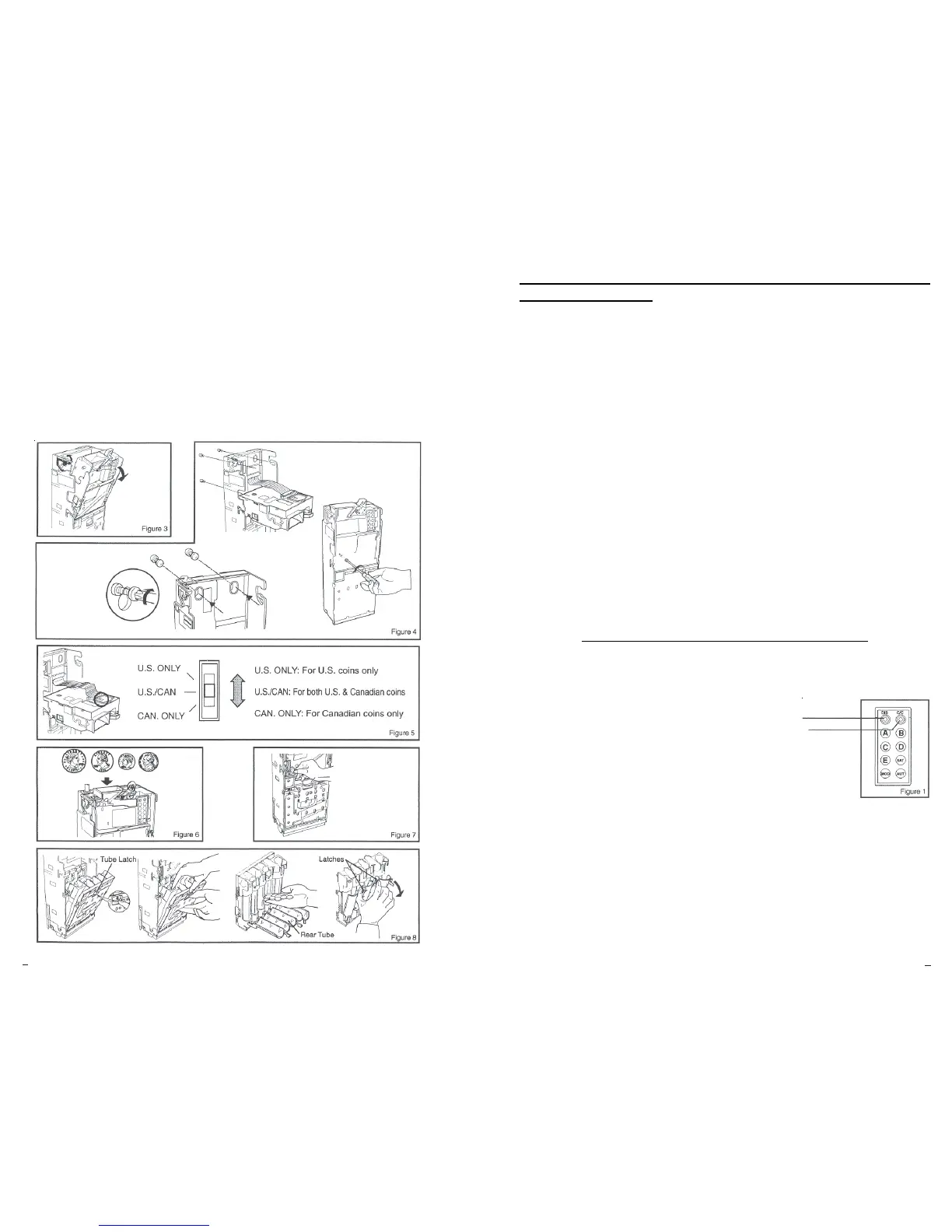
1. Two L.E.D.’s are provided indicate a coin changer or discriminator malfunction. (Please see
Figure I) If a failure is detected, the appropriate L.E.D. will blink. In the normal operating state
both L.E.D.’s are on!
L.E.D. “DIS” (Red) indicates a discriminator malfunction.
L.E.D. “C/C” (Yellow) indicates a coin changer malfunction.
2. Switches A-E are used to inventory coins from the appropriate tubes.
3. Switch “SAT” is used to inventory coins from the optional satellite tubes.
4. Switch “MOD” is used to Accept/Inhibit a certain coin. Please contact the
factory, if you would like to utilize this feature.
5. Switch “AUT” is used when operating the Automatic Change Adjusting Function (Float).
6. Switch “AUT” is also used to Delete Memory Backup:
1. Remove the cassette assembly from the coin changer.
2. Press and hold down the “AUT” button for about 5 seconds.
3. The two L.E.D.’s will flash rapidly for about I second indicating the memory has
been cleared.
4. Reinstall the cassette.


 To Next Page
 Loading...