*Reference connection guide (pgs. 9-11)
FEATURE 1
1 800 Rotation
Supports 180 Degree Rotation for Outputs 1 & 2.
Example of 2x2 orientation
Before - Thick mid-border layout
New Layout - Rotate Image
After - Thinnest physical border layout
Without this adjustment
feature; Screen logo border
(Thickest edge) can
obstruct image and viewing
quality. This feature allows
you to install your displays
in an orientation that has
the thinnest edges.
After displays are installed in
desired layout; use function
on remote. Press the
specific output buttons until
images are fully unified.
O
oxo
ult\lltl (11t111t2
O
(Remote)
•Reference guide (pgs. 9-11)
5
FEATURE 2
Edge Mask
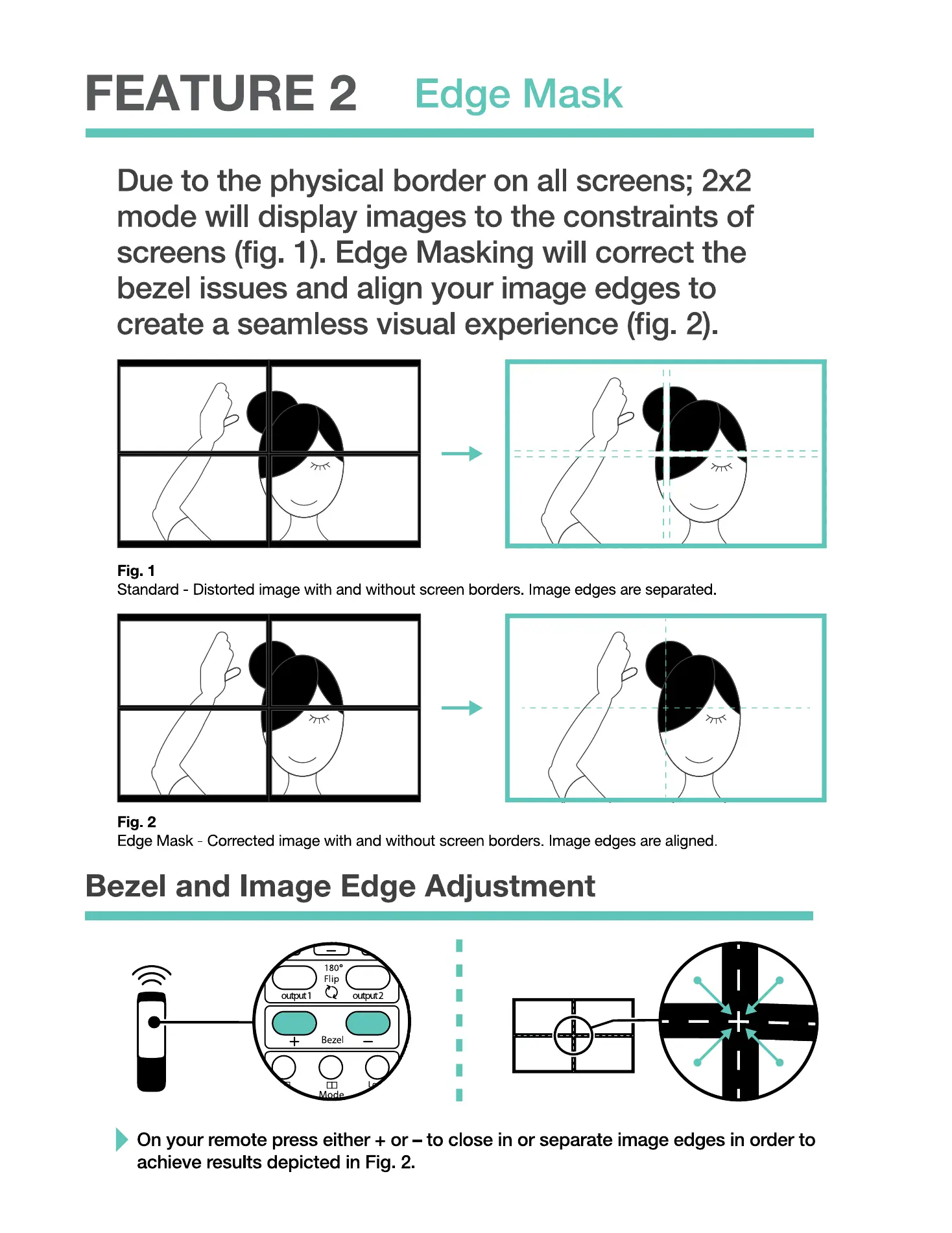
Due to the physical border on all screens; 2x2
mode will display images to the constraints of
screens (fig. 1). Edge Masking will correct the
bezel issues and align your image edges to
create a seamless visual experience (fig. 2).
Fig. 1
Standard Distorted image With and without screen borders mage edges are separated
Fig. 2
Edge Mask - Corrected image with and without screen borders mage edges are aligned
Bezel and Image Edge Adjustment
O
On your remote press either + or —to close in or separate image edges in order to
achieve results depicted in Fig. 2.
6


 To Next Page
 Loading...