Operating & Maintaining the Connex500/350 3-D Printer
7–36
DOC-13000 Rev. E
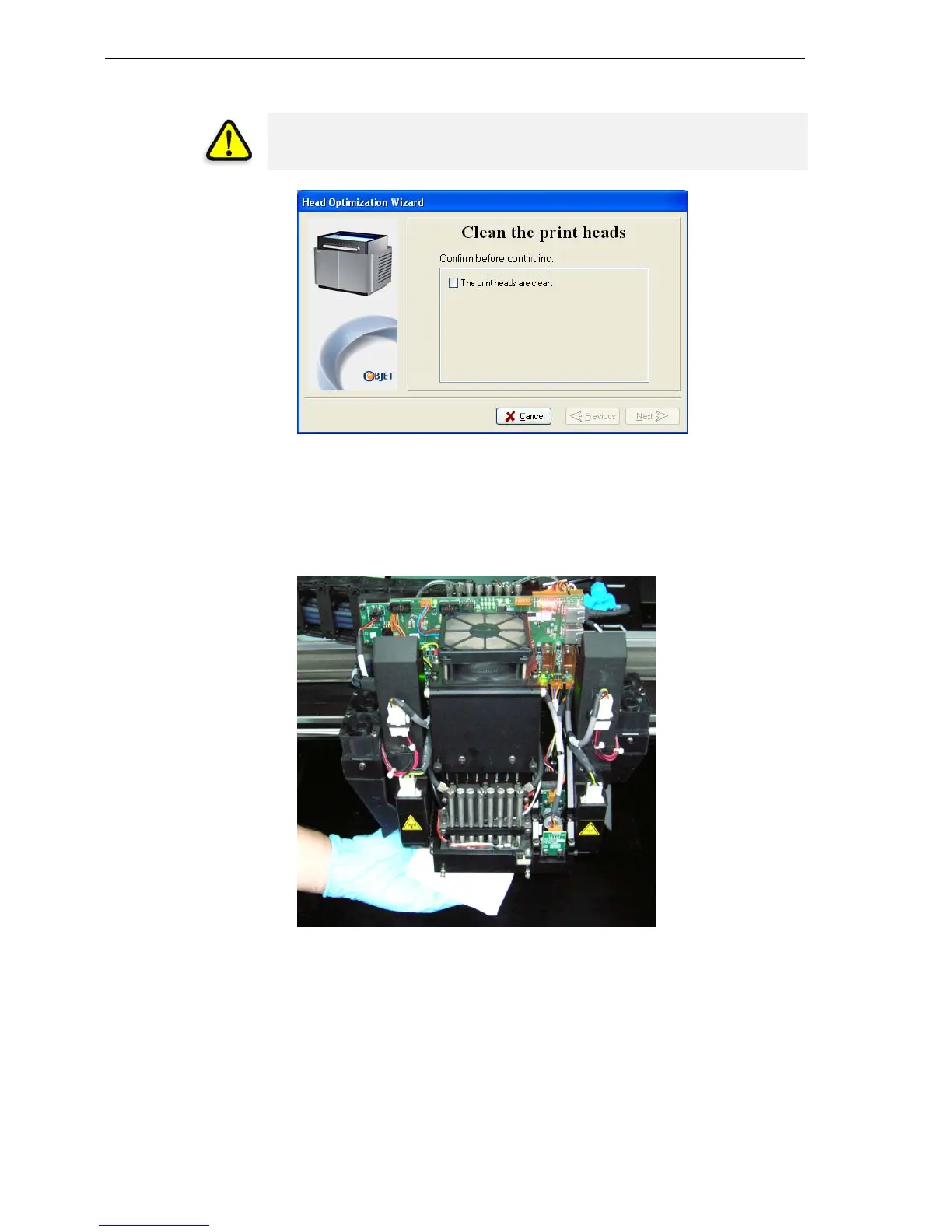
7. Whenthefollowingscreenappears,cleantheprintheads.
Figure 7-50: Clean print heads screen
8. Placethemirroronthebuildtray.
9. Putonthecleaninggloves.
10. Soakthecleaningclothwiththecleaningfluid(alcohol).
11. Cleantheorificeplates,withaback‐and‐forthmotion.
Figure 7-51: Cleaning the print heads
Usethemirrortomakesurethatyouhaveremovedalloftheresidue
material.
12. Whentheprintheadsareclean,selecttheconfirmationcheckboxin
thewizardscreenandclick
Next.
13. Removethecleaningmaterialsfromtheprinter,andclosethecover.
14. Selecttheconfirmationcheckboxinthewizardscreenandclick
Next.
WARNING: The print head orifice plates (bottom surface) may be hot.
Do not touch them with your bare hands, and proceed with caution.


 To Next Page