ROBOT-RI
ROBOT
o
1. If the robot doesn't response when turned on, you need to press the
Record button on the chest twice to activate it.
2. When the robot receives the "Goodbye" instruction, it says "See You"
and go directly to sleep mode. When the robot is in a quiet environment
for more than 2 minutes without receiving any instructions or any other
sound interference, it will go to sleep too. You need to press the Record
button twice to wake it up
ROBOT-RI DESCR/PT/ON OF FUNCTIONS
Free-Play Sensors
• Tap the touch sensors on each side of RI 's head and RI will react
accordingly. Mix up playtime with RI
using the Free-Play sensors on each side of his head and RI might
surprise you with several new sounds
and moods--as well as with tons of new secret-deluxe action
combinations!
Voice Control/Record Button
• Press the Voice Control/Record Button once and RI will stop his current
action and be ready for any new commands.
• Press again immediately after to begin playing through RI 's Voice
Recorder Memory Or, press and hold for around three (3) seconds to
begin recording your message after you hear the beep sound
• Record up to three (3) separate messages into RI 's memory Each
message has a capacity to record up to eight (8) seconds of audio.
• Press the Voice Control Button anytime RI is playing your pre-recorded
message to move onto the next one
• When left untouched for 30 seconds, RI enters into Ambient (Listening)
Mode After three (3) minutes in
Ambient Mode, RI plays the first voice message you recorded into his
memory. Two (2) minutes after the first
message, he'll play your second recorded message to you. And the last
message at seven (7) minutes
5 Voice Control Receiver
• To ensure best results when issuin voice commands: speak loudly,
clearly,andinaquietarea(asbac2round
noisemaycauseRIto etconfuseå)
• Make sure you are direc facing RI's Voice Control Receiver. And for
the same level standing on. Recommended
distance is withln 20 inches
6 Super Tread Tires
• RI travels on two (2) large bi-directional wheels that allow him to
maneuver tight and complex pathways. Along with texturized "Super
Tread Tires," and the smaller rear "Follower-Wheel," RI can contend
with the best of indoor terrain challenges.
(Please Note - RI can occasionally be clumsy and you will need to pick
him back up )
ATTENTION:
WARNING - Not suitable for children under 36
months (3 yrs) of age. Choking hazard. Please
retain packaging for future reference.
Warnung! Nicht für Kinder unter 36 Monaten geeig-
net. Verschluckungsgefahr. Sie sollten diese Packung
zum späteren Nachschlagen aufbewahren.
O Waarschuwing! Niet geschikt voor kinderen jonger
dan 36 maanden. Verstikkingsgevaar. Het wordt
aanbevolen deze verpakking te bewaren voor raad-
pleging in de toekomst.
Attention ! Ne convient pas aux enfants de moins de
36 mois. Risque d'étouffement. Nous vous recom-
mandons de garder cet emballage afin de vous y
Avvertenza! Non adatto ai bambini di etå inferiore
a 36 mesi. Pericolo di soffocamento. Si consiglia di
conservare questo imballaggio per una consultazione
successiva.
iAdvertencia! No adecuado para niäos de menos
de 36 meses. Peligro de asfixia. Le recomendamos
guardar este embalaje para consultas futuras.
Adverténcia! Näo adequado para crianqas com
menos de 36 meses. Perigo de asfixia. Recomen-
damos que guarde esta embalagem para referéncia
futura.
SMART ROBOT
VOICE COMMAND FUNCTION
II
'I
O
Love You"
"Are You Happy?"
"Can You Dance?"
"Music"
"Goodbye"
Theatrical Mode
Tap the Theatrical Mode touch sensor and RI will put on a performance
for its owner, such as:
• Talking to you in robot language, singing, and playing music
• Running around in circles making happy noises
• Marching forward making funny and kissing sounds at you
• Laughing and backing away from you in reverse
"Hey A.T."
"Come Here"
"Turn Left"
"Turn Right"
"Go Back"
ATTENTION:
CALLING RI'S ATTENTION MAKES HIM DO A
LITTLE SHIMMY SIDE-TO-SIDE AND SHOUT, "A.T.!
WACHA"
HEARING YOU CALL HIS NAME MAKES RI
SHOUT FOR JOY AS HE RUNS FORWARD,
"HERE! BWA.BWA.BWAHH! GO GO GO GO
GOOO!"
MAKE RI RESPOND TO YOUR CALL AS HE SAYS,
"HEY GUY! *SCANNING NOISE. SCANNING
NOISE*" THEN HE SPINS AND SCANS THE ROOM
FOR YOU!
MAKES RI SAY "YES! ABLWABALEAHH!" AS HE
MARCHES FORWARD
RI RESPONDS, "YES" AND SHUFFLES
BACKWARD AND FINISHES WITH A, "GROOVY-!"
RI RESPONDS, "YES" AND SHUFFLES
BACKWARD AND FINISHES WITH A, "GROOVY.!"
DIRECTS RI TO SCAN HIS RIGHT SIDE FOR
TARGETS, "YES" (*SCANNING NOISE*)
2 Robotic Eye Emotion
• Eyes change colors depending on RI 's moods or actions
• Eyes light up and cycle through various colors on startup
• Eyes shut off when going into sleep mode (or when power is off)
Power Switch (Located at Bottom of RI Robot)
RI WANTS TO SHOW YOU HIS LOVE TOO AS HE
RUNS FORWARD TO KISS YOU AND SAYS,
"AHBLWEL ABA- HERE I GO! " "M.WAAH."
RI LOVES YOU BACK. HE WILL EVEN SAY, "l
LOVE YOU TOO!" AND BLOW YOU A KISS.
RI MAKES JOYOUS ELECTRONIC SOUNDS AND
SPINS BACK AND FORTH TO SHOW YOU HOW
HAPPY YOU MAKE HIM FEEL.
"TOTALLY HAPPY, TOTALLY! DEE-DOO- YOU
ARE MY SUNSHINE!" AND THEN HE BUST OUT
SOME SPECIAL JAMS JUST FOR YOU
RI IS JUMPING FOR JOY, HE CAN BARELY
SPEAK! "DADA DEDOO! BALA BOO BOO!
HAHA."
RI IS SO HAPPY HE TRIES TO CONTAIN HIS
HAPPINESS BY CLOSING HIS EYES, BUT HE
LETS OUT A "MMMM! MMM!"
OF COURSE, RI CAN DANCE! "NO PROBLEM!"
HE SAYS AND GETS TO SHOWING YOU HIS
FAVORITE DANCE MOVES.
ASKS RI TO PLAY HIS FAVORITE SONGS AND
HE'LL DANCE AROUND THE ROOM PLAYING
ANY OF OVER 10 SONGS.
SEND RI TO BED AND HE'LL SAY, "SEE
BLAH BLAH BLAH BLAH." AS HE
WALK BACKWARDS AND TURN HIS SYSTEM TO
STANDBY MODE. (PRESS THE MIC BUTTON TO
WAKE HIM UP!)
ooo
oooooooooooo
Please use a screwdriver to open battery compartment and to remove
enclosure.
This product uses 3 "AAA" batteries (not included)
This product detects voice. In some cases, background noise may mistakenly
be identified
2
When using Touch Button Commands, please make sure to not press two or
more commands at once. This
can interfere with the action and cause issues with the device.
If the robot makes a "Di-Di-Di" sound for a ong time, please touch (press) any
button to exit.
3
Please make sure battery is not low as this can affect performance There must
be sufficient battery power in
device for optimal experience (full battery recommended)
4. After initiating a command, please allow robot enough time to perform the
command before trying a new action.
If you wish to intercept or stop a command, please press "Voice Message
Button" (Button #4) to interrupt.
5
When battery power is low, the robot may perform some action or play music
automatically. Please make
sure to check the battery life and make any necessary battery changes on a
regular basis.
Maintenance: This product contains electronic components. Please keep away
from water and moisture. Must be o erated in a dry and flat surface environment.
Pleaseuseadryclothtocleanandorwipeawayanydirt.
This manual includes important safety information and operational instructions.
Please keep it for future reference.
(Note - Voice commands and correspondin actions are randomized
In some
cases, the robot will perform functions not
escribed or shown under voice
commands )
Designed by Contixo USA I Assembled in China
Website: www.contixo.com Email: support@contixo.com
Toll-Free: 1-833-CONTIXO (2668496)
02020 Contixo Inc. All rights reserved. Contixon , the Contixo logo, and all associated
characters, trademarks, and design elements are owned and licensed by Contixo Company.


 To Next Page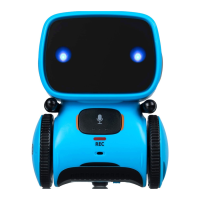


 General