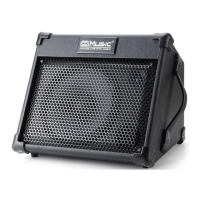
Need help?
Do you have a question about the Cool music BP40 and is the answer not in the manual?
Addresses why the amplifier may not turn on and checks the adapter.
Specifies U disk capacity and format (FAT32) for recording.
Guides on resolving Bluetooth connection problems and indicator lights.
Explains battery care, potential damage from long disuse, and replacement.
Steps to check volume, gain, and adapter/battery status for no sound.
Instructions to disconnect equipment and contact seller if noise persists.
Visual representation of the amplifier's control panel layout.
Steps for turning on Bluetooth and connecting devices.
Explains the meaning of power and charging indicator lights.
Details functions of Bass, Reverb, Treble, and Mode controls.
Instructions on how to start, end, and manage recordings.
Clarifies indicator lights for Bluetooth, U disk, and cycle modes.
Describes Mode, Volume, Power, DI Out, Phones, and input/output ports.
 General
| Power Output | 40W |
|---|---|
| Speaker Size | 10 inches |
| EQ | 3-band |
| Inputs | 1 x 1/4" |
| Outputs | 1 x 1/4" |

 To Next Page