F
unction
Internet E
xplorer
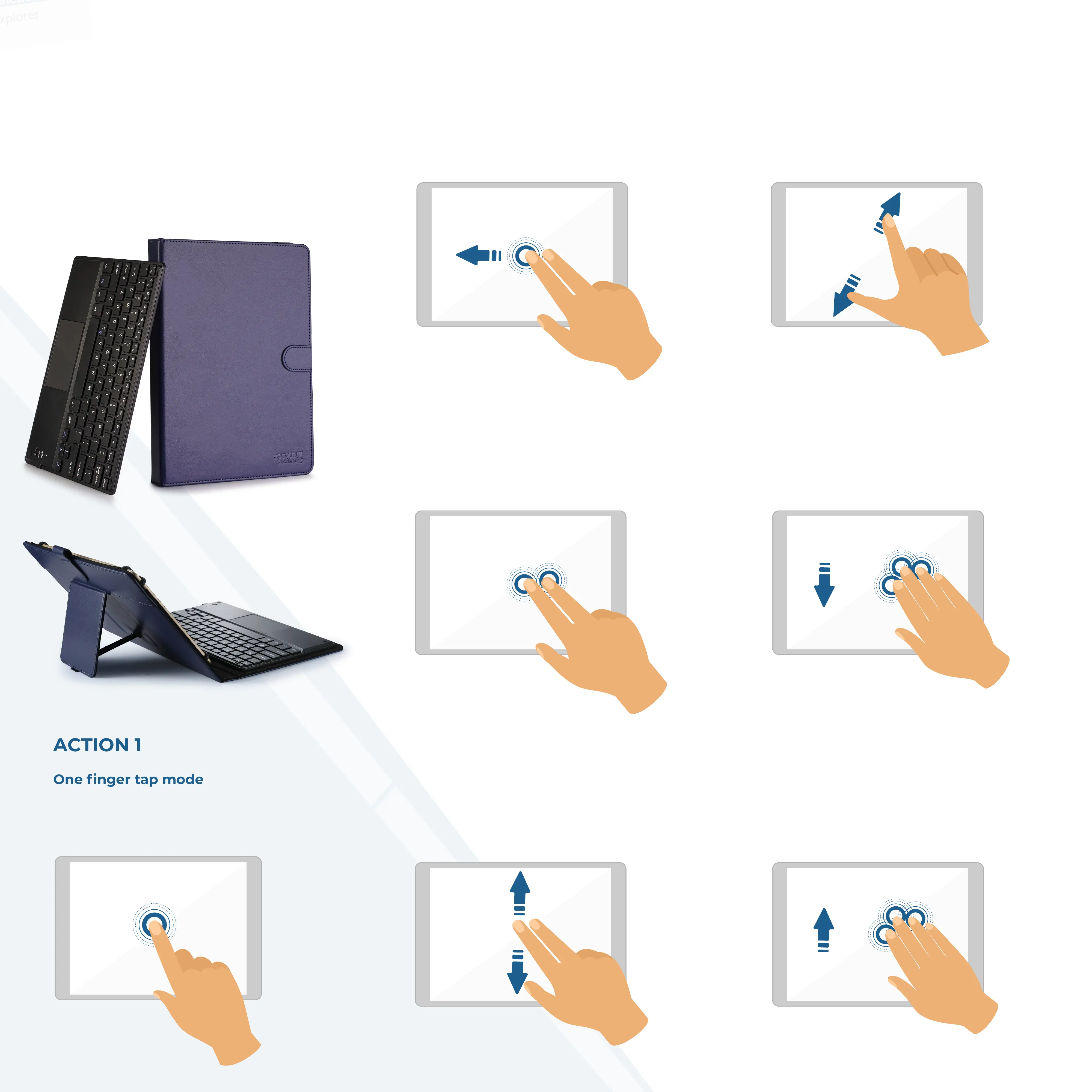
ACTION 7
Three fingers swipe up
Swipe three fingers up.
Function: Switch between main interface
and split screen.
FUNCTIONALITY MANUAL
ACTION 1
One finger tap mode
Tap one time while on main interface.
Function: Mouse cursos manipulation
ACTION 5
Two fingers zoom
Slide two fingers in the direction shown
in image for zooming in.
Slide in opposite direction for zooming out.
Suitable for PDF pages, images or internet
pages that can be zoomed.
ACTION 2
Tap two times and slide.
Jump out of the mode: See Action 3.
Function: Select or move the icon.
2
ACTION 4
Two fingers scroll
Slide fingers up or down.
Function: Scroll web page or file
up/down or scroll split screen.
ACTION 6
Three fingers swipe down
Swipe three fingers down.
Function: Switch between main
interface and previous program or page.
ACTION 3
Two fingers tap mode
Tap the pad one time.
Function: Cancel the selection.
COOPER
TOUCHPAD
EXECUTIVE
BLUETOOTH KEYBOARD FOLIO CASE


 To Previous Page