Copper Chef AirFryer | Model: AF9103 9
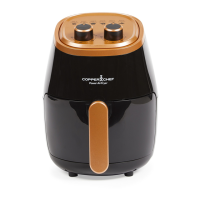
Using the Control Panel
1. Power Indicator Light
The red Power Indicator Light turns on once
the Unit is plugged in and stays on until you
unplug the Unit.
2. Operating Light
The green Operating Light turns on once you
turn the dial and turns off once the cooking
cycle is complete.
3. Time Control Knob
Use the Time Control Knob to set the
cooking time (0–60 min.). Setting the
cooking time will begin the cooking process.
4. Temperature Control Knob
Use the Temperature Control Knob to set the
cooking temperature (180° F–400° F).
Food Cook Times Temperature Time
French Fries 400° F (204° C) 15–20 mins.
Shrimp 330° F (166° C) 8–12 mins.
Cake 310° F (154° C) 20–30 mins.
Chicken 360° F (182° C) 20 –25 mins.
Steak 400° F (204° C) 8–12 mins.
Fish 350° F (177° C) 10–15 mins.
Cooking Chart
Once you are familiar
with the Unit, you may
want to experiment
with your own recipes.
Simply choose the time
and temperature that suits
your personal taste.


 To Next Page