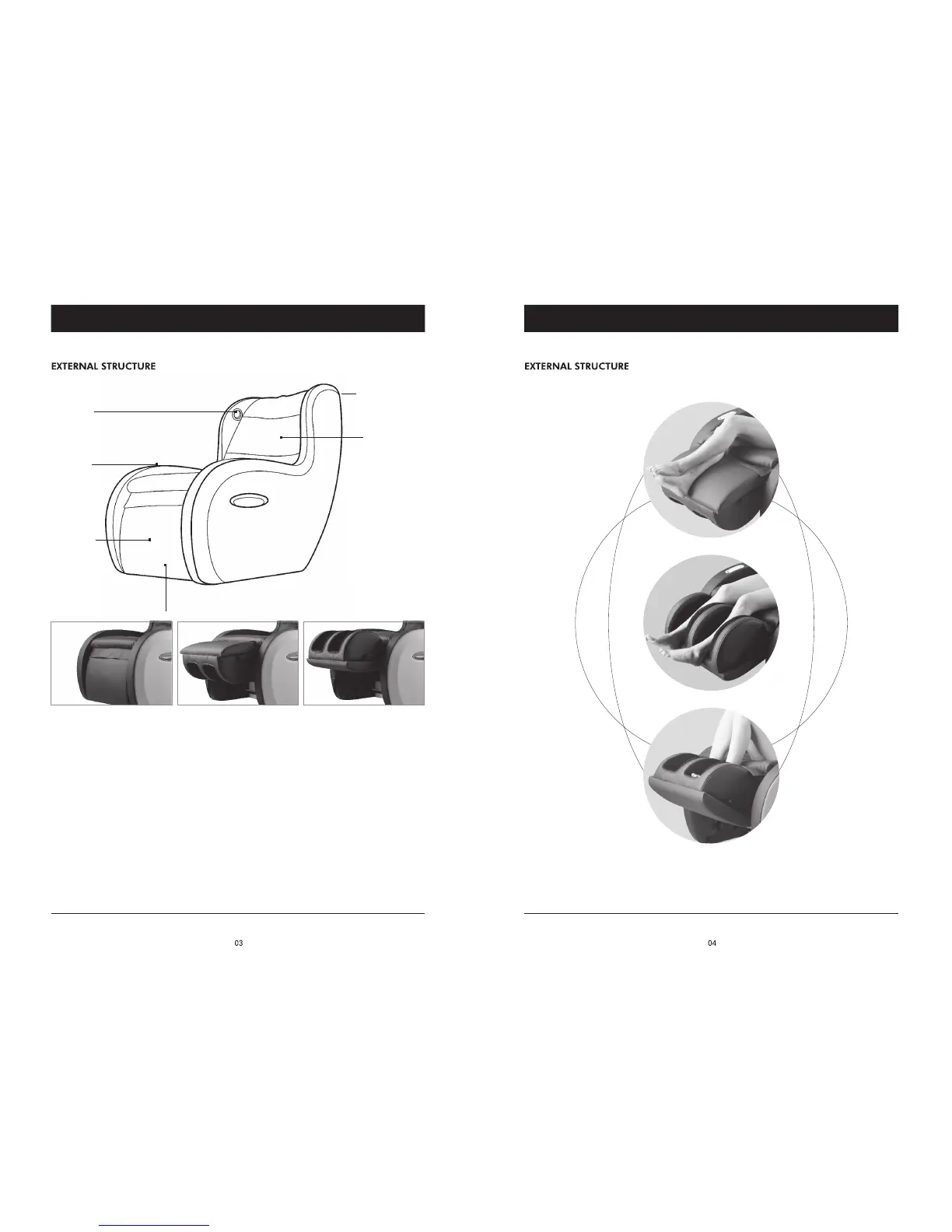
CHAIR COMPONENTS CHAIR COMPONENTS
Back Massage
Mechanism
Zippered Pouch
(on the back of
the back cushion)
Reversible Legrest Ottoman
Foot and Calf Massage
USB Port
Speaker
Foot/Calf
Massage
Ottoman
FOR A LESS INTENSE CALF MASSAGE:
Press the INTENSITY button (the light turns off) to decrease the intensity of the calf massage. If you
are still uncomfortable, you can place your feet into the leg/foot wells for a foot massage instead of a
calf massage, or you can press the AIRBAG button to stop the foot/calf massage.
FOR A LESS INTENSE BACK MASSAGE:
Make sure the back pillow is in place to cover the massage mechanism and soften the massage. You
can also unzip the back cushion at the top of the chair and peel back the cushion from the velcro
attachments. Locate the zippered pocket in the middle of cushion, then locate the zipper pull that is
on the lower left side of the pocket. Unzip and remove the softening pad.
MUSIC FUNCTION:
To connect your music to the massage chair speakers via Bluetooth, press the MUSIC button on
the remote control to activate the chair’s Bluetooth connectivity. Go to your device’s Bluetooth settings
and select “MASSAGE CHAIR.” At this point you will hear your music through the chair’s speakers.


 To Next Page