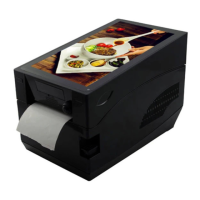
Smart Thermal Printer Series
Line Thermal Printer
User’s Manual
Introduction
Thanks for choosing our new Smart Thermal Printer, This manual guides
user how to operate the printer, please read this manual carefully before
using and keep this manual for reference when necessary.
Main Features:
Install the printer on the stable surface. Choose firm and level surface
where avoid vibration.
Keep enough space for printer operation and maintenance.
Keep printer away from water, sunshine, high lights and heat source.
Do not use and store the printer under high temperature, moist and seriously
polluted environment.
Avoid to put the printer in shaky areas.
Condensation of moisture on the printer surface is not allowed. If failed, do
not turn on the printer until dew disappears.
Connect AC power adapter to a proper power outlet. Avoid to use the same
outlet with other large electric machines which generate voltage fluctuation.
Please unplug the printer power cable from outlet if the printer will not be
used for a long period of time.
Do not let water or conducting material (eg. metal) into the printer. Please
turn off the printer immediately once happened.
Do not print when it is out of paper, which will seriously damage the printer
head and rubber roller.
Make sure printer power is turned off when connecting and disconnecting
with the interface.
When printing quality meets your need, we recommend you set low grade
print density.
Do not try to disassemble, repair or remodel the printer by yourself.
Do not update and upgrade the Android version of smart printer, please
contact us if need to update, otherwise may cause out of work.
Please be noted that the printer will print failure when user install APP
which is without our authentication.
Please download and install APP which our website listed. .
Technique Spec
9" LCD screen, Resolution: 1024*600
Quad-core, integration GPU, 1.6GHZ
Android 8
4 ways of USB port to be supported to connect various USB external
device at the same time
Built-in Wi-Fi and Bluetooth
Two kinds of printing mode, label printing and receipt printing
Width 20mm to 80mm thermal paper roll and sticker paper supported.
Built-in speaker
Safety notice
Unpacking
Printer
Power adapter
Power cable
User ’s manual
1pcs
1pcs
1pcs
1pcs
Smart Thermal Printer
After unpacking the unit, check that all the necessary accessories are
included in the package.
Smart Thermal Printer
Thermal Barcode Mode
Control
component
Display
Operation
System
CPU
RAM
ROM
Flash
TF card
Ethernet
9" TN screen , resolution: 1024*600
Five-Touch ,Capacitive Touch Panel
Android 8
RK3288, Quad-core, , 1.6GHZ
DDR3 , 1GB
1~2GB
Built-in 8GB
1~32GB
100Mbps(IEEE 802.3u)
4*USB2.0 (support host/slave mode, USB HUB)
Built-in WIFI(IEEE 802.11 b/g/n)
Built-in Bluetooth(Bluetooth 2.0)
Double track ,4Ω/3W
Paper type
Paper width
Paper diameter
Printing mode
Dot density
Print speed
Print width
Thermal paper roll / adhesive thermal paper
20mm~80mm
100mm max.
Direct thermal line
203DPI
127mm/s Max
72mm Max
Front paper out, tear off
USB
Wi-Fi
Bluetooth
Speaker
Temperature
sensor
Position sensor
Detection sensor
Thermal sensitive resistance
Barcode
Character
font
Enlargement
& Rotation
Image
Weight
Dimension
Power s upply
Storage
environment
Work
environment
Microswitch
Photoelectricity
CODE128, EAN128, ITF, CODE39, CODE93,
EAN13, EAN13+2, EAN13+5, EAN8, EAN8+2,
EAN8+5, CODABAR, UPC-A, UPCA+2,
UPCA+5, UPC-E, UPCE+2, UPC-E+5, QRCode
1~10 times enlargement in horizontal and vertical
directions; Rotation printing ( 0°, 90°, 180°, 270°)
Single color PCX, BMP image file can be
downloadinto Flash and Dram
245mm (L) * 150mm (W) * 168mm(H)
1.9kg
Print
DC24V/ 2A
5~45℃ , 20~80%RH
-10~50℃, ≤93% RH
Physical
properties
Environment
Power
Paper
Paper cutting
way
Font 0~Font 8
GB18030, Simplified/Traditional/Korea: 24*24dot
Supports: Sales@core-smart.cn


 To Next Page
 Need help?
 General