Need help?
Do you have a question about the Corsair Gaming M65 PRO and is the answer not in the manual?
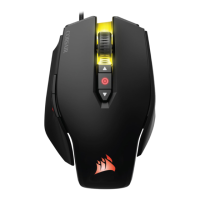
The primary click button for actions and selections.
The secondary click button, typically used for context menus.
Used for scrolling through content and often functions as a middle click.
Increases the mouse's DPI (dots per inch) for faster cursor movement.
Decreases the mouse's DPI for slower, more precise cursor movement.
Typically used for navigating forward in web browsers or applications.
Typically used for navigating backward in web browsers or applications.
A dedicated button to temporarily lower DPI for precise aiming.
Shows the current DPI setting via RGB lighting.
Smooth surfaces on the mouse bottom for effortless gliding.
The optical sensor that tracks mouse movement.
Allows customization of the mouse's weight for preferred feel.
Connects the mouse to the computer for power and data.
 General
| Sensor | PMW3360 |
|---|---|
| Buttons | 8 |
| Weight | 115g |
| On-Board Memory | Yes |
| Cable Length | 1.8m |
| Weight Tuning | Yes |
| DPI | 100 - 12000 DPI |
| Polling Rate | 1000 Hz |
| Lighting | RGB |
| Connection Type | Wired |
| Compatibility | Windows 10, Windows 8, or Windows 7 |

 To Next Page