Ver. 20140207
English
GREAT BRITAIN • customer service Tel: 0845 300 9799, E-mail: customerservice@clasohlson.co.uk, internet: www.clasohlson.com/uk
1
2
3
4
5
6
7
8
9
10 11 12 13 14 15 16
17
18
19
20
Digital Timer with
Weekly Programme
Art.no 18-2025 Modell EMT717A-UK
18-2417 EMT717A-UK
36-1844 EMT717A
36-4425 EMT717A
Please read theentire instruction manual before use and save it for future
reference. Wereserve theright for any errors in text or images and for
making any necessary technical changes to this document. Ifyou should
have any questions concerning technical problems please contact our
Customer Services.
Description
Setting the Time and Day
24-hour clock display: 0:00:00–23:59:59.
12-hour clock display: 12:00:00–11:59:59.
NOTE: Thedisplay reverts to normal clock display 15 seconds after settings
have beenmade.
Setting the current time
1. Press [ MENU ] repeatedly until “SET” flashes and “CLOCK” shows on
thedisplay. Press[ OK ].
2. “24” will begin to flash on thedisplay, press [ OK ] to choose the24-hour
clock (or choose the12-hour clock by pressing [ MENU ] and then [ OK ]).
3. “MO” (Monday) will now start to flash, press [ MENU ] to advance to
thecorrect day (Monday–Sunday), confirm by pressing [ OK ].
4. The hour digits will now start to flash, press [ MENU ] to advance to
thecorrect hour, confirm by pressing [ OK ].
5. The minute digits will now start to flash, press [ MENU ] to advance to
thecorrect minute, confirm by pressing [ OK ].
6. The time and day are nowset.
Programming the Timer
Be sure to follow themanual instructions exactly. Donot press [ OK ] more
times than is stated in theinstructions below.
Note: Ifyou wait 15 seconds without pressing any buttons, thetimer will revert
to normal clock display and theprogramming procedure must be repeated.
1st on-switching time
1. Press [ MENU ] to enter theprogramming mode. “SET” flashes,
“PROGRAM” shows on thedisplay. Press[ OK ] to confirm.
2. “SET” and “PROGRAM” will show on thedisplay, “1” and will flash
(1st on-switching programme). Press[ OK ] to confirm. Note:Ifthere
is already atime set from previously, you will need to press [ OK ]
oncemore.
3. Choose theday(s) for on-switching by pressing [ MENU ] repeatedly (see
theSelecting theon/off switching day section). Press[ OK ] to confirm.
4. Press [ MENU ] repeatedly to set thehour for the1st on-switching time.
Press[ OK ] to confirm.
5. Press [ MENU ] repeatedly to set theminutes for the1st on-switching
time. Press[ OK ] to confirm. “1” and willflash.
The time should now show in thedisplay. Itshould contain no dashes (- - : - -).
If thedisplayed time contains adash, go through theprogramming procedure
again and follow theinstructions step bystep.
Proceed straight away and set thetime for theoff-switching as instructed
in step 6 below. Ifyou wait longer than 15 seconds, thetimer will revert to
normal clock display and you will have to begin again from step 1above.
1st off-switching time
6. Press [ MENU ]. “SET” flashes, “PROGRAM” shows on thedisplay.
Press[ OK ] to confirm.
7. “SET” and “PROGRAM” will show on thedisplay, “1” and will flash
(1st off-switching programme). Press[ OK ] to confirm. Note:Ifthere
is already atime set from previously, you will need to press [ OK ]
oncemore.
8. Choose theday(s) for off-switching by pressing [ MENU ] repeatedly (see
theSelecting theon/off switching day section). Press[ OK ] to confirm.
9. Press [ MENU ] repeatedly to set thehour for the1st off-switching time.
Press[ OK ] to confirm.
10. Press [ MENU ] repeatedly to set theminutes for the1st off-switching
time. Press[ OK ] to confirm. “1” and will flash.
Thetime should now show in thedisplay. Itshould contain no dashes.
Ifthedisplayed time contains adash, go through theprogramming
procedure again and follow theinstructions step bystep.
Proceed and set thetime for thenext on-switching by pressing [ MENU ]
as instructed in step 11, or wait for 15 seconds to save your settings if no
further on/off switchings are to be programmed. Thetimer returns to normal
clock display.
2nd on-switching/2nd off-switching, and so forth
11. Press [ MENU ], “2” and willflash.
12. Continue programming further switchings as instructed in steps 2–10
above, thedesignated number of theswitching operation will increase
each time, 2 for the2nd on/off switching, 3 for the3rd, etc.
13. Programme as many on/off switching times as you need (1 to 10…).
1
→1 , 2
→2 , ... 9
→9 , 10
→10 , 1
→1 etc.
15 seconds after thelast button-press, thetimer reverts to normal clock
display and thesettings aresaved.
Note: Whenthetimer has saved your settings and reverted to normal clock
display mode, it needs to be set to program mode
by pressing [ OK ] in
order for theprogrammed settings to be activated.
The and symbol will be displayed if thetimer is switched off or on all
thetime, indicating that theprogram is not activated.
Selecting the on/off switching day
When setting theoperating day(s) for theon/off switchings, press [ MENU ] to
move through thealternatives in thefollowing order:
Mo – Tu – We – Th – Advance from Mo (Monday) to Su (Sunday)
Fr – Sa – Su by pressing [ MENU ] repeatedly.
Selectaday: Press[ OK ] to confirm.
Mo Tu We Th Fr Sa Su The programme setting incorporates every
day of theweek. Press[ OK ] to confirm.
Mo Tu We Th Fr The programme is valid from Monday to Friday.
Press[ OK ] to confirm.
Sa Su The programme is valid from Saturday to Sunday.
Press[ OK ] to confirm.
Mo Tu We Th Fr Sa The programme is valid from Monday to Saturday.
Press[ OK ] to confirm.
Su The programme only works on Sunday.
Press[ OK ] to confirm.
Countdown Function
When thecountdown programme is activated it will control thetimer
regardless of any other programmed settings.
1. Press [ MENU ] twice until “SET” flashes and “CD” shows on thedisplay.
2. Press [ OK ] twice, select anOn or Off-switching time using
the[ MENU ]button.
-
Switches OFF after thecountdown time has elapsed.
-
Switches ON after thecountdown time has elapsed.
3. Press [ OK ] once more in order to begin programming. Thehour display
begins toflash.
4. Set thehour using [ MENU ]; press [ OK ] to save thesetting.
5. The minutes display will flash, set theminutes using [ MENU ], and press
[ OK ] to save thesetting. Dothesame for theseconds. Thecountdown
function can be set from 1 second up to 99 hours and 59 minutes.
6. “RUN” will flash and “CD” will appear on thedisplay. Push[ OK ] to start
thecountdown programme.
7. Stopping thecountdown programme: Press[ MENU ] until “DEL”
starts to flash and “CD” appears on thedisplay. Press[ OK ] to turn
thecountdown programme off.
Random Function
When therandom function is activated it will control thetimer regardless of
any other programmed settings.
1. Press [ MENU ] three times until “RUN” flashes and “RND” shows on
thedisplay. Press[ OK ] to start therandom function.
2. The timer returns to normal clock display and “RND” flashes on
thedisplay to show that therandom function is activated.
Turning the random function off
1. Press [ MENU ] three times until “DEL” flashes and “RND” shows on
thedisplay. Press[ OK ] to stop therandom function.
2. The timer will now revert to normal clock display.
Random function operation time
On-time: 10–26 minutes.
Off-time: 26–42 minutes.
Reset
Press [ RESET ] once in order to clear all programmed settings.
Selecting programmed or manual control
Select one of thefunctions by pressing [ OK ]:
Timer always on. Thepower at thetimer’s socket is always connected.
On/Off in accordance with theprogramme. Switched on and off in
accordance with theset programme.
Timer completely off. Thepower at thetimer’s socket is always
disconnected.
The timer automatically returns to displaying thetime if no button is pressed
within 15 seconds.
Troubleshooting
Problem Solution
The programmed set-
ting does not work.
The timer might be set to theincorrect
function. Checkthat
(18) is shown on
thedisplay. Ifitis not: Press[ OK ] to advance
tothecorrectfunction.
The light plugged into
thetimer’s socket
does not come on.
Check if thelight has apower switch and if it
does, make sure that it is set toON.
The light plugged into
thetimer’s socket
does not come on or
go off in accordance
with theprogrammed
times.
Check that theon and off times set in
theprogrammed settings are complete and do
not contain any blank spaces/dashes. Ifone
of theset times is incomplete, that function will
not work. Referto theProgramming theTimer
section above.
Specifications
Rated voltage 230 V AC, 50–60Hz
Max load 3.680 kW/13 A (UK)/16 A (SE/NO/FI)
resistive load, 2 A inductive load
Batteries Built-in 1.5 V battery
(fully charged after 2 hours)
Operating temperature 0–55ºC
Shortest operating time 1 minute
Shortest countdown setting 1 second
Random function operation time On-time: 10–26 minutes
Off-time: 26–42 minutes
1. [ RESET ] Reset button
2. LCD display
3. [ MENU ] Button for moving through themenu in order to set thedays,
hours, minutes and seconds.
4. [ OK ] Button for confirming selections or choosing options.
5. AM (for the12-hour clock display).
6. PM (for the12-hour clock display).
7. SET, fixes setting
8. RUN, starts thecountdown and random functions.
9. DEL, stops thecountdown and random functions.
10. Hours
11. PROGRAM, appears during on and off timesetup.
12. Minutes
13. CD, countdown function
14. RND, random function
15. Seconds
16. CLOCK, normal time display
17.
Timer completely off. Thepower at thetimer’s socket is
alwaysdisconnected.
18.
On/Off in accordance with theprogramme. Switched on and off
inaccordance with theset programme.
19.
Timer always on. Thepower at thetimer’s socket is
alwaysconnected.
20. Operational days


 To Next Page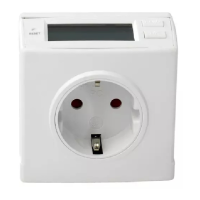


 General