EasyManua.ls Logo

Creative BT-W5 - Page 19

Creative BT-W5
25 pages
Print Icon
To Next Page IconTo Next Page
To Previous Page IconTo Previous Page
Loading...
 




󴇳󷐜󷋩󱷼󵵙󸺧󳩼
󶋓󹝡󳪤
󲷭󸀅󸣶󵋠󵉈󲧅󲷅󱛌
 󵚱 󳠠 󳧓


󱾞󳿑
󱘈󳍿󸺧󳩼󱿔󷃫
  
󱿔󷃫󸺧󳩼󱿔󷃫
󸤑󱷼󳰚󶪔
󷋩󱷼󵵙󸑂󸗰
󸎅󲷢󴇳󸺀󱹫
󱳥󵫞󱿔󷃫
󳰚󶪔󲛆󱿷
 󸺧 󳩼
󲤊󸺧󳩼
󾗜 
󺂿󸋳󱪙󳍿󴘤󲛆󱿷󸺀
󾗜
󸸞󳐢󴇳󲻎󹢔󳩩󱿻󴈮󱬻󱭴
󹘄 󸡄󸺀

 󸺧 󳩼
 
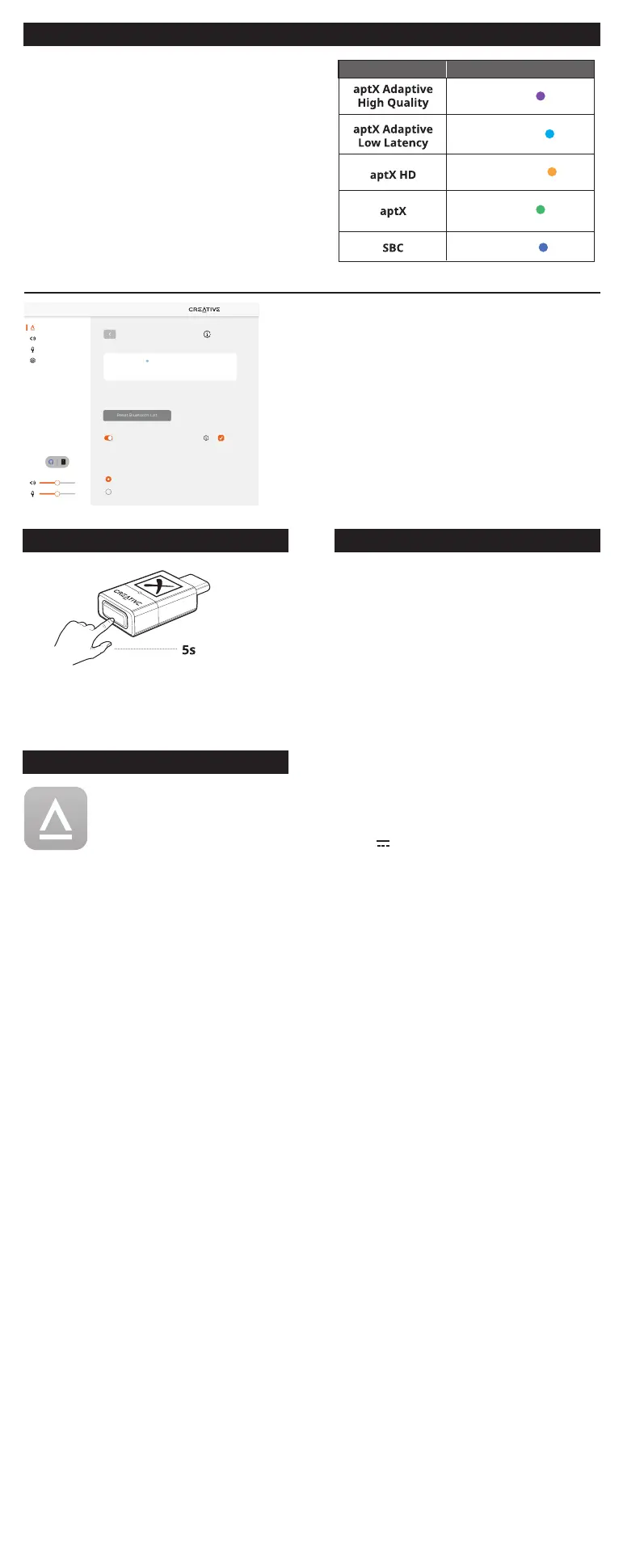
My Headphone
My Speaker
Connected
aptX Adaptive LL
Connect
Bluetooth Pairing
Bluetooth Pairing
BT-W5 remembers up to 4 paired Bluetooth devices. To add a new Bluetooth
device, please trigger Bluetooth pairing.
50%
50%
Settings
Recording
Playback
Devices
Bluetooth Devices
Reset Bluetooth List
Paired Devices
Hands-Free Profile (HFP) Mode
HFP mode allows you to use the built-in microphone on your Bluetooth device
for voice communication with monaural audio channel. Changes to this setting
will cause the device to reboot.
Auto
Optimize aptX
TM
Adaptive for
Low Latency
High Quality
󸅃󲄘󸎅
󲷢 󸅃 󲄘 
󳒞󱹫󸀅
󸍚󳣫󳧼󱷼󸺧󳩼󳰚󶪔󶃘󶓉
󳧼󴂆󵫹󹮪󴘤󵫞

󴚴󳦎
󱯥󵫑󹏐󹮪󸎅󲷢


󵵍󹏐
󵢮󲔩󱳥󵫞󱿔󷃫

󳩏󸀏󱝍󴛍
󳰚󶪔
󱿱󱡋󵫞󲺰󳖶
󳖔 󸉔 
󱷼󱠓󲂐󴰻󳽉󾗜
󾗜
󾗜
󽘘
󽘙
󽘘
 󽘙

 󾗜




󸋳󱪙󳍿󾗜
󴇳󲡱
󸶲󱣭󸦥󹦦󾗜
󴇳󲡱󶥪󽘘󹤜󲸓󵙀󶐀󹞇󽘙
󱷼󱠓󴸼󳍿󾗜
󴇳󲡱󹧖󴰻󱲡󱶣󾗜
󱮧󱶣󾗜

󶦹󵋠󵉈
󵋠󵉈
󶬐󵋠󵉈
󹪍󵋠󵉈
󵋠 󵉈

Related product manuals