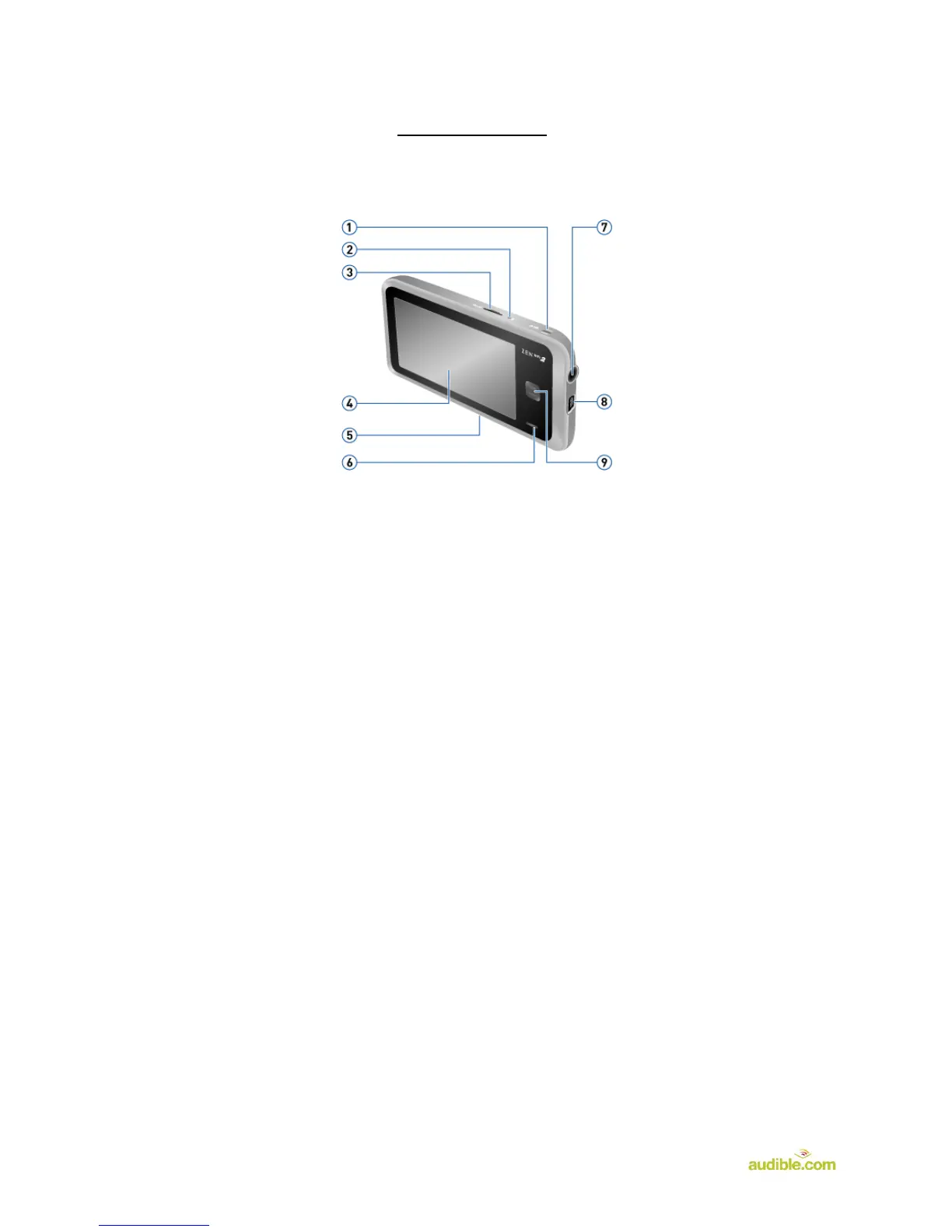
Device Layout:
1. On/Off/Lock - Press and hold to turn the player on or off. See Turning Your Player On and
Off. Press to lock the player's buttons and touch screen.
2. Microphone - When recording, place this built-in microphone as close as possible to the
sound source.
3. microSD™ Card Slot - For additional storage capacity, insert a microSD memory card into
this slot.
4. Touch Screen
5. Reset Button - To reset your player if it stops responding, press the Reset button using
straightened paperclip or ballpoint pen.
6. Built-in Speaker
7. Earphone Jack and A/V Out - Connect your player's earphones to this jack.
8. USB Port - To charge your player or transfer files, connect one end of the supplied USB
cable to this port, and the other end to your computer's USB port. To charge your player from
a power outlet, use a ZEN® USB power adapter.
9. Menu Button - Press to return to the main menu.Press and hold to display the volume control.












 To Next Page