6
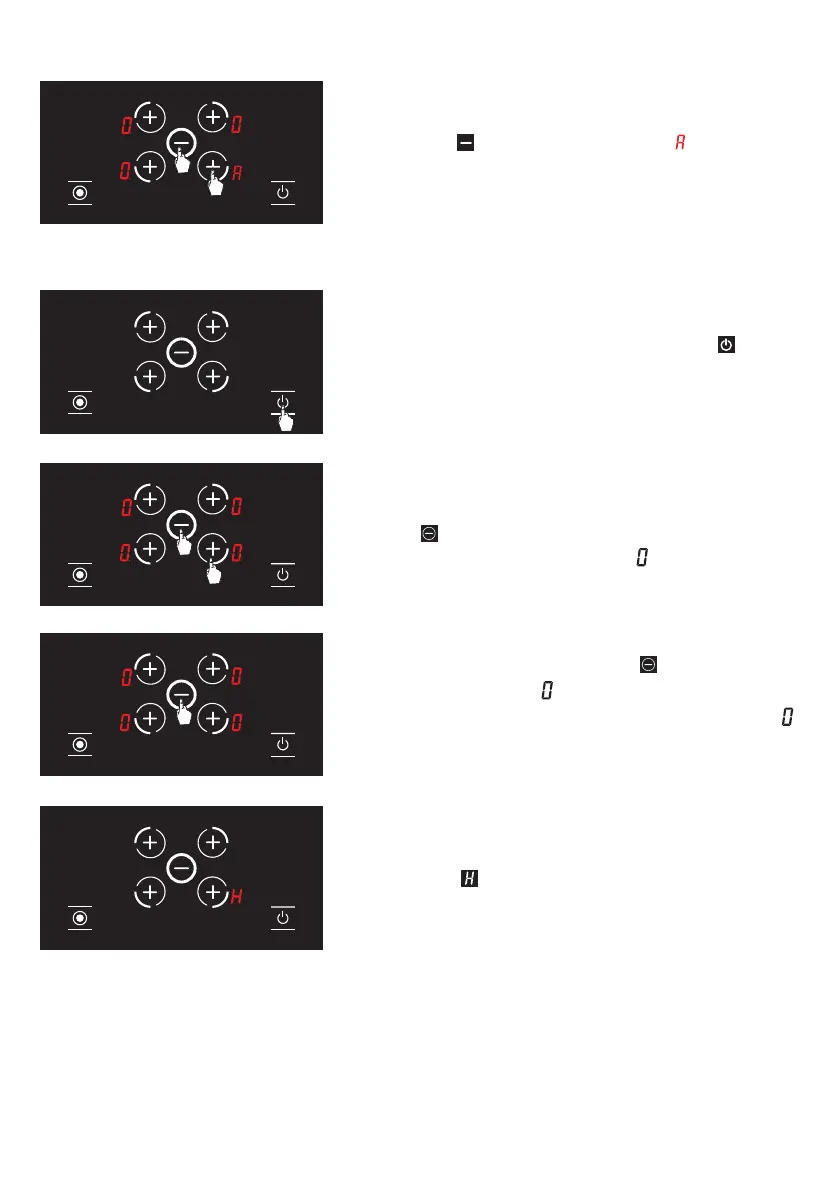
4. After setting the auto heating, you may set the
cooking level desired using the relevant hob selection
key and the
key. (see Fig. 14) The icon and the
cooking level selected are displayed alternatively on
the screen.
Turning the hob cooking zones off
1. You may turn the stove off by pressing the button.
(See Fig. 15)
2. When you press the relevant hob selection key
and the
key simultaneously, the temperature level
of the relevant hob is lowered to . (See Fig. 16)
3. Alternatively, you may use the
key to bring the
temperature level to on all hobs. (see Fig. 17)
When the temperature level of all hobs becomes ,
stove shall be turned off by itself after 20 seconds.
4. If any hob is still hot after 20 seconds, until the
temperature of the relevant hob becomes lower than
+60 °C, the symbol is illuminated on the screen.
(see Fig. 18) No icon is displayed after the stove is
turned off if the relevant hob is not hot.
Figure 15
Figure 16
Figure 17
Figure 18
Figure 14
25


 To Next Page