8
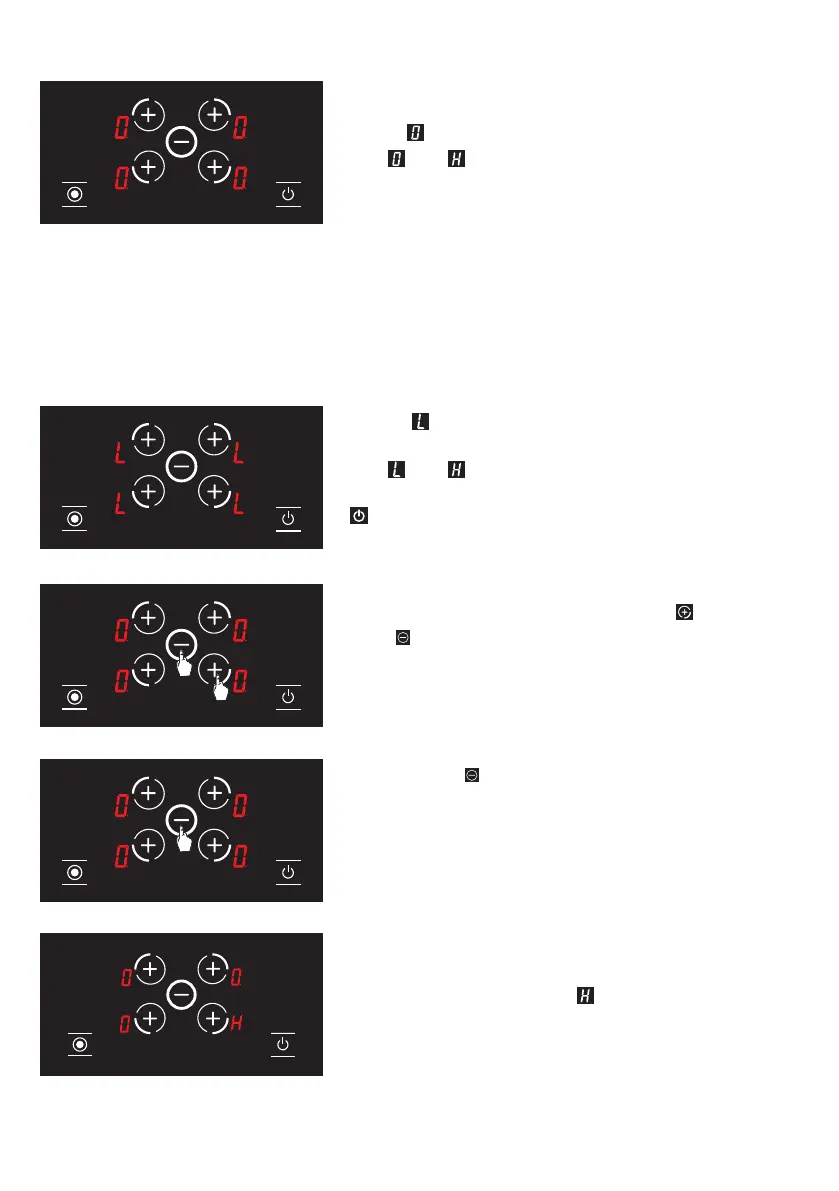
3. The icon is displayed on all displays. (see Fig. 24)
The and icons are displayed alternatively if any
hob is hot.
WARNING: Child lock is deactivated until the stove is turned off only with the steps
performed in this section. In other words, child lock shall be activated again if the unit
is turned off and on again. Thus, the child lock shall be activated whenever the stove is
turned off and on.
To activate the child lock completely;
1. The
icon is displayed on all displays when the
stove is on and the child lock is active. (see Fig. 25)
The and icons are displayed alternatively if any
hob is hot. You may turn the stove on or off with the
key only.
2. Press front right hob selection key (
) and minus
key ( ) simultaneously (see Fig. 26), you shall hear
a short warning signal at this time. Then, remove your
ngers from the stove control panel.
3. Press the
key again. (see Fig. 27) This shall
be performed right after the 2rd step. Child lock is
deactivated permanently. In other words, child lock
shall continue to be deactivated even if the unit is
turned off and on again.
4.
Unit switches to stand-by mode after these
procedures. However, the icon shall be displayed
in case of a hot hob even if the unit switches to stand-by
mode. (See Fig. 28)
Figure 24
Figure 26
Figure 27
Figure 28
Figure 25
27


 To Next Page