PRODUCT OVERVIEW & SET UP
Before use, T4 should always be checked for any signs of physical damage. If this is
the rst time of use, the battery will require charging to attain the full operating time. The
typical battery run time for T4 is 18 hours.
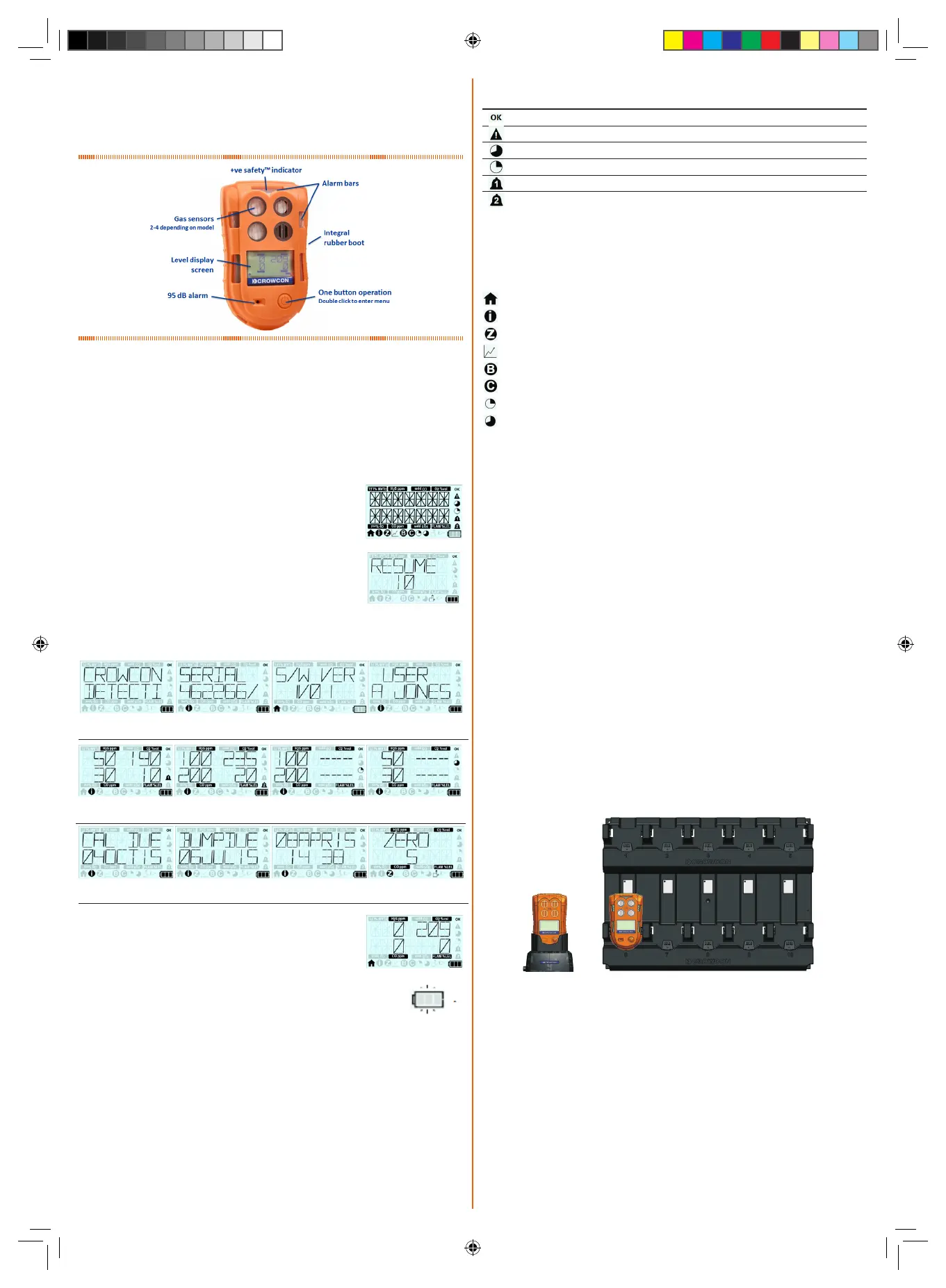
T4 Orientation
Before Operating T4
Before turning T4 on ensure you are in ‘clean air’ (i.e. outside, in normal air away from
any plant process or suspected gas location). This will allow T4 to be zeroed using clean
air as the base point. If T4 is zeroed in contaminated air a false gas reading can result, or
the zero could fail.
Turn On Your T4
Turn on T4 by holding down the operator button for 3 audible short blips followed by one
longer tone. T4 will warm up and go through a series of automatic processes as follows:
i
T4 will not respond to gas until the startup sequence is complete.
Firstly a test screen will be displayed showing all the possible
LCD segments and icons turned on.
If T4 is switched on within 8 hours of being switched
off, the following screen will be displayed allowing T4 to retain
TWA, STEL and peak readings (refer to the T4 User and
Operator Manual for further details on this feature).
Simply click the operator button to retain or do not click the
operator button and allow countdown to expire.
The following screens will then be shown (Note that not all screens may be shown and
will be dependent upon conguration settings).
After a successful test cycle the screen will revert to the ‘home
screen’.
Alarms
Low battery
T4 will indicate a low battery alarm when the battery has a maximum of
30 minutes remaining life.
Instantaneous alarm
T4 will go into alarm immediately if the level of any gas exceeds acceptable limits, T4 will
indicate an alarm state ‘1’ or alarm state ‘2’ according to which level has been exceeded
(see alarm icon table).
Short term exposure (STEL)
For each toxic gas being monitored T4 stores information about the gas levels detected
to determine the average exposure over a 15 minute running period. If the average levels
exceed predetermined levels, T4 will go into alarm (see alarm icon table).
Time weighted average alarm (TWA)
For each toxic gas being monitored T4 stores information about the gas levels detected
to determine the average exposure over an 8 hr running period. If the average levels
exceed predetermined levels, T4 will go into alarm (see alarm icon table).
Crowcon splash
screen
T4 serial number
T4 rmware
version
Congured user
name
Congured lower
alarm levels
Congured upper
alarm levels
STEL congured
alarm levels
TWA congured
alarm levels
Calibration due
date
Bump test due
date
T4 internal date
& time
Autozero
conrmation
Calibration is due: Calibration has failed or exceeded the due date required to
meet the site procedure. The calibration due date can be
reviewed via the information menu.
T4 is in gas alarm: This could be a high or low gas alarm, or a STEL or TWA
alarm. The T4 display will indicate which alarm type has been
activated by the relevant icon being displayed on the screen.
T4 fault: T4 must be reviewed by trained personnel for repair as T4
has detected an internal fault. An appropriate fault warning
will also have been shown on the display.
Charging & Battery Indications
Charging must take place in non-hazardous (safe) areas. To charge T4, simply plug it
into either the desktop charging unit or the ten-way charging unit.
Only Crowcon supplied AC Adaptors must be used.
When T4 is powered off and placed in a charger, the +ve Safety™ LED will indicate
charging status. Whilst charging the +ve Safety™ LED will ash red, then when fully
charged the LED will ash green. The T4 battery icon contains 3 segments and indicates
charging by sequentially lling the segments and repeating this process.
If T4 is switched on whilst charging, after approximately 30 minutes of being on charge
T4 will automatically power down and continue charging,
Whilst T4 is not charging the battery icon segments, indicate the battery’s state of
charge.
When fully charged and all three segments are shown, the battery typically has a
maximum of 18 hours run time. When T4 changes from three to two segments the
battery typically has a maximum of 12 hours run time. When T4 changes from two
segments to one, the battery typically has a maximum of 8 hours run time. When the
battery icon is ashing with no segments the battery typically has a maximum of 30
minutes run time before the battery will be depleted.
Display Alarm Icons
Icon Description Action
Status OK No action required
Fault status Refer to manual
Long term exposure alarm (TWA) Follow site procedure
Short term exposure alarm (STEL) Follow site procedure
Alarm 1 Follow site procedure
Alarm 2 Follow site procedure
Accessing Menu Functions
With the home screen displayed, double click the operator button to access the menu
functions. Single click the operator button repeatedly to scroll right until the required
menu icon is displayed and then double click the operator button to select the function.
Menu Function & Icons
When this icon is selected, the Home screen will be displayed.
The information function displays T4 status/conguration.
The manual zero function allows T4 to be zeroed at any time.
The peak mode function allows the peak gas readings to be displayed.
The bump test function allows T4 to be bump tested at anytime.
The calibration function allows T4 to be calibrated at anytime.
The STEL function allows the current STEL value to be displayed.
The TWA (or long term exposure limit) function allows the current TWA value to be
displayed.
+ve Safety™
+ve Safety™ is a quick and easy indication of the operating status of T4, this status is
indicated by a front mounted LED.
When the +ve Safety™ LED is illuminated green, this indicates that the unit is functioning
as required and no further action is necessary. This enables users and supervisors to
easily see that the employee is safe and following work procedures.
When the +ve Safety™ LED is illuminated red this indicates that one of the following
situations has occurred and will require user action:
Battery is critically low: The battery has a maximum of 30 minutes runtime before
it will be completely depleted. This will be accompanied by
additional alerts signifying a low battery.
Bump test is required: Bump test has failed or exceeded the due date required
to meet site procedures. The bump test due date can be
reviewed via the information menu.
T4 QSG A6 Issue 3.indd 2 14/07/2018 17:41:52


 To Previous Page
 Loading...

