EasyManua.ls Logo

Crown Wave - Display

Crown Wave
39 pages
Print Icon
To Next Page IconTo Next Page
To Previous Page IconTo Previous Page
Loading...
Page 12
Vehicle
Maintenance
Protect
Yourself
Vehicle
Operation
Load
Handling
You & Your
Wave
®
Vehicle
Protect
Yourself
Vehicle
Operation
Load
Handling
Vehicle
Maintenance
You & Your
Wave
®
Vehicle
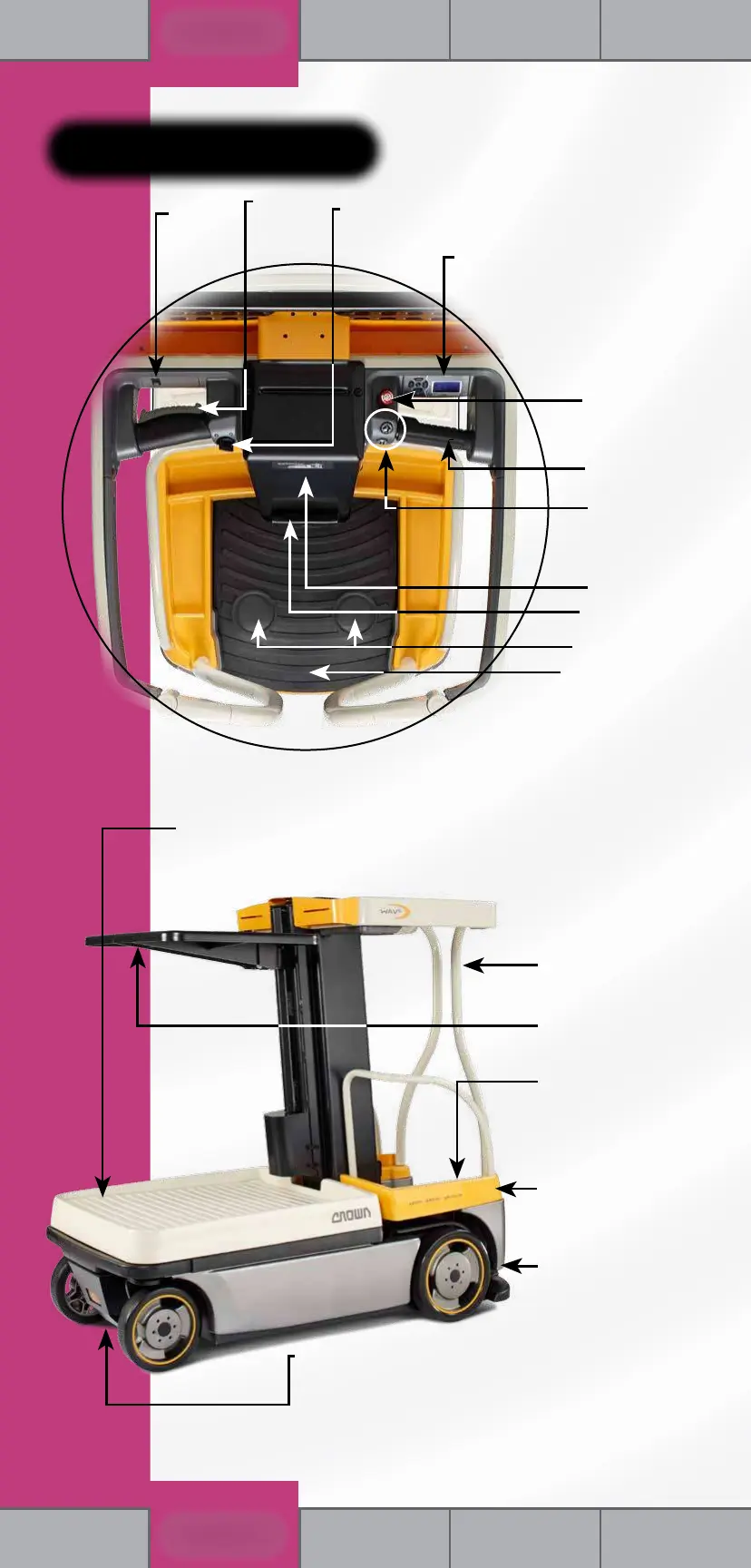
Vehicle Parts
Display
Steering
Control
Key Switch
(Power On & Off)
Travel
Speed
Switch
Emergency
Disconnect Button
Travel Twist Grip
Data Label
Operator Manual
Platform
Foot Pedals
• Raise Button
• Lower Button
• Horn Button
Gates
Load Tray
(Optional Power Load Tray shown)
Storage
Compartments
Located under Load Deck:
• Manual Lowering Valve
• Batteries
Motor Cover
(Located Under Platform)
Located Behind Pull-Down Cover:
• Service Panel
• Emergency Disconnect Button
• Raise/Lower Switch
• Push/Drive Switch
• Platform/Base Switch
• Battery Charging Socket or Pullout Cord & Display
Located Under Platform:
Manual of Responsibilities
& Service Manual
(see page 5)

Related product manuals