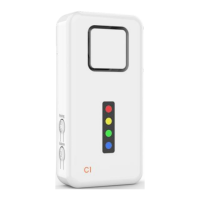
On/Off- and volume buon
Connect buon
Loudspeaker
Zone indicators
Dual funcon:
Zone indicator and
status light
3. Instrucons for use
Unpacking
Remove the baery strip on the back of the pager. The pager will switch on
automacally. The blue light flashes every 5 seconds to indicate that the pager is
acve.
4. Accessories
Oponal compable accessories (sold separately)
32
Call buons
Pager
Switching the pager on and off
Switch the pager on and off by pressing the volume buon for 4 seconds. When
the pager is switched on, it is immediately acve. The blue light flashes every 5
seconds to indicate that the pager is acve.
Sound sengs
There are two sound types. The red and the yellow zone feature sound 1, the
green and the blue zone feature sound 2. This allows the caregiver to disnguish
by ear between 2 paents, or 2 locaons, or 2 sensors, etc.
Sounds & reset
When a connected device triggers a noficaon, the pager produces a sound
(depending on the zone and volume adjustment), and the respecve zone indicator
will flash. This sound repeats every 10 seconds, and the zone indicator flashes
connuously unl the sound is stopped by pressing one of the two buons.
Status light
The C1 pager features a status light. When the pager is switched on, the blue light
will flash every 5 seconds. If desired, this indicaon can be switched off.
Short-pressing the Connect-buon will switch the indicaon on or off.
CruxCare call buons red and blue CCCB01R and CCCB02B
IMPORTANT: You will never miss a call even if mulple calls are made from more
than one device shortly aer another because the associated zone indicator will
connue to light up unl the carer stops the noficaon. This safety feature
prevents an emergency call is missed by the carer in the case of more than one
call in a short period.
Adjusng the volume
The pager features 4 volume levels and a silent mode. Adjust the levels by
repeatedly pressing the Volume-buon.
Accessory Product Code
CruxCare call buon (red) CCCB01R
CruxCare call buon (blue) CCCB02B
Tiiwee PIR moon sensor TWPIR02
Tiiwee door sensor TWWS03
To stop the sound, press any of the two buons on the pager.


 To Next Page
 Loading...