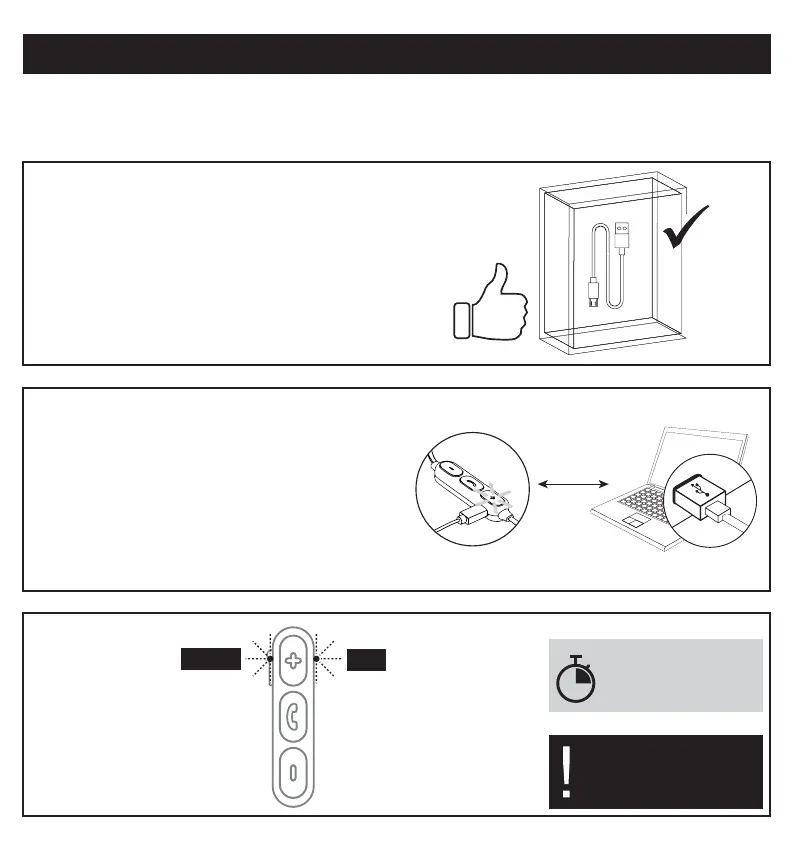
Charge it
• Use the micro USB cable
which is included in the
package of the headphones.
• A different micro USB cable
might not be able to charge
correctly (or even not at all)
the battery of the headphones.
Connect:
• the micro USB plug
into the headphone’s port.
• the USB plug
into any compatible USB device.
2h
• While battery is charging
the indication light is red.
A full charge of
the battery takes
approximately 2 hours.
• When battery has been
fully charged the light
turns blue.
The headphones are
automatically deactivated
during charging process.
red
blue


 To Next Page