
 Need help?
Do you have a question about the ctechi ST2000 and is the answer not in the manual?
Essential precautions to ensure safe operation, covering handling, environment, and maintenance.
Details on how to power on and off the AC output using the AC switch button.
Instructions for powering the DC output on and off via the DC switch button.
Explains the operation of the USB switch button for controlling USB output.
How to operate the LED light, including activation and SOS mode.
Guide on connecting the AC charging cable to the product's AC socket.
Explanation of the entry-level UPS feature for seamless power transfer.
Details on the DC5521 output ports and their maximum power capacity.
Instructions for using the DC car cigarette lighter output port.
Specifications for DC, USB-C, QC3.0, and USB output ports.
Information on QC3.0 fast charging port capabilities and protocols.
Details on the USB-C port's PD60W output and compatibility.
Overview of ordinary USB output ports and their supported protocols.
Information on the XT60 input port for car charging or solar panel charging.
Instructions for charging the unit using a car charger connected to the XT60 port.
Guide for charging the unit using solar panels connected to the XT60 port.
Procedure to activate or deactivate the hibernation mode using button combinations.
Details on automatic shutdown behavior in hibernation mode.
Behavior of AC and DC icons and outputs in non-hibernation mode.
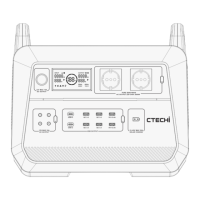
The CTECHi ST2000 Portable Power Station is a versatile and robust energy solution designed for a wide range of applications, from outdoor adventures to emergency home backup. This user-friendly device integrates advanced power management and safety features, ensuring reliable performance and ease of use.
At its core, the ST2000 serves as a portable power hub, capable of delivering both AC and DC power to various electronic devices and appliances. It features a high-capacity LiFePO4 battery, known for its longevity and safety, which can be fully charged in approximately 1.5 hours, thanks to its super-fast charging technology. This rapid charging capability makes it ideal for situations where quick turnaround times are essential.
The device supports multiple charging methods, including direct AC input, solar panel charging via an XT60 input port, and car charging, also through the XT60 port. This flexibility ensures that the power station can be recharged in diverse environments, whether at home, in a vehicle, or off-grid using solar energy. The integrated MPPT (Maximum Power Point Tracking) technology optimizes solar charging efficiency by intelligently matching the solar panel's output voltage with the battery's voltage, maximizing power extraction under varying sunlight conditions.
A key feature of the ST2000 is its entry-level UPS (Uninterruptible Power Supply) function. This allows for simultaneous charging and discharging, providing a seamless power transition in the event of a main power grid outage. The device can automatically switch to supplying power from its internal battery within 15ms, offering a degree of protection for connected devices. However, it's important to note that this is a non-professional UPS function and may not be suitable for equipment requiring highly uninterrupted power supply, such as data servers or workstations, without prior compatibility testing.
The power station offers a comprehensive array of output ports to accommodate different devices. These include AC output sockets, DC5521 output ports, a DC car cigarette lighter output port, multiple USB-A ports (including QC3.0 fast charging ports), and USB-C ports (supporting PD60W output). This wide selection ensures compatibility with a broad spectrum of electronics, from smartphones and laptops to small appliances and power tools.
The intuitive LED display provides real-time information on the device's status, including input power, output power, battery capacity, remaining charging time, and estimated battery life. It also indicates the current AC power status, solar charging status, and any abnormal working conditions or error codes, allowing users to monitor performance at a glance.
Operating the ST2000 is straightforward, thanks to its clearly labeled switch buttons for AC, DC, USB, and LED light functions. Each power output group (AC, DC, USB) has its dedicated switch, allowing users to activate only the necessary outputs, conserving battery life.
The device also incorporates a "Hibernation Mode" which can be toggled on or off using a combination button press (press and hold the USB switch, then click the DC switch). In Hibernation Mode, if the AC output is less than 5W, it automatically turns off after 8 hours. If there's no output from USB and DC ports (or current is less than 200mA) and AC output is off, the ST2000 will automatically shut down after 10 minutes. This intelligent power management helps conserve energy when devices are not actively drawing significant power. In Non-hibernation Mode, once AC or DC is turned on, their respective icons will remain lit, and outputs active, until manually turned off, regardless of load.
The display provides critical information through various icons and numerical readings. For instance, the input power is shown when charging, and the output power is displayed when appliances are connected. In scenarios where charging and discharging occur simultaneously, the output power display reflects the power consumed by connected electrical appliances. The input value adjusts based on the difference between total input and output power, or shows 0 if input is less than or equal to output. Icons indicate solar charging, AC power status, battery capacity (with an orange circle scrolling during recharge), and total output power for DC, USB, and AC inverter. Error codes are also displayed for various abnormalities, such as over-current, short-circuit, over-temperature, and input voltage issues, aiding in quick troubleshooting.
The ST2000 is designed for durability and long-term use, but proper maintenance is crucial to ensure its optimal performance and longevity.
The CTECHi ST2000 is built with safety in mind, incorporating protections against various electrical faults and environmental conditions. While charging, it's normal for the device to feel warm, which is not a cause for concern. The battery performance will naturally decline over several years under normal conditions, but the LiFePO4 battery is designed for a long cycle life, maintaining over 85% capacity after 3500+ cycles. Adhering to the safety instructions and maintenance guidelines will help users get the most out of their portable power station for years to come.
 General
| Category | Power Supply |
|---|---|
| Model | ST2000 |
| Output Power | 2000W |
| Input Voltage | 100-240V |
| Input Frequency | 50/60Hz |
| Cooling System | Fan |
| Protection Features | OVP, OCP, OTP, SCP, UVP |

 To Next Page
