32
FFuunnccttiioonn ddeessccrriippttiioonn oorr ccoonnttrrooll sseeccttiioonn
((LLHH--55331111NN))
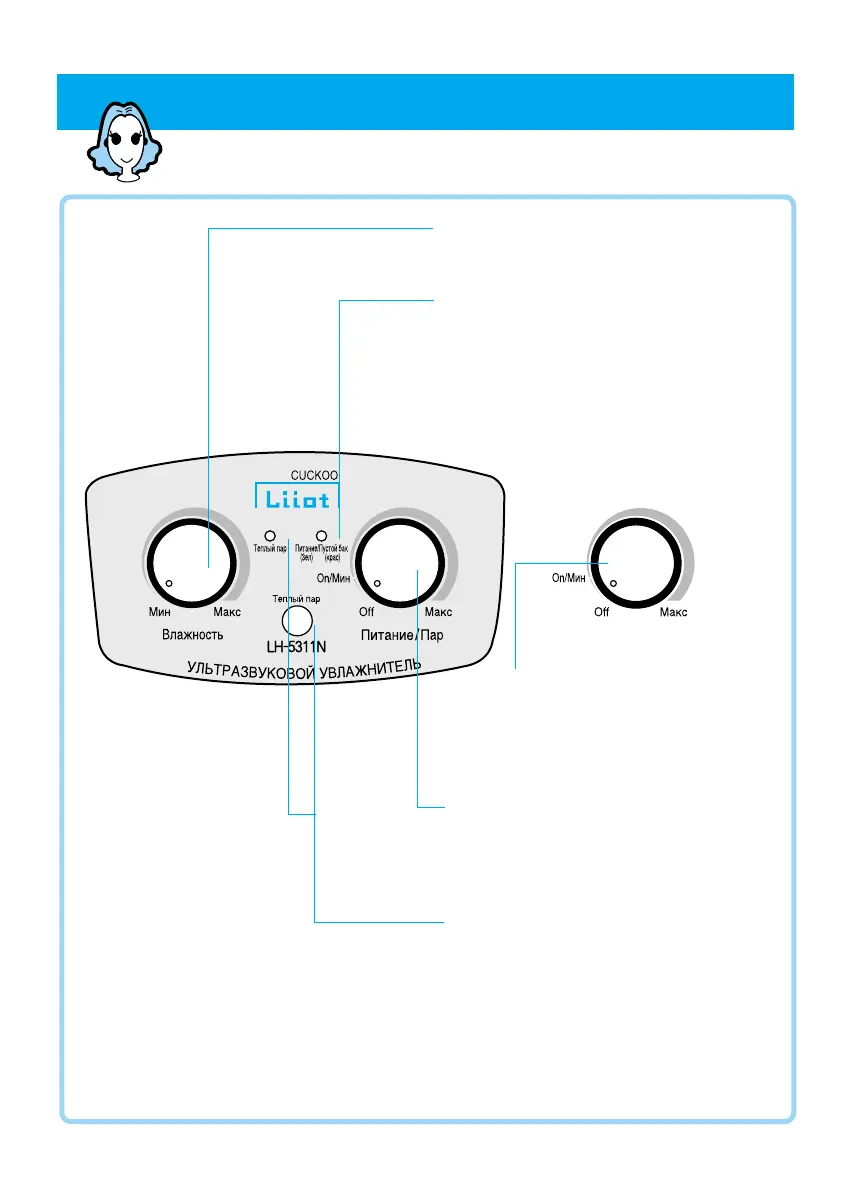
Humidity Control Switch
Select desired humidity by switch.
“Power Switch/Refill” Alarm Lamp
● If you turn on main switch, lamp is displayed as
green color.
●
At time of normal working, lamp is displayed as
green color, but if water tank is short of water,
spray is stopped and lamp is displayed as red
color.
●
When adjusting the mist volume and
humidity setting control switch, please
be aware that there is a specific
shape like the picture above.
Power/Spray Volume Control Switch
●
Used when you want to operate or stop
humidifier.
●
Select desired spray volume by switch.
Warm Humidification button and
lamp display
●
Used when you want warm humidification.
●
If you press button, warm humidification
lamp is displayed as red color, and after
about 10 minutes warm fog is sprayed.


 To Next Page
 Loading...