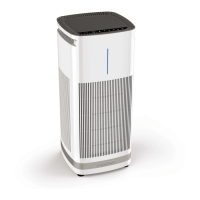
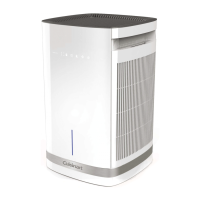
The Cuisinart Purxium™ Air Purifier (model CAP-1000) is a sophisticated 4-stage, 4-sided air purification system designed for household use, capable of cleaning and deodorizing large rooms. It features a 360-degree air intake, ensuring comprehensive air purification.
Function Description:
The primary function of the CAP-1000 is to capture airborne particles and contaminants, providing fresher, cleaner air. It utilizes a multi-stage filtration system that includes four metal pre-filters, H13 high-grade HEPA filters, active carbon filters, and a UV-C light. This combination works synergistically to capture up to 99.9% of various airborne particles 0.1 micron or larger, including bacteria, pollen, dust, pet dander, dust mites, carbon dust, lead dust, tobacco smoke, and general smoke, as well as cooking odors and VOCs (Volatile Organic Compounds). The quiet DC motor allows the unit to purify air in an area up to 1,000 sq. ft. two times every hour, or a 500 sq. ft. area four times every hour.
Important Technical Specifications:
- Filtration System: 4-stage, 4-sided filtration.
- Metal Pre-Filters (4): Removable and reusable, designed to capture larger airborne particles such as dust and pet dander.
- H13 High-Grade HEPA Filters (4): Capture up to 99.9% of airborne particles 0.1 micron or larger, including bacteria and various contaminants.
- Active Carbon Filters (4): Capture up to 99.9% of unwanted particles, including cooking odors, smoke, and VOCs 0.1 micron or larger.
- UV-C Light: Illuminates automatically when the unit is turned on. It helps in further purification by targeting bacteria and other microorganisms. The UV-C light bulb (Lamp Model No.: Z138) has a lifespan of 10,000 hours and contains mercury, requiring special disposal.
- Airflow Output: Top panel airflow output.
- Coverage Area: Purifies air in up to 1,000 sq. ft. area two times per hour, or 500 sq. ft. area four times per hour.
- Power: Operates with a polarized plug. Users are advised to ensure the plug fits tightly into the outlet to prevent overheating.
- Safety Features: Child Safety Lock, automatic UV-C light, filter replacement indicator.
Usage Features:
The CAP-1000 is operated via a touchscreen control panel located on the top of the unit.
- Power On/Off: A dedicated button to turn the unit on and off.
- Fan Speeds: Offers 4 fan speeds (1, 2, 3, and 4) for customizable airflow. Users can cycle through speeds by pressing the fan speed button.
- 12-Hour Timer Function: Allows users to set the operating time from 1 to 12 hours. If no time is selected, the unit will run continuously until manually turned off.
- Child Safety Lock: This feature can be activated by pressing and holding the lock button for 3 seconds, disabling all other buttons on the control panel. To unlock, hold the button again for 3 seconds.
- Sleep Mode/Night Light:
- Pressing the icon once activates the blue night light and illuminates the control panel lights.
- Pressing it a second time activates Sleep Mode, illuminating the Moon symbol in addition to the night light.
- Pressing it a third time illuminates only the Moon icon, indicating a low-light operation.
- UV-C Light Control: The UV-C light illuminates automatically when the unit is turned on. It can be turned off by pressing its dedicated button once.
- Filter Replacement Indicator: A red light illuminates on the control panel after 2,500 hours of continuous use, signaling that it's time to replace the HEPA H13 and active carbon filters.
Maintenance Features:
Regular maintenance is crucial for optimal performance and filter longevity.
- Filter Replacement:
- The unit signals filter replacement via a red indicator light after 2,500 hours of use.
- To replace filters, first unplug the unit.
- Remove the back panel by squeezing the latch at the top and tilting it down.
- Slide out the entire 4-sided H13 HEPA filter system.
- The metal pre-filters can be slid out from the main filter housing.
- After replacing filters, the filter indicator light needs to be reset by pressing and holding the night light button for 3 seconds.
- Cleaning Pre-Filters:
- The four removable, reusable metal pre-filters should be hand-washed with warm soapy water at least once a month, or more frequently if the air purifier is in a dusty environment or if there are pets. A soft brush can be used for very dirty filters.
- Ensure pre-filters are completely dry before reinserting them.
- Cleaning HEPA H13 Filters:
- The H13 high-grade HEPA filters should be vacuumed once a month using a brush attachment on a vacuum cleaner. Gently run the brush attachment along the white side of the filter only. The active carbon filter on the other side does not need to be vacuumed.
- UV-C Light Bulb Replacement:
- The UV-C light bulb should be replaced after 10,000 hours of use.
- To replace, follow the steps for filter removal (Steps 1 and 2).
- At the base of the unit, remove the screw holding the UV-C bulb compartment cover with a screwdriver.
- Carefully remove and replace the UV-C light bulb (Lamp Model No.: Z138).
- Always disconnect power before relamping or servicing.
- Due to mercury content, use gloves when handling the old bulb and dispose of it at a recycle facility.
Safety Precautions:
- Always unplug the air purifier before cleaning, replacing filters, or servicing.
- Do not immerse the base in water.
- Do not disassemble the base, as it contains no user-serviceable parts.
- Keep the air purifier at least 6 inches away from walls and 3 feet away from heat sources.
- Do not block air intakes or exhausts.
- Do not use outdoors or in wet/moist conditions.
- Do not tilt or move the unit while powered on.
- Repairs should only be made by authorized personnel.
- This appliance is for household use only.
- Viewing the UV-C light directly can cause skin or eye damage.
- Utilizing an H13 High-Grade HEPA filter does not make this a medical device.

 Need help?
 General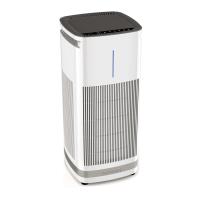

 To Next Page