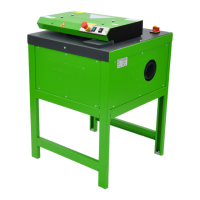
The PaperEZ SmartFill is a machine designed to produce paper cushions for packaging, offering both better cushioning and better protection for items. This handbook provides comprehensive instructions for its installation, operation, and maintenance.
Function Description:
The PaperEZ SmartFill machine allows users to create paper cushions of various lengths and quantities. It operates in three distinct modes: Continuous Mode, Re-Fill Mode, and Manual Mode, catering to different packaging needs. In Continuous Mode, the machine produces paper cushions based on a preset length and quantity, stopping once the program is complete. Re-Fill Mode is designed for on-demand production, where the machine outputs the next paper cushion only after the previous one has been removed, also stopping when the program is complete. Manual Mode provides continuous output of paper cushions as long as the "Start" button or the Foot Pedal is held down. The machine is equipped with a control panel for easy setting adjustments, mode selection, and operation control. It features components such as a paper inlet, paper outlet, power cord connector, foot pedal connector, and a power switch, all contributing to its functionality.
Important Technical Specifications:
- Power Supply: DC24V, 6A
- Rated Power: 144W
- Max Speed: 60m/min
- Weight: 32kg
- Size: 660mm x 612mm x 1312–1712mm (This range indicates adjustable height)
- Cushion Length (L): Range 20–999 (units not specified, likely mm or cm)
- Cushion Quantity (N): Range 1–99
Usage Features:
The PaperEZ SmartFill is designed for user-friendly operation with several adjustable features:
- Height Adjustment: The machine's height can be adjusted by unscrewing the fix-pin and lowering or lifting the preferred height (in total 5 positions). This involves aligning the inner and outer holes and then inserting the fix-pin and screw to tighten.
- Adjust Working Angle of Head: The working angle of the machine's head can be adjusted by pulling out the bolt and adjusting the head to the preferred angle (in total 5 positions).
- Height Adjustment of Paper Holder: The paper holder's height can be adjusted by lifting the paper holder and pulling it out into a slot, then moving the holder to the preferred height. This involves snapping the two screw rods into the corresponding positions (in total 6 positions).
- Control Panel: The control panel features six buttons:
- ENT (Enter): Saves data for all settings.
- SET: Moves the cursor and selects parameters on the main page. Holding "SET" allows switching between Continuous, Re-Fill, and Manual modes.
- Start: Initiates machine operation.
- STOP: Halts machine operation.
- Up: Increases data values.
- Down: Decreases data values.
- Preparation before Operation: Before starting, users need to connect the power cord and foot pedal, feed paper into the paper holder, turn on the machine, check the screen and lights, and ensure the emergency stop is switched off. Paper is then inserted into the paper inlet, and the "IN/OUT" button is pressed to load paper.
- Safety Statement: The manual emphasizes reading the safety statement and operating instructions carefully to prevent injury and damage. It highlights the importance of training, careful handling, proper grounding to avoid electric shock, clearing the operation area, and not blocking the safety sensor. It also advises against opening the cover without authorization during operation.
Maintenance Features:
While specific maintenance schedules are not detailed, the manual implies general maintenance practices through its safety guidelines:
- Regular Checks: Users are instructed to check the screen and lights before operation, suggesting a routine visual inspection.
- Emergency Stop: The presence of an emergency stop button is a safety feature that also aids in maintenance by allowing immediate shutdown for inspection or intervention.
- Professional Training: The requirement for operators to be trained and to read the handbook carefully suggests that proper operation, which includes understanding the machine's limits and potential issues, is key to its longevity and maintenance.
- Damage Prevention: The safety statement warns against improper use that could lead to damage, implying that adherence to operational guidelines is a form of preventative maintenance.

 Need help?
 General

 To Next Page