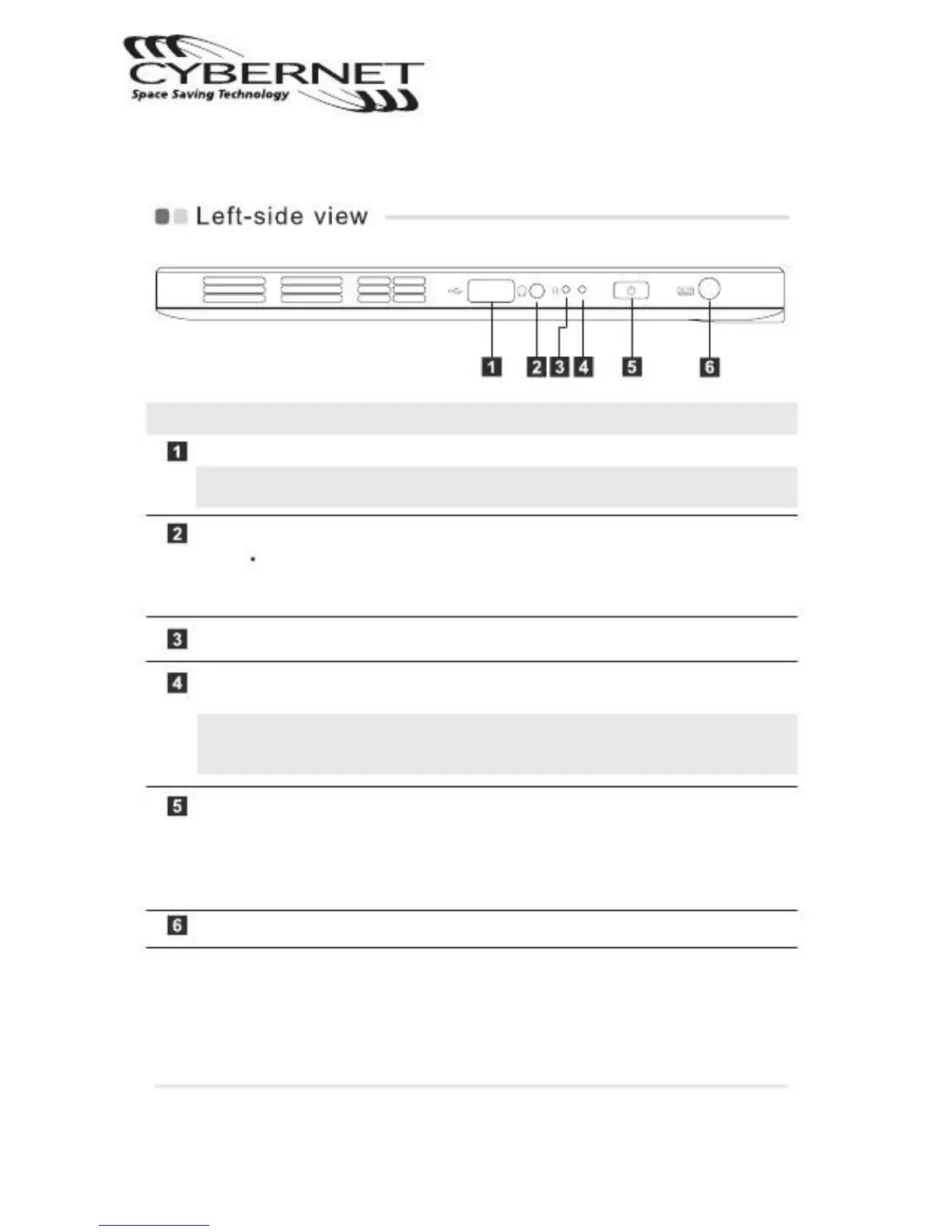
USB 2.0 port Connect to USB device.
Note:For details, see "Connecting a universal serial bus ( USB ) device" on
page 9.
Headphone jack Connect to an external headphone.
Attention:
Listening to music at a high volume over an extended period of time
may damage your hearing.
Press to force shutdown immediately.
Battery status Shows status of the battery.
indicator
Note:When battery is charging, it is always green; when battery is fully charged,
there is no light; when battery power is less than 10%, it is amber and
blinking.
Ready to use
Power button
Press to turn the Tablet on; press again to place the
Tablet in sleep mode. Press and hold to turn the
Tablet off.
Pressing the button 2 times in a second turns on
"Ctrl+Alt+Del" function.
Connect the AC adapter here.
CyberMed T10C/T10C Tablet
Getting to know your Tablet


 To Next Page