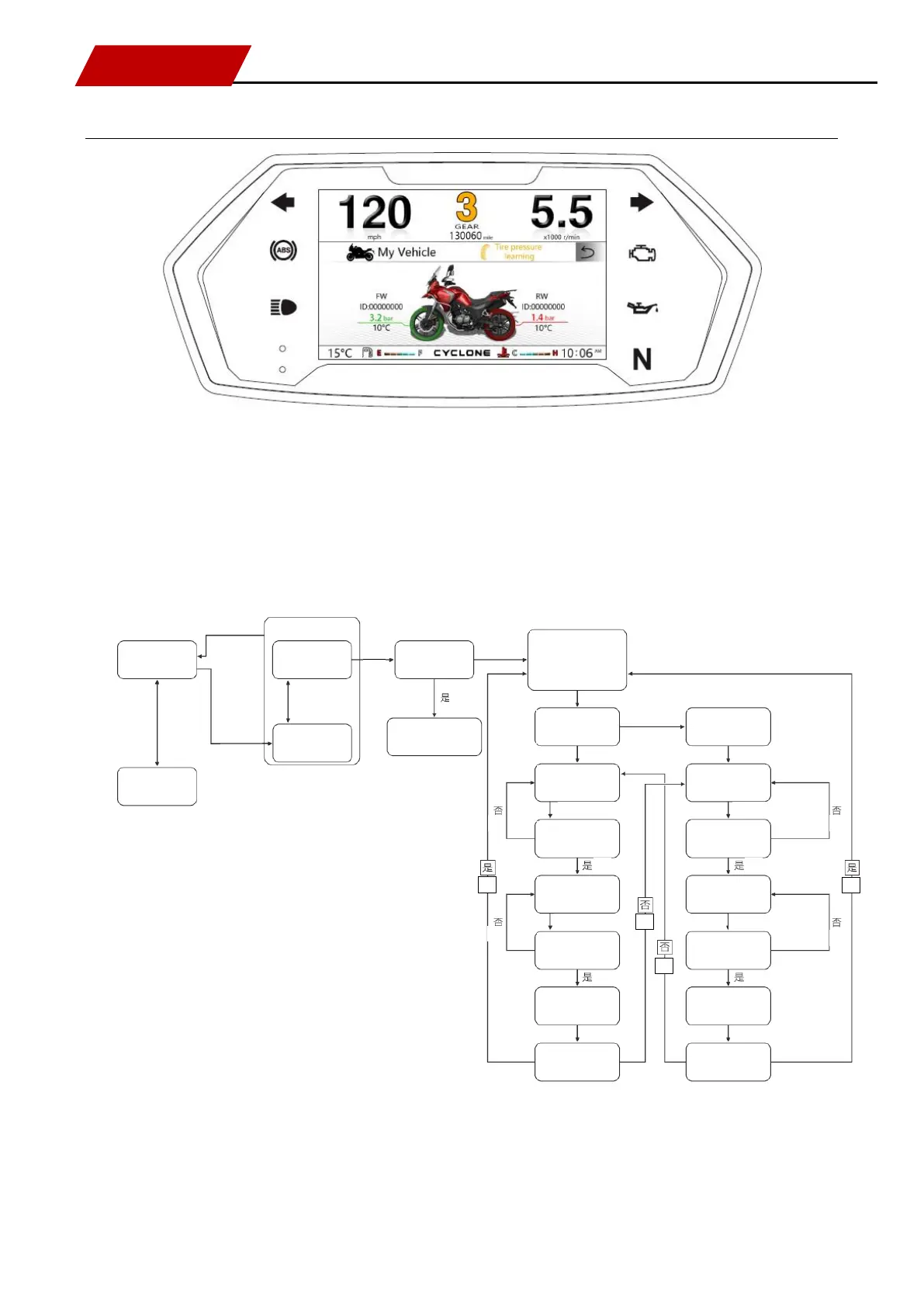
Description of [Tire pressure learning] setting
Press [SEL key] for switching: my vehicle / tire pressure learning option
Press to switch to [Tire pressure learning] option and then press and hold [SEL key] for entering: tire pressure
learning sub-menu.
Refer to processes in the following logic diagram:
Are front / rear tires at learning status
The tire at learning status turns red and flashes
The tire that has completed learning shows green,
normally on; the tire that fails learning or fails to
learn shows gray, normally on
The front tire shows gray, flashing;
the rear tire shows gray, normally on
The front tire shows gray, normally on;
the rear tire shows gray, flashing
The front tire turns red, normally on, and
triggers learning
The rear tire turns red, normally on, and
triggers learning
ECU
Front tire ECU has turned to learning
ECU
Has rear tire ECU turned to learning
The front tire turns red, flashing
The rear tire turns red, flashing
Has front tire ECU turned to successful
learning
Has rear tire ECU turned to successful
learning
The front tire turns green, normally on
The rear tire turns green, normally on
Has rear tire completed learning
Has front tire completed learning
Wait for body CAN information
CAN
Wait for body CAN information
CAN
Wait for body CAN information
Wait for body CAN information
Tire pressure learning sub-menu


 To Next Page
 Loading...