Add foam pad
Helmet bracket (bottom view)
Charging Port
Rubber Cover
WARNING: We recommend to charge the battery with the supplied charger
or USB cable. If using another USB charger, check the power button to
verify the light is taking a charge. The charger is for indoor use only.
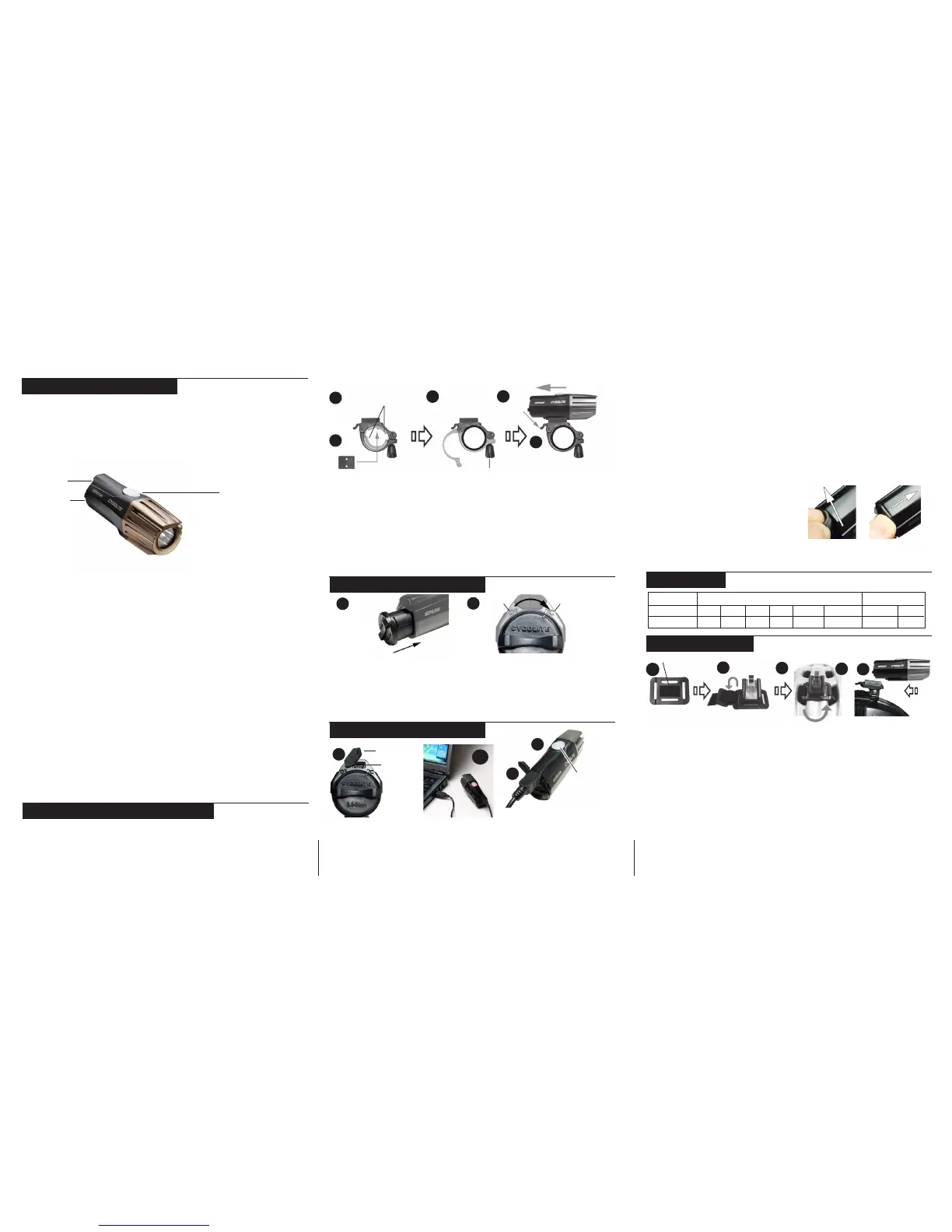
INSTALLING BATTERY
1. Align the arrow on the back of the battery and the arrow on the back
of the headlight that reads “O”, then insert battery completely.
2. Turn battery clockwise completely (until battery arrow is aligned with
“C” arrow on headlight) to lock battery into the headlight.
3. Reverse step 1 and 2 to remove the battery.
3
4
BATTERY CHARGING - continued
1. Lift the RIGHT side of the rubber cover to reveal the charging port.
STEP 2 VARIES DEPENDING ON CHARGING METHOD.
2A. (Wall charging) Connect the charger to the wall outlet.
2B. (Computer USB charging) Connect USB cable to computer USB port.
3. Insert charging cable into the USB charging port on back of light.
4. The power button on top of the light will flash green when charging
then have a steady green when fully charged.
5. Allow approximately 5 continuous hours to fully charge a drained
battery. (Charging times may vary depending on charging method)
1. Add foam pad to bottom of helmet bracket to cushion against helmet.
Peel away paper to reveal adhesive and fasten to the helmet bracket.
2. Weave the 12” long velcro strap up through one hole of the helmet
bracket, then down through the outer hole on the other side. Pull the
strap until the plastic loop prevents the strap from moving further.
3. Position helmet bracket over vent holes on the front top of the helmet.
4. Insert velcro strap downward through the vent hole then up through the
opposing vent hole. Thread the velcro strap through the velcro strap loop
and pull to tighten. Then fasten the velcro strap to itself, making sure the
helmet bracket is secured in place.
5. Sliding backward, insert the headlight into the helmet bracket until it locks
in place. To remove headlight, press the bracket tab down and slide the
headlight forward.
SPECIAL MODE (3 settings)
(Day Flash > Walking > SOS)
1. (While the headlight is off) Press and hold the power button for
2 seconds to operate in special mode.
2. Press power button to scroll through the 3 special settings.
3. Press and hold power button for 2 second to turn the light off.
The Expilion features a BICYCLE MODE (5 settings) and a SPECIAL
MODE (3 settings). The settings are controlled by the power button which
also functions as the low battery and charging indicator. The diagram and
instructions below indicate where these features are located on the
headlight and how to use them.
CAUTION: The light may get hot during use. Handle with care and turn
light off if stationary for more than 10 minutes.
BICYCLE MODE (5 settings)
(Med > High > Boost > Low > 2-in-1 SteadyPulse)
1. Press power button to operate in bicycle mode. The light will turn on in
the Medium setting and the button will illuminate.
2. Press power button to scroll through the bicycle settings.
3. Hold the power button for 2 second to turn the light off.
NOTE: Boost setting is the brightest setting in bicycle mode. The power
button will blink slowly when boost setting is on.
3. Wrap bracket around handlebar, return thumbnut in slotted space, twist
thumbnut clockwise to tighten
4. Slide headlight back into the bracket until headlight clicks into place.
5. To remove headlight, press the release tab on the bracket down and
slide headunit forward.
ADJUST THE SIDE-TO-SIDE BEAM DIRECTION
Swivel the headlight left to right to adjust the side-to-side direction. If side
swivel becomes loose, tighten the swivel screw on the top of the bracket
with a philips screwdriver.
Close
Open
HEADLIGHT OPERATIONHEADLIGHT OPERATION
HEADLIGHT OPERATIONHEADLIGHT OPERATION
HEADLIGHT OPERATION
MOUNTING CONTINUED
1
3
4
INSTALLING BATTERYINSTALLING BATTERY
INSTALLING BATTERYINSTALLING BATTERY
INSTALLING BATTERY
1 2
BATTERY CHARGINGBATTERY CHARGING
BATTERY CHARGINGBATTERY CHARGING
BATTERY CHARGING
1
2B
RUN TIMESRUN TIMES
RUN TIMESRUN TIMES
RUN TIMES
HELMET MOUNTHELMET MOUNT
HELMET MOUNTHELMET MOUNT
HELMET MOUNT
2
1
3
4
5
High
2:15
Med
3
Low
9
Boost
1:15
Day Flash
22
Bicycle Modes (hr:min)
Special Modes
Walking
38
SOS
38
Model
EXPILION
REINSTALLING USB COVER:
1. Insert the left inner edge of the
USB cover into the recharging port.
2. Apply pressure diagonally inward to
the right side of the cover until the
USB cover is fully inserted.
Thumbnut
Release Tab
Power Button
(During use)
USB port
Battery stick
LOW BATTERY INDICATOR
As the battery runs low, the illuminated power button will fast flash indicating
approximately 10~15 minutes of power left. At this time we recommend stop
using the light and recharging it immediately.
Solid
Fast flash
Slow blink
= Light on
= Low battery
= Boost mode
1. Attach handlebar spacers to inside of handlebar bracket for standard
sized handlebars. Remove spacers for oversized handlebars.
2. Attach rubber pad to handlebar spacer (or handlebar bracket) for grip.
MOUNTING ON HANDLEBARSMOUNTING ON HANDLEBARS
MOUNTING ON HANDLEBARSMOUNTING ON HANDLEBARS
MOUNTING ON HANDLEBARS
S-Pulse
4
Rubber pad
Attach Handlebar spacers
(for standard sized bars)
Power Button
(During charging)
Flash
Solid
= Charging
= Full
2
5
If USB cover does not stay seated in the hole, add lubricant to the
inside of the cover to slide and stay in the hole more easily.
(select models only, see package for details)
24/7 Safety Technology
TM
: Night and day modes give added visibility
2-in-1 SteadyPulse
TM
: Alerts nearby motorists with triple pulses while
constantly lighting your path at night.
Day Flash: Intensly bright flashes demands motorist’s
attention in peak daylight.For daytime use only.


 To Previous Page
 Loading...