FAILURE TO READ AND FOLLOW ALL INSTRUCTIONS MAY RESULT IN SERIOUS INJURY
11
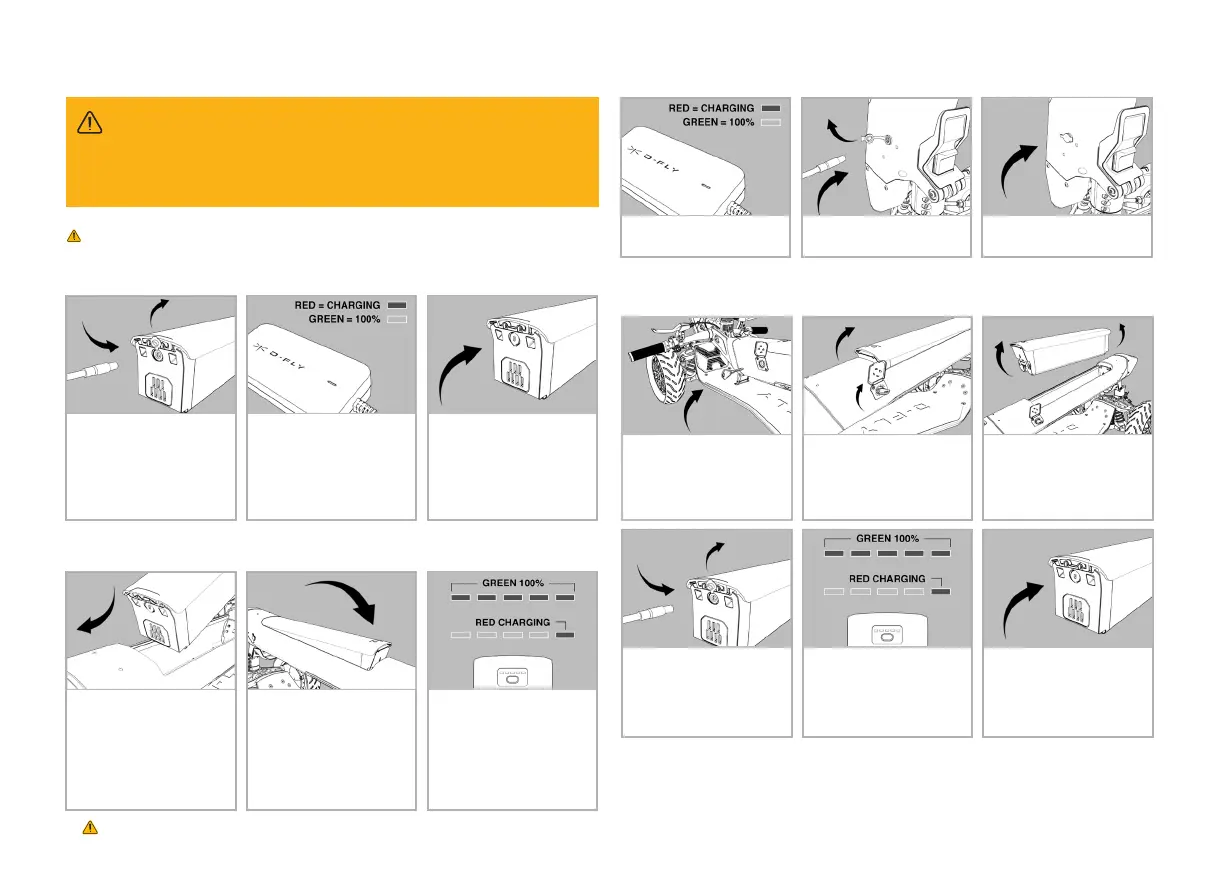
1. Once your battery is fully
charged insert into the tiller.
Carefully align the connector
slots at the base of the
battery into the cradle.
2. Push down rmly to hear
a double click and your front
light will ash. Your front light
will ash every subsequent
time you insert a charged
battery into your Dragony.
Your battery is now locked in.
3. Press the button on the
front of your battery to view
its charge status.
3.4 Battery and Charger
Fully charge your Dragony before riding.
3.4.1 First time charging
1. In order to charge the
battery, open the cap and
insert the barrel socket cable.
2. Connect to a power outlet
and switch on the power. A red
light indicator will signal the
battery is being charged; this
light will turn to green as the
battery progressively charges.
3. Replace the cap once
charging is complete.
3.4.2 Insering your battery
3.4.3 On-vehicle charging
1. Place the tiller in the folded
position and open the lock
cover.
2. Using your battery or Fob
key in the side lock turn
clockwise 90 degrees to
release the battery.
3. Using two hands lift and
slide to remove the battery
from its cradle. Place on a
hard, at, dry surface away
from direct sunlight.
4. Open the cap, insert barrel
socket cable and connect to a
power outlet.
5. Switch on. A red-light
indicator will signal the battery
is being charged; this light will
turn to green as the battery
progressively charges.
6. Replace the cap once
charging is complete.
WHEN CONNECTED TO A POWER OUTLET. Should there be an abnormal state,
voltage, current, temperature or short circuit, the indicator will ash red. If this
occurs, do not continue charging the battery and disconnect from the power source.
WARNING
1. Open the cap and insert
barrel socket cable.
2. Connect to a power outlet
and switch on power.
3. Replace the cap once
charging is complete.
3.4.4 Removing your battery to charge


 To Next Page
 Loading...