
 Need help?
Do you have a question about the DAB DAB-PC1 and is the answer not in the manual?
Covers scan setting, backlight, time/date, sleep timer, and language selection.
Configures alarm functions and audio equalizer presets.
Includes factory reset and system version check.
Instructions for operating the DAB radio functions.
Instructions for operating the FM radio functions.
Guides on pairing and using Bluetooth devices.
Details on Bluetooth version, power, frequency, and display.
Lists the items included in the product packaging.
Addresses issues like no power, no signal, and no sound.
Advice on cleaning, temperature, and handling.
Recommendations for storing the unit when not in use.
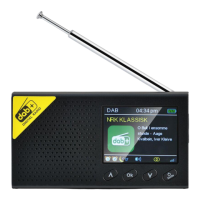
This document describes a portable digital radio, model DAB-PC1, which offers a range of functionalities for an enhanced listening experience. The device is designed to be fashionable and portable, making it suitable for various environments such as home, office, outdoor travel, sports, leisure, entertainment, and learning.
The DAB-PC1 unit serves as both a DAB/DAB+ and FM receiver, allowing users to access a wide array of digital and analog radio stations. It features stereo output for a rich audio experience. A key modern feature is its integration of the latest wireless Bluetooth 5.0 technology, enabling seamless connection with Bluetooth-enabled devices like iPhones, iPads, and smartphones for high-quality music streaming.
The radio is equipped with a high-end DAB chip, ensuring sensitive reception of digital signals. It also supports DAB program picture display, which is shown on its 2.4-inch LCD display. This display boasts 320x240 points, designed to highlight clearer text and picture display effects.
Beyond basic radio functions, the DAB-PC1 includes several user-centric features. It offers a screen saver and screen brightness adjustment to optimize viewing and conserve battery. Users can choose from multiple time display effects and set the time according to their preference. For convenience, the device incorporates a dual alarm setting function, allowing users to set two separate alarms. The interface supports nine different languages, catering to a diverse user base. Power is supplied by a built-in 1200mAh polymer rechargeable battery, emphasizing its portability.
Operating the DAB-PC1 involves a straightforward set of controls. The "Power/Mode" key is central to turning the device on and off, and also for switching to Clock mode with a long press.
Navigation and selection are managed through several keys:
The device also includes dedicated ports:
Accessing settings is primarily done by a short press of the Vol- key in any mode, which brings up the setting view. Within the settings, users can adjust various parameters:
To use DAB radio, users select the DAB icon and press the OK key. A long press of the OK key initiates a station search. Once stations are found, users can press Vol- to enter settings, which include:
In FM playing mode:
To connect via Bluetooth, select the Bluetooth icon and press the OK key. Then, enable Bluetooth on your mobile phone, search for the device's Bluetooth name, and click to pair.
To ensure the longevity and proper functioning of the DAB-PC1, several maintenance guidelines are provided:
 General
| Type | DAB/FM Radio |
|---|---|
| Presets | 20 (10 DAB, 10 FM) |
| Audio Output | 3.5mm headphone jack |
| DAB Band | Band III (174–240 MHz) |
| FM Band | 87.5-108 MHz |
| Display | LCD |
| Power Source | AC adapter |

 To Next Page